

 microsoft
404 errors loading styles with relative paths (no styles on recordings)
Clarity constructs incorrect URLs for stylesheets that cause 404 errors and no styles being used on recordings and heatmaps.
For an Angular app the <header> in index.html contains a relative link to the minimized stylesheet (AOT compilation) like this:
<link rel="stylesheet" href="styles.b77c364ea21aae4c.css">
Inspecting the recordings on Clarity I can see that the GET request for that stylesheet are incorrect. For example:
- If the user is visits
hello.com/booksClarity makes a GET with the URLhello.com/books/styles.b77c364ea21aae4c.css - If the user is visits
hello.com/books/latest/software/clarity/latestthen the GET request for the styles will behello.com/books/latest/software/clarity/latest/styles.b77c364ea21aae4c.css.
The correct behavior would be to request hello.com/styles.b77c364ea21aae4c.css regardless of what page the user is visiting.
Clarity's code is minimized so I can't debug and tell where the bug comes from but I think this is where the stylesheet are treated.
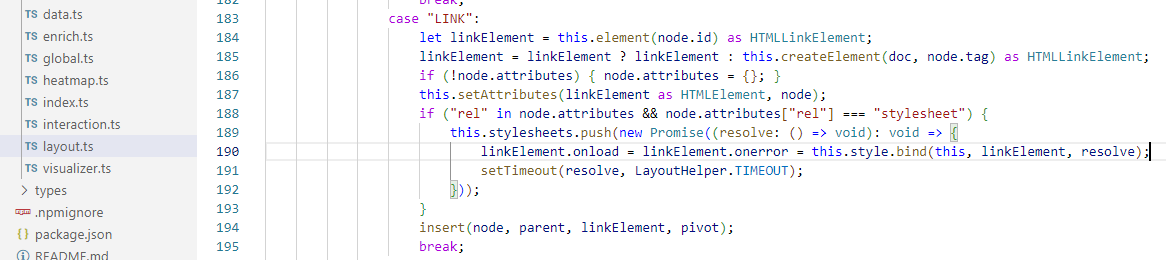
Hardcoding absolute URLs for the stylesheets in index.html fixes the problem but is not an option as the file name of the minimized stylesheets changes on every build.

Same issue. Also, there are cases where the Clarity Live extension for Chromium based browsers gives the correct result in the recording, while failing when viewed from the dashboard in the "My Project" dashboard. Did you find any fixes yet?


I've been facing a similar issue, but i think that the expected behavior described in this issue doesn't seem right.
My webapp (is not made in angular and is not a single page app) also makes use of relative path for css files.
I believe that the correct behavior is what @ozkoidi described as the wrong behavior.
For example:
If you have a css link tag as:
<link rel="stylesheet" href="style.css">
In a address such as
https://github.com/microsoft/clarity/issues/
Clarity should look for the style at:
https://github.com/microsoft/clarity/issues/style.css
since that is the exact address browsers will look for it.
My issue is exactly the opposite, clarity should be trying to access the relative path, but it is trying to access the style at the base address (which does not match the browser behavior). 😕
https://github.com/style.css


@ozkoidi , We are Clarity support team. Could you please share projectId or sample recordings to investigate the issue further.

@ClaritySupport, if you can provide us an email we can share the projectId. That being said, we implemented a workaround using absolute URLs so you won't be able to see the problem in our recordings anymore. We also reported the problem within Clarity's dashboard itself but we never got any response.
@ozkoidi , We checked your recent recordings and they seem fine. Also, this (<link rel="stylesheet" href="styles.b77c364ea21aae4c.css") hints that you are using temporary stylesheets which Clarity may not have cached before they were no longer available online.