

 microsoft
Unauthorized error in User authentication in Bot in Government Cloud (GCC High)
I am getting Unauthorized error, bot setup details are given below. I have tried the same setup in commercial azure and it's working. Issue is only in GCC High Azure.
bot Setup in Azure portal (portal.azure.us)
- Created Azure Bot in Azure portal.
- Add new client secret in Bot Azure App.
- Added redirect URI in authentication settings "https://tokengcch.botframework.azure.us/.auth/web/redirect"
- In Bot configuration in Azure portal
- Configured Messaging endpoint
- Created oAuth connection setting - Test Connection is working.
Used TeamsAuth Sample code.
- Updated AppSettings.json file.
1. MicrosoftAppId
2. MicrosoftAppPassword
3. ConnectionName
- Added this code in startup.cs file as per this Article. (tried this and without this code also)
string uri = "https://apiGCCH.botframework.azure.us"; MicrosoftAppCredentials.TrustServiceUrl(uri); AuthClientConfig.OAuthEndpoint = uri;
I have tried the bot in Teams and Web chat Channels. getting below excetion in both
Exception Message: Microsoft.Rest.HttpOperationException: Operation returned an invalid status code 'Unauthorized' at Microsoft.Bot.Connector.OAuthClient.GetSignInResourceWithHttpMessagesAsync(String state, String codeChallenge, String emulatorUrl, String finalRedirect, Dictionary2 customHeaders, CancellationToken cancellationToken) at Microsoft.Bot.Connector.BotSignInExtensions.GetSignInResourceAsync(OAuthClient operations, String state, String codeChallenge, String emulatorUrl, String finalRedirect, CancellationToken cancellationToken) at Microsoft.Bot.Connector.Authentication.UserTokenClientImpl.GetSignInResourceAsync(String connectionName, Activity activity, String finalRedirect, CancellationToken cancellationToken) at Microsoft.Bot.Builder.Dialogs.UserTokenAccess.GetSignInResourceAsync(ITurnContext turnContext, OAuthPromptSettings settings, CancellationToken cancellationToken) at Microsoft.Bot.Builder.Dialogs.OAuthPrompt.SendOAuthCardAsync(OAuthPromptSettings settings, ITurnContext turnContext, IMessageActivity prompt, CancellationToken cancellationToken) at Microsoft.Bot.Builder.Dialogs.OAuthPrompt.BeginDialogAsync(DialogContext dc, Object options, CancellationToken cancellationToken) at Microsoft.Bot.Builder.Dialogs.DialogContext.BeginDialogAsync(String dialogId, Object options, CancellationToken cancellationToken) at Microsoft.BotBuilderSamples.MainDialog.PromptStepAsync(WaterfallStepContext stepContext, CancellationToken cancellationToken) in D:\Bot\46.teams-auth\Dialogs\MainDialog.cs:line 51 at Microsoft.Bot.Builder.Dialogs.WaterfallDialog.OnStepAsync(WaterfallStepContext stepContext, CancellationToken cancellationToken) at Microsoft.Bot.Builder.Dialogs.WaterfallDialog.RunStepAsync(DialogContext dc, Int32 index, DialogReason reason, Object result, CancellationToken cancellationToken) at Microsoft.Bot.Builder.Dialogs.WaterfallDialog.BeginDialogAsync(DialogContext dc, Object options, CancellationToken cancellationToken) at Microsoft.Bot.Builder.Dialogs.DialogContext.BeginDialogAsync(String dialogId, Object options, CancellationToken cancellationToken)

Hi @vivekagrawal1110
Please review this document: https://docs.microsoft.com/en-us/azure/bot-service/how-to-deploy-gov-cloud-high
What is missing might be the ChannelService configuration setting:
"ChannelService": "https://botframework.azure.us",

Thanks. I have made changes as per the document and still getting error.
Microsoft.Bot.Schema.ErrorResponseException: Operation returned an invalid status code 'BadGateway' at Microsoft.Bot.Connector.Conversations.ReplyToActivityWithHttpMessagesAsync
- Using Bot Framework SDK version 4.16
- Startup.cs file has this line:
services.AddSingleton<BotFrameworkAuthentication, ConfigurationBotFrameworkAuthentication>(); - Added configuration setting as per article as given below
{
  "MicrosoftAppId": "db9c0376-41c2-4abc-bee6-a1c2f64b4f61",
  "MicrosoftAppPassword": "ad8...",
  "ConnectionName": "ccsGraphAuth",
  "ChannelService": "https://botframework.azure.us",
  "OAuthUrl": "https://tokengcch.botframework.azure.us/",
  "ToChannelFromBotLoginUrl": "https://login.microsoftonline.us/MicrosoftServices.onmicrosoft.us",
  "ToChannelFromBotOAuthScope": "https://api.botframework.us",
  "ToBotFromChannelTokenIssuer": "https://api.botframework.us",
  "ToBotFromChannelOpenIdMetadataUrl": "https://login.botframework.azure.us/v1/.well-known/openidconfiguration",
  "ToBotFromEmulatorOpenIdMetadataUrl": "https://login.microsoftonline.us/cab8a31a-1906-4287-a0d8-4eef66b95f6e/v2.0/.well-known/openid-configuration",
  "ValidateAuthority": true
}
46.teams-auth.zip I have removed the client secret from appsettings.json file. Rest everything is same.
@EricDahlvang, Please let me know if you found the issue. I can provide any other information that you may require.
hi @tracyboehrer, Please let us know if there is any update on this.
@tracyboehrer Facing similar issue. Will really appreciate if there is a sample starter project that work for bots in GCC high.

@vivekagrawal1110 @PrakashCCS, Thank you for your patience.
We will attempt to try from our end to see if we can reproduce this issue. Will report back once we have updates. Thanks.

@vivekagrawal1110 @PrakashCCS, Thank you for your patience.
We will attempt to try from our end to see if we can reproduce this issue. Will report back once we have updates. Thanks.
@ramfattah Issue has been open for 3.5 months. There is no substantial update on this so far. Can you give some timeline on when something meaningful can be done for this? I have tried all possible options but bot is not working in GCC. If you can just give a simple working sample from your side then that is enough. Thank you.
Hi @vivekagrawal1110,
Are you planning to use sample 46.teams-auth specifically for Teams channel?
@ramfattah yes, I need in Teams channel only.
I'm unsure if these points were clarified, so let me quickly ask:
- Are you unable to communicate with the bot in GCC High at all, or is it just the OAuth scenario which results in a 401 Unauthorized error?
- For this code:
string uri = "https://apiGCCH.botframework.azure.us"; MicrosoftAppCredentials.TrustServiceUrl(uri); AuthClientConfig.OAuthEndpoint = uri;Where exactly in theStartup.csfile did you put it?

I'm unsure if these points were clarified, so let me quickly ask:
- Are you unable to communicate with the bot in GCC High at all, or is it just the OAuth scenario which results in a 401 Unauthorized error?
- For this code:
string uri = "https://apiGCCH.botframework.azure.us"; MicrosoftAppCredentials.TrustServiceUrl(uri); AuthClientConfig.OAuthEndpoint = uri;Where exactly in theStartup.csfile did you put it?
@anishprasad01,
- I am able to communicate with bot but problem is with Authentication.
- you can download my code for GCC High bot from here. I originally took the code from here and modified for GCC High.
I have added code in starting of ConfigureServices method.
public void ConfigureServices(IServiceCollection services) { string uri = "https://apiGCCH.botframework.azure.us"; MicrosoftAppCredentials.TrustServiceUrl(uri); OAuthClientConfig.OAuthEndpoint = uri; services.AddHttpClient().AddControllers().AddNewtonsoftJson(); ...
Hi @vivekagrawal1110,
I ran into Microsoft.Graph.ServiceException: Code: generalException error after signing in using GCC High with sample 46.teams-auth.
Sharing the steps I took (using GCC High):
- Clone Teams Auth sample
- Added authentication to the bot by following docs here
- Authentication -> Redirect URI:
https://tokengcch.botframework.azure.us/.auth/web/redirect - API permissions:
- Mail.Read
- Mail.Send
- openid
- profile
- User.Read
- User.ReadBasic.All
- Authentication -> Redirect URI:
- Registered the Azure AD identity provider with the bot (steps here)
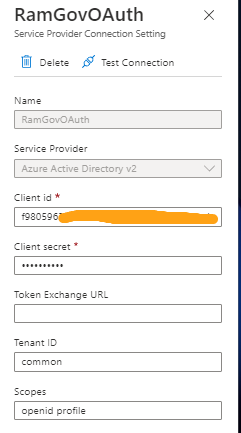
- Updated the bot
appsettings.json:{ "MicrosoftAppId": "<your bot's app ID>", "MicrosoftAppPassword": "<your bot's app secret>", "ConnectionName": "<your OAuth connection name>", "ChannelService": "https://botframework.azure.us", "OAuthUrl": "https://tokengcch.botframework.azure.us/", "ToChannelFromBotLoginUrl": "https://login.microsoftonline.us/MicrosoftServices.onmicrosoft.us", "ToChannelFromBotOAuthScope": "https://api.botframework.us", "ToBotFromChannelTokenIssuer": "https://api.botframework.us", "ToBotFromChannelOpenIdMetadataUrl": "https://login.botframework.azure.us/v1/.well-known/openidconfiguration", "ToBotFromEmulatorOpenIdMetadataUrl": "https://login.microsoftonline.us/cab8a31a-1906-4287-a0d8-4eef66b95f6e/v2.0/.well-known/openid-configuration", "ValidateAuthority": true } - Added the following code in the
Startup.csfile:public class Startup { // This method gets called by the runtime. Use this method to add services to the container. public void ConfigureServices(IServiceCollection services) { + string uri = "https://apiGCCH.botframework.azure.us"; + MicrosoftAppCredentials.TrustServiceUrl(uri); + OAuthClientConfig.OAuthEndpoint = uri; services.AddHttpClient().AddControllers().AddNewtonsoftJson(); // Create the Bot Framework Authentication to be used with the Bot Adapter. services.AddSingleton<BotFrameworkAuthentication, ConfigurationBotFrameworkAuthentication>(); - Ran ngrok - point to port 3978
ngrok http --host-header=rewrite 3978 - Created the Bot Framework registration resource in Azure
- In Azure Bot, set the messaging endpoint to use the current
httpsURL you were given by running ngrok. Append with the path/api/messagesused by this sample - Ensure that you've enabled the Teams Channel
- In Azure Bot, set the messaging endpoint to use the current
- Updated the
manifest.jsoncontained in theteamsAppManifestfolder to replace your Microsoft App Id-
Zip up the contents of the
teamsAppManifestfolder to create amanifest.zip -
Upload the
manifest.zipto Teams - Ran the bot from visual studio
-
Zip up the contents of the
- Interact with the bot in Teams channel
- Clicked
Sign in: - Entered GCCH email and password and encountered the error:
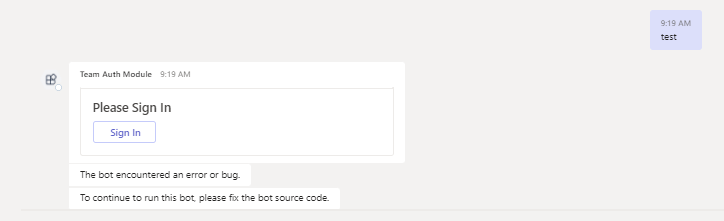
Status Code: 0
Microsoft.Graph.ServiceException: Code: generalException
Message: Location header not present in redirection response.

   at Microsoft.Graph.HttpProvider.SendRequestAsync(HttpRequestMessage request, HttpCompletionOption completionOption, CancellationToken cancellationToken)
   at Microsoft.Graph.HttpProvider.SendAsync(HttpRequestMessage request, HttpCompletionOption completionOption, CancellationToken cancellationToken)
   at Microsoft.Graph.BaseRequest.SendRequestAsync(Object serializableObject, CancellationToken cancellationToken, HttpCompletionOption completionOption)
   at Microsoft.Graph.BaseRequest.SendAsync[T](Object serializableObject, CancellationToken cancellationToken, HttpCompletionOption completionOption)
   at Microsoft.Graph.UserRequest.GetAsync(CancellationToken cancellationToken)
   at Microsoft.BotBuilderSamples.SimpleGraphClient.GetMeAsync() in C:\Users\ramfa\OneDrive\Desktop\46.teams-auth\SimpleGraphClient.cs:line 87
   at Microsoft.BotBuilderSamples.MainDialog.LoginStepAsync(WaterfallStepContext stepContext, CancellationToken cancellationToken) in C:\Users\ramfa\OneDrive\Desktop\46.teams-auth\Dialogs\MainDialog.cs:line 62
   at Microsoft.Bot.Builder.Dialogs.WaterfallDialog.OnStepAsync(WaterfallStepContext stepContext, CancellationToken cancellationToken)
   at Microsoft.Bot.Builder.Dialogs.WaterfallDialog.RunStepAsync(DialogContext dc, Int32 index, DialogReason reason, Object result, CancellationToken cancellationToken)
   at Microsoft.Bot.Builder.Dialogs.WaterfallDialog.ResumeDialogAsync(DialogContext dc, DialogReason reason, Object result, CancellationToken cancellationToken)
   at Microsoft.Bot.Builder.Dialogs.DialogContext.EndDialogAsync(Object result, CancellationToken cancellationToken)
   at Microsoft.Bot.Builder.Dialogs.OAuthPrompt.ContinueDialogAsync(DialogContext dc, CancellationToken cancellationToken)
   at Microsoft.Bot.Builder.Dialogs.DialogContext.ContinueDialogAsync(CancellationToken cancellationToken)
   at Microsoft.BotBuilderSamples.LogoutDialog.OnContinueDialogAsync(DialogContext innerDc, CancellationToken cancellationToken) in C:\Users\ramfa\OneDrive\Desktop\46.teams-auth\Dialogs\LogoutDialog.cs:line 42
   at Microsoft.Bot.Builder.Dialogs.ComponentDialog.ContinueDialogAsync(DialogContext outerDc, CancellationToken cancellationToken)
   at Microsoft.Bot.Builder.Dialogs.DialogContext.ContinueDialogAsync(CancellationToken cancellationToken)
   at Microsoft.Bot.Builder.Dialogs.DialogExtensions.InnerRunAsync(ITurnContext turnContext, String dialogId, DialogContext dialogContext, CancellationToken cancellationToken)
   at Microsoft.Bot.Builder.Dialogs.DialogExtensions.InternalRunAsync(ITurnContext turnContext, String dialogId, DialogContext dialogContext, DialogStateManagerConfiguration stateConfiguration, CancellationToken cancellationToken)
   at Microsoft.Bot.Builder.Dialogs.DialogExtensions.InternalRunAsync(ITurnContext turnContext, String dialogId, DialogContext dialogContext, DialogStateManagerConfiguration stateConfiguration, CancellationToken cancellationToken)
   at Microsoft.Bot.Builder.Dialogs.DialogExtensions.RunAsync(Dialog dialog, ITurnContext turnContext, IStatePropertyAccessor`1 accessor, CancellationToken cancellationToken)
   at Microsoft.BotBuilderSamples.TeamsBot`1.OnTeamsSigninVerifyStateAsync(ITurnContext`1 turnContext, CancellationToken cancellationToken) in C:\Users\ramfa\OneDrive\Desktop\46.teams-auth\Bots\TeamsBot.cs:line 41
   at Microsoft.Bot.Builder.ActivityHandler.OnInvokeActivityAsync(ITurnContext`1 turnContext, CancellationToken cancellationToken)
   at Microsoft.Bot.Builder.Teams.TeamsActivityHandler.OnInvokeActivityAsync(ITurnContext`1 turnContext, CancellationToken cancellationToken)
   at Microsoft.Bot.Builder.ActivityHandler.OnTurnAsync(ITurnContext turnContext, CancellationToken cancellationToken)
   at Microsoft.BotBuilderSamples.DialogBot`1.OnTurnAsync(ITurnContext turnContext, CancellationToken cancellationToken) in C:\Users\ramfa\OneDrive\Desktop\46.teams-auth\Bots\DialogBot.cs:line 36
   at Microsoft.Bot.Builder.MiddlewareSet.ReceiveActivityWithStatusAsync(ITurnContext turnContext, BotCallbackHandler callback, CancellationToken cancellationToken)
   at Microsoft.Bot.Builder.BotAdapter.RunPipelineAsync(ITurnContext turnContext, BotCallbackHandler callback, CancellationToken cancellationToken)
'iisexpress.exe' (CoreCLR: clrhost): Loaded 'C:\Program Files\dotnet\shared\Microsoft.NETCore.App\3.1.30\Microsoft.Win32.Registry.dll'. Skipped loading symbols. Module is optimized and the debugger option 'Just My Code' is enabled.
Microsoft.Bot.Builder.Integration.AspNet.Core.IBotFrameworkHttpAdapter: Information: SendActivitiesAsync for 1 activities.
Microsoft.Bot.Builder.Integration.AspNet.Core.IBotFrameworkHttpAdapter: Information: Sending activity.  ReplyToId: f:30d85255-13e9-cab8-3d23-1bd1645bccdd
System.Net.Http.HttpClient.Default.LogicalHandler: Information: Start processing HTTP request POST https://smba.infra.gov.teams.microsoft.us/gcch/v3/conversations/a%3A1kkJ0QSO56B2XrG367ESRThWGmQVwKTzNFEe8zd2_CdCgoGoytcEdEP6cADGPJGAwV-tvmR7AcSyZNjBHj_I59Sh13ZZzgNDuqEsngetx7Ym5DMoWisuQJmMmerzhtFv9plTSnRRS4Sk-AZH4ZFENpw/activities/f%3A30d85255-13e9-cab8-3d23-1bd1645bccdd
System.Net.Http.HttpClient.Default.ClientHandler: Information: Sending HTTP request POST https://smba.infra.gov.teams.microsoft.us/gcch/v3/conversations/a%3A1kkJ0QSO56B2XrG367ESRThWGmQVwKTzNFEe8zd2_CdCgoGoytcEdEP6cADGPJGAwV-tvmR7AcSyZNjBHj_I59Sh13ZZzgNDuqEsngetx7Ym5DMoWisuQJmMmerzhtFv9plTSnRRS4Sk-AZH4ZFENpw/activities/f%3A30d85255-13e9-cab8-3d23-1bd1645bccdd
System.Net.Http.HttpClient.Default.ClientHandler: Information: Received HTTP response after 305.5767ms - Created
System.Net.Http.HttpClient.Default.LogicalHandler: Information: End processing HTTP request after 310.7407ms - Created
Microsoft.Bot.Builder.Integration.AspNet.Core.IBotFrameworkHttpAdapter: Information: SendActivitiesAsync for 1 activities.
Microsoft.Bot.Builder.Integration.AspNet.Core.IBotFrameworkHttpAdapter: Information: Sending activity.  ReplyToId: f:30d85255-13e9-cab8-3d23-1bd1645bccdd
System.Net.Http.HttpClient.Default.LogicalHandler: Information: Start processing HTTP request POST https://smba.infra.gov.teams.microsoft.us/gcch/v3/conversations/a%3A1kkJ0QSO56B2XrG367ESRThWGmQVwKTzNFEe8zd2_CdCgoGoytcEdEP6cADGPJGAwV-tvmR7AcSyZNjBHj_I59Sh13ZZzgNDuqEsngetx7Ym5DMoWisuQJmMmerzhtFv9plTSnRRS4Sk-AZH4ZFENpw/activities/f%3A30d85255-13e9-cab8-3d23-1bd1645bccdd
System.Net.Http.HttpClient.Default.ClientHandler: Information: Sending HTTP request POST https://smba.infra.gov.teams.microsoft.us/gcch/v3/conversations/a%3A1kkJ0QSO56B2XrG367ESRThWGmQVwKTzNFEe8zd2_CdCgoGoytcEdEP6cADGPJGAwV-tvmR7AcSyZNjBHj_I59Sh13ZZzgNDuqEsngetx7Ym5DMoWisuQJmMmerzhtFv9plTSnRRS4Sk-AZH4ZFENpw/activities/f%3A30d85255-13e9-cab8-3d23-1bd1645bccdd
System.Net.Http.HttpClient.Default.ClientHandler: Information: Received HTTP response after 271.1206ms - Created
System.Net.Http.HttpClient.Default.LogicalHandler: Information: End processing HTTP request after 295.1988ms - Created
Microsoft.Bot.Builder.Integration.AspNet.Core.IBotFrameworkHttpAdapter: Information: SendActivitiesAsync for 1 activities.
Microsoft.Bot.Builder.Integration.AspNet.Core.IBotFrameworkHttpAdapter: Information: Sending activity.  ReplyToId: f:30d85255-13e9-cab8-3d23-1bd1645bccdd
Microsoft.AspNetCore.Mvc.Infrastructure.ControllerActionInvoker: Information: Executed action method Microsoft.BotBuilderSamples.BotController.PostAsync (TeamsAuth), returned result Microsoft.AspNetCore.Mvc.EmptyResult in 3747.006ms.
Microsoft.AspNetCore.Mvc.Infrastructure.ControllerActionInvoker: Information: Executed action Microsoft.BotBuilderSamples.BotController.PostAsync (TeamsAuth) in 3766.7211ms
Microsoft.AspNetCore.Routing.EndpointMiddleware: Information: Executed endpoint 'Microsoft.BotBuilderSamples.BotController.PostAsync (TeamsAuth)'
Microsoft.AspNetCore.Hosting.Diagnostics: Information: Request finished in 3779.447ms 200
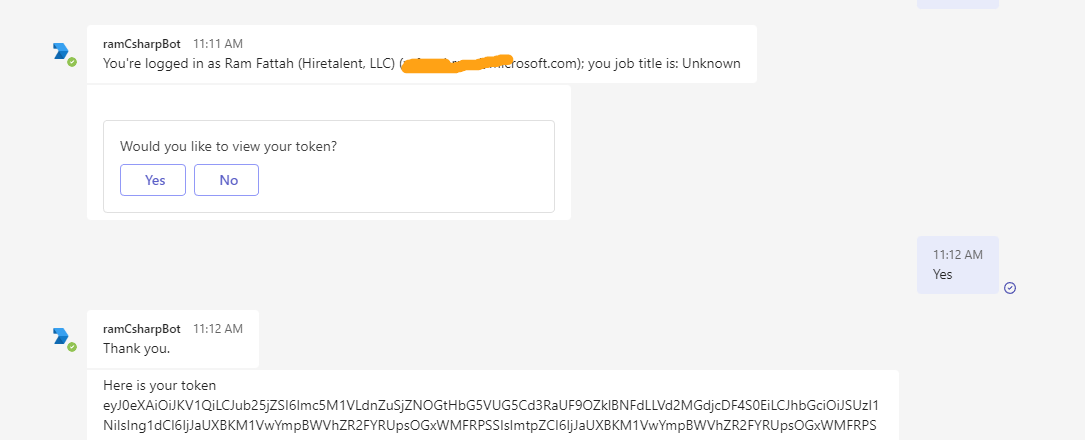
Cross examined bot sample 46.teams-auth without GCCH account.
Using non-government cloud account seems to work without issues:
Hi @ramfattah ,
Thanks for trying this out. I had followed the same steps earlier and it did not work for me in GCC.
Please let us know what is the next step to resolve this issue and get the bot working in GCC environment.
Hi @vivekagrawal1110 & @PrakashCCS
To clarify: are you sideloading the bot app to Teams?
I was able to reproduce this issue using GCC High account when sideloading (uploading through manifest.json) app in Teams.
Came across this Teams documentation:
https://learn.microsoft.com/en-us/microsoftteams/platform/concepts/deploy-and-publish/apps-upload
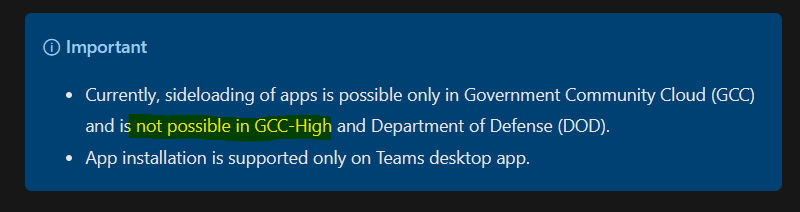
This is by design if using GCC High and sideloading the app in Teams, according to Teams documentation: https://learn.microsoft.com/en-us/microsoftteams/platform/concepts/deploy-and-publish/apps-upload
Closing. @vivekagrawal1110, please re-open if needed.