

 microsoft
MSTest Discovery Broken with 1.1.x
Describe the bug
After updating to 1.1.1/1.1.2 from 1.0.3 MSTest discovery is now broken. This is a blocking issue for us.
We couldn't test in our CI before because we were blocked by #2631 as well. I tried in the CI, but it seems there may have been something missed with the fix for #2631 as it's trying to install 1.1.1 still for MSTest, see comment here on that issue.
Locally I see the same behavior still I did with 1.1.1:
========== Starting test discovery ==========
[MSTest][Discovery][H:\...\tests\SizerBase.UnitTests.WinAppSdk\bin\x64\Debug\net6.0-windows10.0.19041.0\SizerBase.UnitTests.WinAppSdk.dll] Failed to discover tests from assembly H:\...\tests\SizerBase.UnitTests.WinAppSdk\bin\x64\Debug\net6.0-windows10.0.19041.0\SizerBase.UnitTests.WinAppSdk.dll. Reason:File does not exist: H:\...\tests\SizerBase.UnitTests.WinAppSdk\bin\x64\Debug\net6.0-windows10.0.19041.0\SizerBase.UnitTests.WinAppSdk.dll
No test is available in H:\...\tests\SizerBase.UnitTests.WinAppSdk\bin\x64\Debug\net6.0-windows10.0.19041.0\SizerBase.UnitTests.WinAppSdk.dll. Make sure that test discoverer & executors are registered and platform & framework version settings are appropriate and try again.
========== Test discovery finished: 0 Tests found in 5.1 sec ==========
The file exists on disk, everything built. Only change is updating NuGet reference from 1.0.3 to 1.1.x causes tests now to not be discovered properly/run.
Steps to reproduce the bug
- Create a MSTest based unit test project for WinAppSDK with 1.0.3
- Run tests.
- Close VS
- Clean environment
- Update to 1.1.x
- Re-run tests (fail)
Note, you have to close VS/clean environment as VS caches test discovery, didn't detect this issue at first on initial update as VS used prior cache to run tests. Issue seems to be with test discovery itself.
Expected behavior
Able to run MSTest projects as was able to with 1.0.3.
Screenshots
No response
NuGet package version
1.1.1
Packaging type
No response
Windows version
Windows 10 version 21H2 (19044, November 2021 Update)
IDE
Visual Studio 2022
Additional context
No response

Can reproduce. Here's log output from my test project w/ verbosity cranked up. Not very helpful.
[7/5/2022 2:45:33.994 PM]  Operation Dequeue : 'RunFromCodeLensOperation'
[7/5/2022 2:45:33.999 PM]  Building Test Projects
[7/5/2022 2:45:34.070 PM]  Start building 1 containers.
[7/5/2022 2:45:34.070 PM]  Triggering build for 1 IProjectBasedTestContainers.
[7/5/2022 2:45:35.599 PM]  No IBuildableTestContainers were found.
[7/5/2022 2:45:35.599 PM]  Completed building containers.
[7/5/2022 2:45:35.599 PM]  Start updating 1 containers.
[7/5/2022 2:45:35.599 PM]  Updating container C:\Sources\was-repros\was_issue_2706\tests\testproject\bin\Debug\net6.0-windows10.0.19041.0\testproject.dll.
[7/5/2022 2:45:35.615 PM]  Successfully refreshed container: C:\Sources\was-repros\was_issue_2706\tests\testproject\bin\Debug\net6.0-windows10.0.19041.0\testproject.dll
[7/5/2022 2:45:35.615 PM]  Completed updating containers.
[7/5/2022 2:45:35.615 PM]  DiscoveryOperation<RunFromCodeLensOperation> Changed container count is 1
[7/5/2022 2:45:35.654 PM]  Test run animation has started.
[7/5/2022 2:45:35.663 PM]  Test run progress has started.
[7/5/2022 2:45:35.663 PM]  Discovering the following containers :
[7/5/2022 2:45:35.663 PM]  	C:\Sources\was-repros\was_issue_2706\tests\testproject\bin\Debug\net6.0-windows10.0.19041.0\testproject.dll
[7/5/2022 2:45:35.765 PM]  Starting test discovery for requested test run
[7/5/2022 2:45:35.921 PM]  Project testproject references test adapter: MSTest.TestAdapter, version 2.2.8
[7/5/2022 2:45:36.123 PM]  ========== Starting test discovery ==========
[7/5/2022 2:45:36.124 PM]  File timestamp changed from 7/5/2022 2:34:56 PM to 7/5/2022 2:45:35 PM for C:\Sources\was-repros\was_issue_2706\tests\testproject\bin\Debug\net6.0-windows10.0.19041.0\testproject.dll
[7/5/2022 2:45:36.126 PM]  Grouped C:\Sources\was-repros\was_issue_2706\tests\testproject\bin\Debug\net6.0-windows10.0.19041.0\testproject.dll : (AnyCPU, FrameworkCore10, net6.0, )
[7/5/2022 2:45:36.128 PM]  Test discovery settings for C:\Sources\was-repros\was_issue_2706\tests\testproject\bin\Debug\net6.0-windows10.0.19041.0\testproject.dll:
 <RunSettings>
  <BoostTestInternalSettings xmlns:xsd="http://www.w3.org/2001/XMLSchema" xmlns:xsi="http://www.w3.org/2001/XMLSchema-instance">
    <VSProcessId>28340</VSProcessId>
  </BoostTestInternalSettings>
  <RunConfiguration>
    <ResultsDirectory>C:\Sources\was-repros\was_issue_2706\TestResults</ResultsDirectory>
    <SolutionDirectory>C:\Sources\was-repros\was_issue_2706\</SolutionDirectory>
    <CollectSourceInformation>False</CollectSourceInformation>
  </RunConfiguration>
  <GoogleTestAdapterSettings xmlns:xsd="http://www.w3.org/2001/XMLSchema" xmlns:xsi="http://www.w3.org/2001/XMLSchema-instance">
    <SolutionSettings>
      <Settings />
    </SolutionSettings>
    <ProjectSettings />
  </GoogleTestAdapterSettings>
</RunSettings>.
[7/5/2022 2:45:36.565 PM] [Warning] [MSTest][Discovery][C:\Sources\was-repros\was_issue_2706\tests\testproject\bin\Debug\net6.0-windows10.0.19041.0\testproject.dll] Failed to discover tests from assembly C:\Sources\was-repros\was_issue_2706\tests\testproject\bin\Debug\net6.0-windows10.0.19041.0\testproject.dll. Reason:File does not exist: C:\Sources\was-repros\was_issue_2706\tests\testproject\bin\Debug\net6.0-windows10.0.19041.0\testproject.dll
[7/5/2022 2:45:36.566 PM] [Warning] No test is available in C:\Sources\was-repros\was_issue_2706\tests\testproject\bin\Debug\net6.0-windows10.0.19041.0\testproject.dll. Make sure that test discoverer & executors are registered and platform & framework version settings are appropriate and try again.
[7/5/2022 2:45:36.590 PM]  ========== Test discovery finished: 0 Tests found in 466.1 ms ==========
[7/5/2022 2:45:36.902 PM]  ========== Starting test run ==========
[7/5/2022 2:45:36.904 PM]  Attachments processing not needed
[7/5/2022 2:45:36.906 PM]  ========== Test run finished: 0 Tests (0 Passed, 0 Failed, 0 Skipped) run in < 1 ms ==========
[7/5/2022 2:45:36.989 PM]  Test run animation has stopped.
[7/5/2022 2:45:37.021 PM]  Test run progress has stopped.

Thanks @riverar for confirmation on another machine. I was hoping to get more details from the CI on our GitHub action as well, but that's been stuck because of #2631 as well (which seems resolved for our main build with 1.1.2 but is failing for the test project still - it seems that 1.1.2 is still trying to install the 1.1.1 package still in that case?).
I tried to reproduce this issue using MSTest 2.2.10, and the test discovery seemed to work.
Were you using MSTest 2.2.10? If 2.2.10 still doesn't work, could you share a minimal repro project? (I'm new to using MSTest).

Concur @DefaultRyan. Looks like this is fixed in 2.2.10, suspect it was related to https://github.com/microsoft/testfx/pull/1064 or https://github.com/microsoft/testfx/commit/6901b31266b14c1d98665ccca320e2ca20ce24d7. @michael-hawker tag you're it.
Thanks folks, we were on 2.2.8 indeed. I believe I'll still be blocked from fully validating in our CI by the remaining issue with the fix for https://github.com/microsoft/WindowsAppSDK/issues/2631 though.
I tried locally, and I see test discovery may have found them now, but didn't appear to run them:
Log level is set to Informational (Default).
Connected to test environment '< Local Windows Environment >'
Test data store opened in 0.023 sec.
Loaded 0 test records from the solution cache in 0.416 sec.
========== Starting test discovery ==========
========== Test discovery finished: 5 Tests found in 5.6 sec ==========
Starting test discovery for requested test run
========== Starting test discovery ==========
========== Test discovery finished: 5 Tests found in 20.4 sec ==========
========== Starting test run ==========
========== Test run finished: 10 Tests (5 Passed, 5 Failed, 0 Skipped) run in 424 ms ==========
Though I don't see anything listed in the Test Explorer now either:
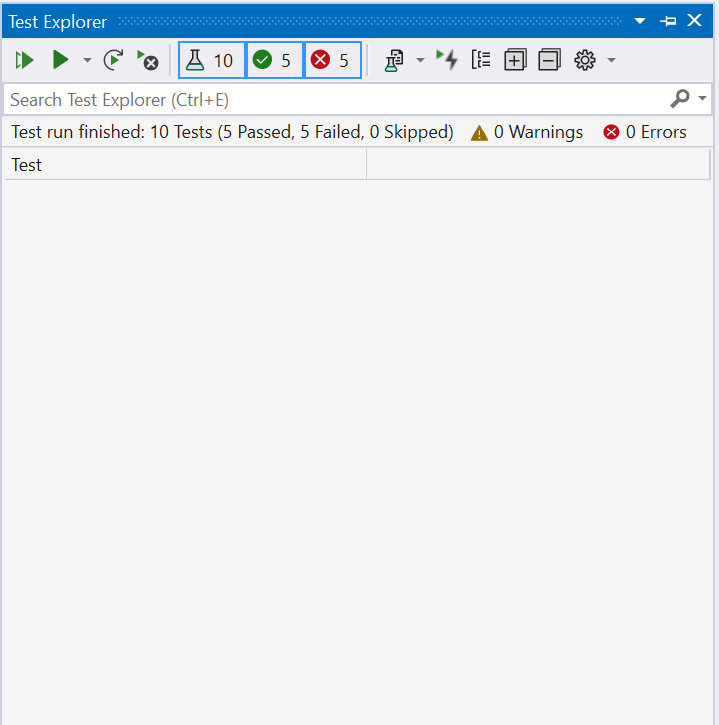
I'm on 17.2.4 of VS, so I'll try updating that as well.
Was able to grab the message from the bubble over the method:
Message:
    Initialization method SizerBase.Tests.ExampleSizerBaseTestClass.TestSetup threw exception. System.TypeInitializationException: The type initializer for 'CommunityToolkit.Labs.UnitTests.App' threw an exception. ---> System.TypeInitializationException: The type initializer for 'WinRT.ActivationFactory`1' threw an exception. ---> System.Runtime.InteropServices.COMException: Class not registered (0x80040154 (REGDB_E_CLASSNOTREG)).
    TestCleanup method SizerBase.Tests.ExampleSizerBaseTestClass.TestCleanup threw exception. System.TypeInitializationException: System.TypeInitializationException: The type initializer for 'CommunityToolkit.Labs.UnitTests.App' threw an exception. ---> System.TypeInitializationException: The type initializer for 'WinRT.ActivationFactory`1' threw an exception. ---> System.Runtime.InteropServices.COMException: Class not registered (0x80040154 (REGDB_E_CLASSNOTREG)).

  Stack Trace:
    BaseActivationFactory.ctor(String typeNamespace, String typeFullName)
    ActivationFactory`1.ctor()
    ActivationFactory`1.cctor()
    --- End of inner exception stack trace ---
    ActivationFactory`1.As(Guid iid)
    Window.Make___objRef_global__Microsoft_UI_Xaml_IWindowStatics()
    Window.get__objRef_global__Microsoft_UI_Xaml_IWindowStatics()
    Window.get_Current()
    App.cctor() line 41
Looks like something may be going on with accessing the Window.Current now that wasn't happening with 1.0.3:
public sealed partial class App : Application
{
#if WINAPPSDK
    private static Microsoft.UI.Xaml.Window currentWindow = Microsoft.UI.Xaml.Window.Current; // Line 41
@DefaultRyan I've invited you to our repo, so you can see the PR with the WinAppSDK and MSTest updates here: https://github.com/CommunityToolkit/Labs-Windows/pull/183 (it's working on our main with WAS 1.0.3 and MSTest 2.2.8).
I'd be curious if you just add the line above with the reference to Window.Current in your setup for App.xaml.cs, if you'll hit the same issue though?
I tried putting breakpoints on this line and in the constructor, but I don't see them being hit when I ask it to debug the test from the code bubble.
I updated to 17.2.6 and I can see the tests again now in Test Explorer, but still hit the WinRT activation issue now with all the WinUI tests.
@DrusTheAxe and @huichen123 may have seen something similar. Could one of you respond here regarding the class activation issue?
Is there a WindowsAppSDK issue, an MSTest issue, or is there some manual configuration that is expected for our customers to use 1.1 with MSTest (and if so, is it documented)?

We're using single-package MSIX projects for both app and tests:
  <ItemGroup Condition="'$(DisableMsixProjectCapabilityAddedByProject)'!='true' and '$(EnablePreviewMsixTooling)'=='true'">
    <ProjectCapability Include="Msix" />
  </ItemGroup>

Still seeing the same message with 1.1.3 locally, though still blocked from testing in our CI by https://github.com/microsoft/WindowsAppSDK/issues/2768.
Message:
Initialization method SizerBaseExperiment.Tests.ExampleSizerBaseTestClass.TestSetup threw exception. System.TypeInitializationException: The type initializer for 'CommunityToolkit.Labs.Tests.App' threw an exception. ---> System.TypeInitializationException: The type initializer for 'WinRT.ActivationFactory`1' threw an exception. ---> System.Runtime.InteropServices.COMException: Class not registered (0x80040154 (REGDB_E_CLASSNOTREG)).
TestCleanup method SizerBaseExperiment.Tests.ExampleSizerBaseTestClass.TestCleanup threw exception. System.TypeInitializationException: System.TypeInitializationException: The type initializer for 'CommunityToolkit.Labs.Tests.App' threw an exception. ---> System.TypeInitializationException: The type initializer for 'WinRT.ActivationFactory`1' threw an exception. ---> System.Runtime.InteropServices.COMException: Class not registered (0x80040154 (REGDB_E_CLASSNOTREG)).

  Stack Trace:
BaseActivationFactory.ctor(String typeNamespace, String typeFullName)
ActivationFactory`1.ctor()
ActivationFactory`1.cctor()
--- End of inner exception stack trace ---
ActivationFactory`1.As(Guid iid)
Window.Make___objRef_global__Microsoft_UI_Xaml_IWindowStatics()
Window.get__objRef_global__Microsoft_UI_Xaml_IWindowStatics()
Window.get_Current()
App.cctor() line 41
--- End of inner exception stack trace ---
App.get_DispatcherQueue() line 85
VisualUITestBase.EnqueueAsync(Func`1 function) line 19
VisualUITestBase.TestSetup() line 69
TestCleanup Stack Trace
App.get_DispatcherQueue() line 85
VisualUITestBase.EnqueueAsync(Func`1 function) line 19
VisualUITestBase.TestCleanup() line 79
Branch is here: https://github.com/CommunityToolkit/Labs-Windows/tree/llama/input-injection-test
Let me know if we should open a separate issue for this specifically, since this original issue on discovery seems to be resolved with latest packages for MSTest+WinAppSDK.
I believe this issue is resolved in terms of VS, but would like to validate everything is still working in our CI with the latest version; however, that's still blocked by https://github.com/microsoft/WindowsAppSDK/issues/2768
New tracking issue for root cause of issues with 1.1.x is here: https://github.com/microsoft/WindowsAppSDK/issues/2829
Tried 1.2 and getting this in WinAppSDK test run:
DEP0800: The required framework "C:\Users\runneradmin\.nuget\packages\microsoft.windowsappsdk\1.2.221109.1\buildTransitive\..\tools\MSIX\win10-x64\Microsoft.WindowsAppRuntime.1.2.msix" failed to install. [0x80073CF9] Deployment Add operation with target volume C: on Package Microsoft.WindowsAppRuntime.1.2_2000.677.1750.0_x64__8wekyb3d8bbwe from:  (Microsoft.WindowsAppRuntime.1.2.msix)  failed with error 0x8000000B. See http://go.microsoft.com/fwlink/?LinkId=235160 for help diagnosing app deployment issues.
	DeploymentSucceeded = False
	DeploymentError = Err_Deploy_SDKInstall
	DeploymentUserError = False
	DeploymentHRESULT = -2147009[287](https://github.com/CommunityToolkit/Labs-Windows/actions/runs/3474985456/jobs/5808745845#step:12:288)
	HasSharedCode = False
	SDKFileName =
(Seemed msbuild was fine though? See action run here: https://github.com/CommunityToolkit/Labs-Windows/actions/runs/3474985456/jobs/5808745741)
FYI @bpulliam @gabbybilka @SavoySchuler as well, as not sure if still related to https://github.com/microsoft/WindowsAppSDK/issues/2829
Ah, looking at https://github.com/actions/runner-images (finally found this) it seems like the OS is still in LTSC from summer:
Current runner version: '2.299.1'
Operating System
  Microsoft Windows Server 2022
  10.0.20348
  Datacenter
I can open an issue there, but would be nice to validate E2E and ensure this and #2829 is indeed fixed.
So, to follow-up this is kind of resolved, but also still broken with the latest WindowsAppSDK bits...
You need to manually update properties in your project in order to use the new bits with mstest, see thread here: https://github.com/microsoft/testfx/issues/1127
    <EnableMsixTooling>true</EnableMsixTooling>
    <WindowsAppContainer>true</WindowsAppContainer>
Discovery works fine regardless, but running tests fail with the class not registered message I had mentioned here above.
There should probably be some analyzer or config or something shipped with new versions of the WindowsAppSDK which detects if <EnablePreviewMsixTooling> is still enabled and prompts folks with the instructions for updating their projects off of 1.0-1.1 (or whichever versions had the preview tooling).
FYI @bpulliam

Hey @michael-hawker @Scottj1s ,
Sorry for the direct ping but issue was marked as solved in 1.2.X but we are having users saying they still have the issue in this version. What's the status here? Did 1.2.x solved the issue?
