

 microsoft
Unable to package app for Microsoft Store, because: "error: The app manifest must be valid as per schema. Reason: Required attribute 'PhonePublisherId' is missing."
Describe the bug
I created an app with WinAppSDK/WinUI3 template (without WinForm and Wpf)
I tried to publish the app by left clicking the Project file and select "Associate with with Store" or "Create app package..." but it gets halted very quickly. Because:
Error 0x80080204 - The specified package format is not valid: The package manifest is not valid.
&
Error info: error C00CE020: App manifest validation error: The app manifest must be valid as per schema: Line 35, Column 4, Reason: Required attribute 'PhonePublisherId' is missing.
After I did that, I could not debug my app anymore either.
Because of:

&
DEP0700: Registration of the app failed. [0x80080204] error 0xC00CE020: App manifest validation error: The app manifest must be valid as per schema: Line 35, Column 4, Reason: Required attribute 'PhonePublisherId' is missing.
so the only way the debug the app again is to revert the changes made by the "Associate with the Store / Create app package".
And I still can't publish my app to Microsoft Store. I've uploaded my UWP apps with no problems to Microsoft Store, I can't do this with WinAppSDK/WinUI3.
Steps to reproduce the bug
- Create Windows App SDK + WinUI3 Project
- In Project leftclick menu, select "Associate the app with the Store" or ... "Create app package".
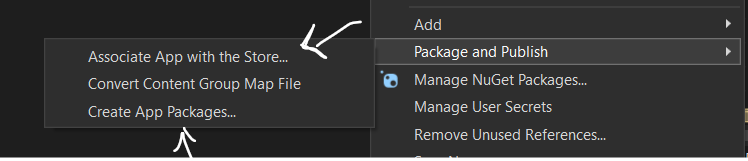
- Follow the wizard steps to make package for Microsoft Store.
Until it gets aborted for this:

Expected behavior
I've released few UWP apps in the Store, and I keep maintaining them regularly, I've no problems with it... but with Windows App SDK it doens't work at all.
Screenshots
No response
NuGet package version
1.1.1
Packaging type
No response
Windows version
Windows 10 version 21H2 (19044, November 2021 Update)
IDE
Visual Studio 2022-preview
Additional context
I don't remember which WinUI3 template I used... I just picked one and started developing.

Oke I fixed my issue by adding: PhonePublisherId="00000000-0000-0000-0000-000000000000" in the PackageManifest's <mp:PhoneIdentity />
I guess this is a bug and needs to be automated?


@sachintaMSFT Santosh Chintalapati FTE tag you're it
@sachintaMSFT Was this fixed in the servicing update?
This seems to be an issue with WinUI3 template not adding phone publisher ID automatically to the manifest of the app being created. This is not an issue with the WinAppSDK packages itself. @MikeHillberg , who should look at this WinUI 3 template issue ?

Encountered this problem, can't believe this is still not being fixed ☹️ The experience of developing WinUI 3 App cannot catch up with UWP☹️ Lots of Win32 Interop and a broken template
Update: I've created a new project using the WAP template then moved my codes into this one and it works fine. Seems the template without WAP doesn't work properly.
