

 microsoft
C++/WinRT - including the Microsoft.Windows.AppLifecycle.h header file causes issues
Describe the bug
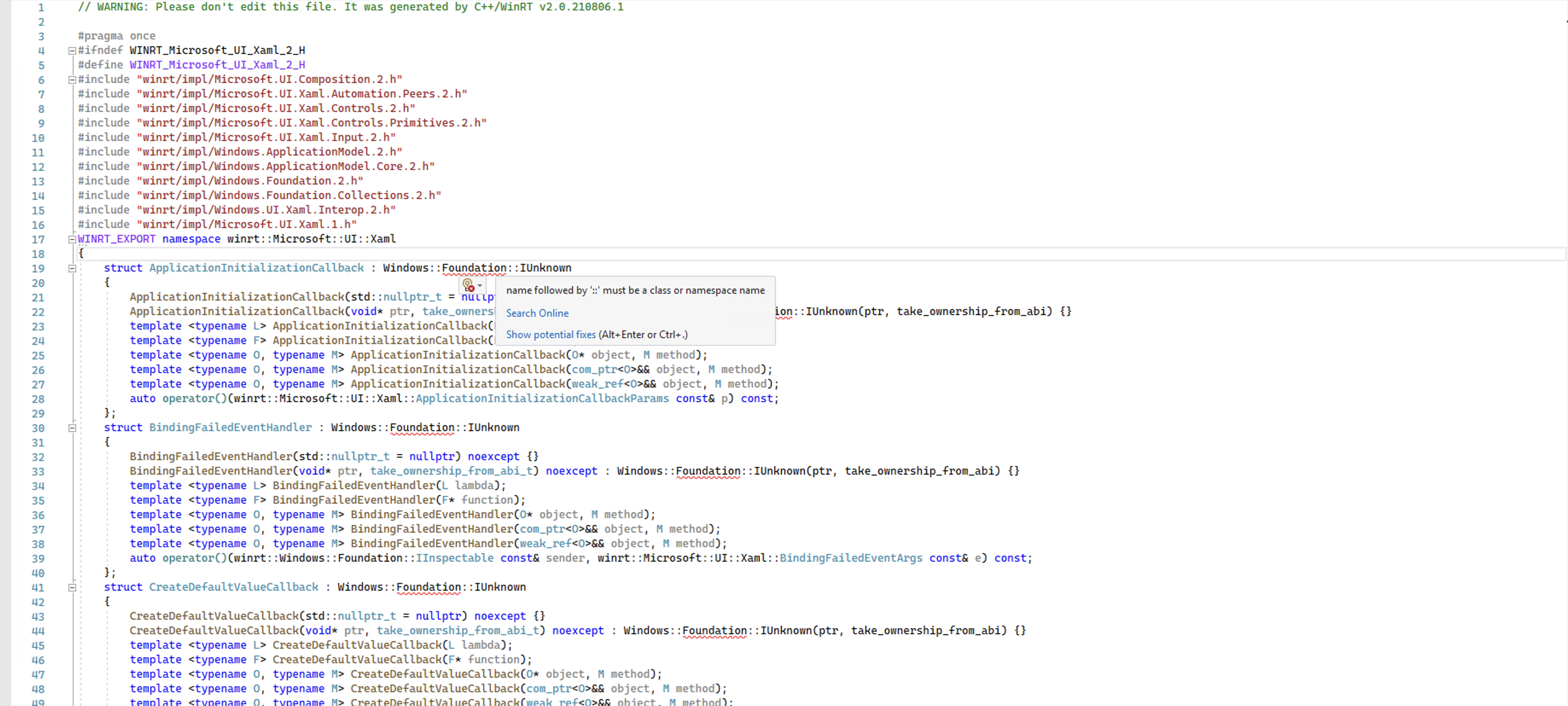
When you include the Microsoft.Windows.AppLifecycle.h (or any other header that starts with Microsoft.Windows), it causes issues in other AppSDK headers included after that (eg: Microsoft.UI.Xaml.h) since the generated code references types under the Windows::Foundation namespace but the compiler thinks that it's the Microsoft::Windows::Foundation namespace which doesn't exist.
Steps to reproduce the bug
- Include any header that starts with "Microsoft.Windows" before other AppSDK headers.
- See the error.
Expected behavior
This should compile and work. Including the header, after all other AppSDK headers works but shouldn't be necessary.
Screenshots
NuGet package version
1.0.0
Packaging type
Packaged (MSIX)
Windows version
Windows 10 version 21H2 (19044, November 2021 Update)
IDE
Visual Studio 2022
Additional context
No response

This sounds like an issue with "using" statements. Can you show me your repro C++ file and/or precompiled header? I suspect the specific issue here is that since Windows isn't prefixed with "::", if you add the line "using Microsoft", the name Windows becomes ambiguous. Tthe error shown seems slightly misaligned with that interpretation, so I'd like to repro what you're seeing before jumping too far ahead.

@BenJKuhn I'm not "using Microsoft" inside the precompiled header and the error occurs only inside the Microsoft namespace.
It's not an issue with using statements.
The gist of the issue is that since the namespace is unqualified, lookup rules will traverse the namespace tree backwards to find a Windows namespace. Because of the inclusion order (<winrt/Microsoft.Windows.AppLifecycle.h> is included before <winrt/Microsoft.UI.Xaml.h>) a winrt::Microsoft::Windows namespace exists while <winrt/Microsoft.UI.Xaml.h> is being parsed. The namespace lookup goes as follows.
- It will look at
winrt::Microsoft::UI::Xamlto see if there's aWindowsnamespace within. There is not. - It will look at
winrt::Microsoft::UIto see if there's aWindowsnamespace within. There is not. - It will look at
winrt::Microsoftto see if there's aWindowsnamespace within. There is, so the search stops here.
Then, it will lookup winrt::Microsoft::Windows for a namespace named Foundation, which does not exist. So the compiler stops here and throws the error seen above.
TLDR; this is an issue with the cppwinrt codegen, it should use winrt::Windows::Foundation::IUnknown here.

I also think not using Microsoft.Windows would be the best move considering that according to https://github.com/microsoft/WindowsAppSDK/issues/1823, adding a using namespace within the winrt namespace is considered "best practice" (I would personally not consider anything involving using namespace to be best practice, but w/e), somebody is bound to do
namespace winrt
{
    using namespace Microsoft;
}
and everything will blow up spectacularly (something as simple as winrt::Windows becomes ambiguous).
But it's probably too late for that.
@chrisguzak fyi on the practice of nesting using namespaces under winrt and unintended consequences

I think this is a bug in cppwinrt.exe which has already been fixed there. When I manually generate the headers using the latest cppwinrt NuGet the headers correctly contain the winrt:: prefix.
Since we can’t use these headers generated by the newer cppwinrt.exe since they don’t match the cppwinrt version used to generate the WinRT system headers we use this crude one-liner to manually fix up our generated headers:
powershell -noprofile -command "Get-ChildItem -Recurse -Filter *.h | Foreach-Object {"^
  "  $tmp = (Get-Content -Path $_.FullName) -Replace '([^:])(Windows::Foundation)', '$1winrt::$2';"^
  "  [System.IO.File]::WriteAllLines($_.FullName, $tmp)"^
  "}"

Why not use cppwinrt NuGet for everything? It is generating headers for system APIs too.
If there was some actual documentation for cppwinrt.exe we could probably figure out how to do that, but since there isn’t we’re just happy we figured out how to generate the Windows App SDK headers against the system SDK and will leave it at that + crude workarounds. Also we’re not using Visual Studio but Qt, so this is all a manual process for us.
you can run cppwinrt.exe to see its command line options and will find the implementation here. the command line support is stable as there are many dependecies on it. Raymond wrote about some of the command line usage here

@ChrisGuzak yes I can get a list of command-line options with terse descriptions, but is there any place where they are documented and explained?
Closing, as this issue was fixed in cppwinrt: https://github.com/microsoft/cppwinrt/pull/1004/files

@triplef This might be helpful: https://github.com/microsoft/cppwinrt/tree/master/nuget