

 microsoft
selenium 4.0: find_element returning dictionary instead of WebElement
Tested with Win App Driver 1.2.99 and Appium-Python-Client 2.0.0.
Code: driver.find_element(By.XPATH, )
Return: {'ELEMENT': '42.1312384.4.2'}
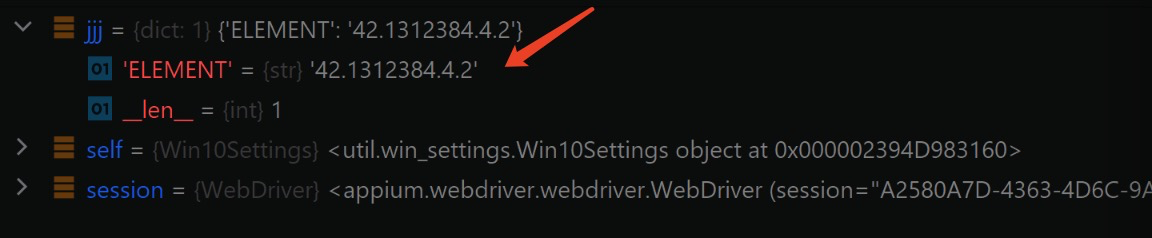
Logs: self = <util.win_settings.Win10Settings object at 0x00000249E5A278B0> session = <appium.webdriver.webdriver.WebDriver (session="C3CA67AF-4207-48C4-A90E-0A345049DC16")>
def go_to_display_settings_page(self, session):
    jjj = session.find_element(By.XPATH, "//Window[@Name='Settings'][@AutomationId='TitleBar']/Button[@Name='Maximize Settings'][@AutomationId='Maximize']")
jjj.click()
E AttributeError: 'dict' object has no attribute 'click'
I created this bug for selenium first: https://github.com/SeleniumHQ/selenium/issues/10079
Here is their reply:


I'm having the same issue with your latest exe. I'm trying the calculator.py.


Facing the same issue with Appium 2.2.0, Selenium 4.1.3 and WinAppDriver.exe 1.2.1

Facing the same issue with Appium 2.2.0, Selenium 4.1.5 and WinAppDriver.exe 1.2.1

I've encountered the same issue, downgrading to Selenium 3.14 does seem to fix it. Otherwise a workaround is:
item_dict = driver.find_element(AppiumBy.ACCESSIBILITY_ID, 'id')
web_element_item = driver.create_web_element(list(item_dict.values())[0])
web_element_item.click()
