

 microsoft
FancyZones broken on multiple monitors in v0.68
Microsoft PowerToys version
0.68.0
Installation method
PowerToys auto-update
Running as admin
Yes
Area(s) with issue?
FancyZones
Steps to reproduce
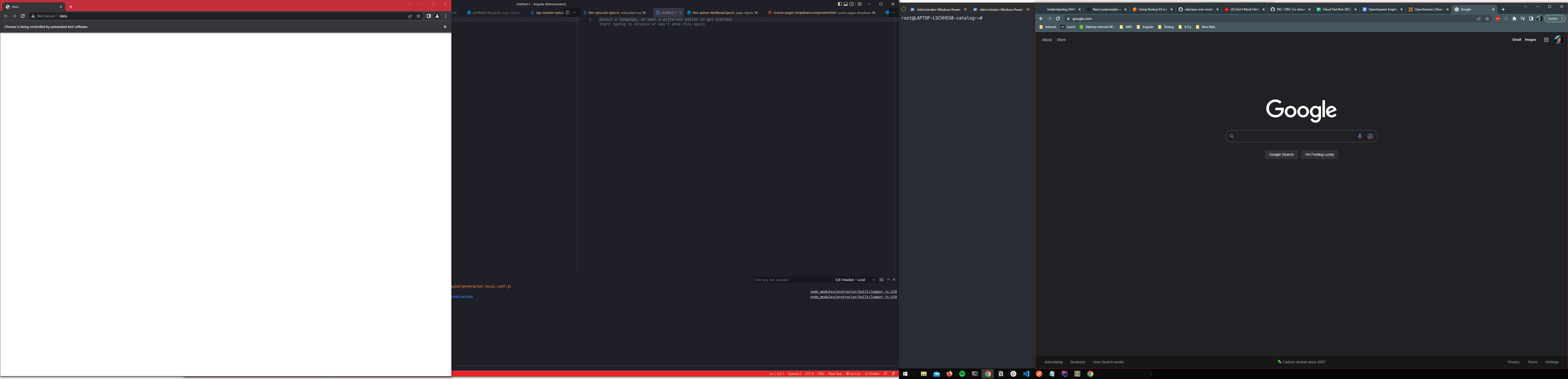
The image below is a screenshot of two monitors stitched together. You can see I have a zone with web browsers (Chrome) on the right-side monitor and another zone of browsers on the left. When I try to cycle through the windows in either of these zones, it cycles through both zones!
To me this is completely unexpected behavior that started happening right after my upgrade to v0.68.0. I hope it's a bug.
Another thing that happens is I'll have Chrome focused in one zone and it's the only window in that zone. Then I hit the cycle shortcut and it cycles to a different zone and never cycles back to the original zone I was in.
I'm not suggesting this issue is specific to Chrome. I can't be sure. It just happens to be the only software I tend to use in multiple zones.
✔️ Expected Behavior
Win + Pg Up/Dn cycles through the zone I am currently on.
❌ Actual Behavior
Win + Pg Up/Dn is cycling through multiple zones.
Other Software
No response

I just updated to v0.68.0 today and it seems to be getting worse and worse over time. I'll try restarting my computer at the end of the workday to see if that helps at all. Otherwise, I'm willing to help in anyway I can.
If yall need more screenshots or if you want to hop on a call and do some live debugging I'm happy to oblige. This is my all-time favorite feature of not just PowerToys but in all of Windows (besides PowerToys Run) and I hate having to work without this.
Just want to update that this is still happening after restarts. It's also happening between zones that don't have Chrome nor any shared apps. For example in the screenshot in my original message it scrolls between the zone with my code editors and the zone with my terminal. At this point, FancyZones is not usable for me anymore.
Hi @DamianRivas, can you please attach a /bugreport? It could help me to reproduce the issue.

Hi there!
We need a bit more information to really debug this issue. Can you add a "Report Bug" zip file here? You right click on our system tray icon and just go to report bug. Then drag the zipfile from your desktop onto the GitHub comment box in this issue. Thanks! 
![microsoft-github-policy-service[bot] avatar](https://avatars.githubusercontent.com/in/95686?v=4 "Published by a pub.dev verified publisher")
@SeraphimaZykova That doesn't work. After I click "Report bug" nothing happens and now the system tray icon is frozen (right clicking on it is not working anymore)
@SeraphimaZykova That doesn't work. After I click "Report bug" nothing happens and now the system tray icon is frozen (right clicking on it is not working anymore)
Thank you for answering. It could take some time for creating the report. If you wait a bit more, it'll finish and create a zip archive.
Well, nevermind! That was SLOW and hung up PowerToys for a while but a zip file now showed up in my desktop. GitHub is not allowing me to attach it so I uploaded to OneDrive. Here it is
Hi @DamianRivas, I've managed to reproduce this issue, I'll let you know when the fix is ready.
