

 microsoft
Hololens isn't connecting to remote server
Describe the bug When starting the video chat unity sample on the hololens 2, it shows an error message on the hololens, that it cannot connect to the remote server. I checked the settings, like the Peer Ids and the host Ip is the Ip of the PC the server is running on. But there are no GET Requests coming from the Hololens to the Server.
To Reproduce Steps to reproduce the behavior:
- Set Settings in Unity sample
- Deploy to Hololens 2
- Error Messages start to appear
Expected behavior Hololens should connect to the server and GET Requests should start to appear in the server console.
Environment
- Host: Windows 10, latest stable WebRTC
- Remote Peer: Hololens2
Additional context When starting the App from the local PC it works as expected.


You may need to (temporarily!!!) disable your PC's firewall.
If this works, remember to re-enable it, but to open required ports (STUN/TURN ports, ports for your Signal server).
You'll generally need UDP incoming/outgoing on arbitrary temporary ports. This is generally a security concern, and the long term fix for this is to run your own TURN server.
Unlike STUN, there are not usually public TURN servers because of the more intense cost requirements.

I trid it but it still not works.. I tried to do the same with a second PC and it works. Seems like the problem really comes from the Hololens 2.
Hi, @alxfigueiredo , did you solve the problem? if yes, please can you tell what to do?

Hi @Matteo-0 ,
I made here a post about my previous problem #769, check it out for more details informations. My problem was that my unity project root had a too long Path (MAX 255 Characters) and was probably missing some importants files/dependencies when building and deploying. With the projects roots very (very) near of C:/ resolved my problem. Since that, I had no more problems about that with any others unity projects.
I missed this information on the "Getting started" Unity :

You probably know that but there is the Capabilities in the players settings to check that may cause problems if not checked.
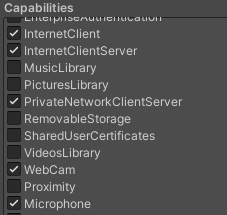
Hope it will help you !