
MSBuildForUnity

MSBuildForUnity copied to clipboard
 microsoft
Does not clean up properly when switching API level in the player settings
version 0.9.1-20200131-14 is causing duplication of assemblies if the API level is changed in player settings. previous versions (0.8.3) would properly delete and restore the package contents.
Repro steps
- Create a .csproj file from the inline code in the Assets folder
- Let MSBuild restore the package
- In Player settings, change the API level between from .net 4.x to .net standard 2.0
- Let MSBuild restore the package
- Note duplication of the assemblies in the Dependencies folder
<Project>
  <Import Project="$([MSBuild]::GetPathOfFileAbove(MSBuildForUnity.Common.props))" Condition="Exists('$([MSBuild]::GetPathOfFileAbove(MSBuildForUnity.Common.props))')" />

  <PropertyGroup Condition="'$(UnityCurrentTargetFramework)' == ''">
    <TargetFramework>netstandard2.0</TargetFramework>
  </PropertyGroup>

  <PropertyGroup Condition="'$(UnityCurrentTargetFramework)' != ''">
    <TargetFramework>$(UnityCurrentTargetFramework)</TargetFramework>
  </PropertyGroup>

  <PropertyGroup>
    <!-- Make sure Unity ignores the contents of the output path. -->
    <BaseIntermediateOutputPath>.obj\</BaseIntermediateOutputPath>
    <OutputPath>.bin\</OutputPath>
  </PropertyGroup>

  <!-- Note that this is the special "NoTarget" SDK to prevent this project from producing a dll. -->
  <Import Project="Sdk.props" Sdk="Microsoft.Build.NoTargets" Version="1.0.85" />

  <ItemGroup>
    <PackageReference Include="Microsoft.Windows.MixedReality.DotNetWinRT" Version="0.5.1043" />
  </ItemGroup>

  <Import Project="Sdk.targets" Sdk="Microsoft.Build.NoTargets" Version="1.0.85" />
</Project>
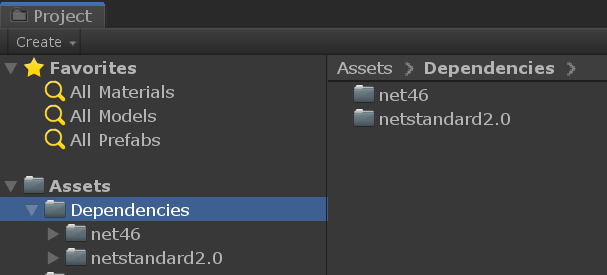

Ok, so this corner case is the reason I previously added "Clean", take a look here: https://github.com/microsoft/MSBuildForUnity/blob/master/Source/MSBuildTools.Unity/Packages/com.microsoft.msbuildforunity/Editor/ProjectGenerator/MSBuildTemplates/MSBuildForUnity.Common.props.template
There is a comment on line 33, uncomment that block and you should have this working again.
