

 microsoft
How to update Bot avatar image per Activity
We are using React app with below version
"botframework-webchat": "^4.11.0"
Case
We need to show a different bot avatar on Activity basis. Example - We have a handoff feature, where Bot avatar should be an agent icon when the user is chatting with Live Agent and once the chat ended we need to show the old/original bot avatar.
We are using avatarMiddleware to achieve the above case.
Code Sample
const avatarMiddleware = () => next => ({ fromUser, ...otherArgs }) => {
const renderAvatar = next({ fromUser, ...otherArgs });
if (otherArgs.styleOptions !== null && otherArgs.styleOptions !== undefined) {
otherArgs.styleOptions.userAvatarImage = avatarImg.userAvatarImage;
otherArgs.styleOptions.userAvatarInitials = avatarImg.userAvatarInitials;
otherArgs.styleOptions.botAvatarInitials = avatarImg.botAvatarInitials;
if (isLiveChatStarted) {
otherArgs.styleOptions.botAvatarImage = 'data:image/png;base64,xxxxxx';
}
}
if (!isLiveChatStarted) {
otherArgs.styleOptions.botAvatarImage = eva.imageData;
}
return (
renderAvatar &&
(() => (
<AvatarWithLPStatus lpStatus={isLiveChatStarted} fromUser={fromUser}>
{renderAvatar()}
</AvatarWithLPStatus>
))
);
};
Issue
The above logic is updating the bot avatar image however it is updating the old activities bot avatar also. We are looking for middleware to update bot avatar image per activity.
Thanks, Kundan(Ecolab)

@kumarkundan, please look at this posted answer I provided to a similar Stack Overflow question. This solution is for a React project, but that shouldn't matter. Focus on the code in App.js regarding Web Chat's store. This was created just prior to the AvatarMiddleware middleware being a part of Web Chat.
In their case, they were wanting to update the avatar to reflect the user's profile upon logging in via a login prompt. It should help provide an idea on how to approach creating a solution.

@stevkan Thanks for the info. I'm re-labeling this as a feature request per convo with @compulim :) Apologies for the extra noise.

@stevkan - Thanks for the update.
We have already gone through the mentioned article, but our problem is different.
Giving you step by step flows what we are trying here
Step1: After the user is logged in, the bot will give you the Welcome card with the bot avatar.

Step2: Now the user is trying to chat with Bot

Step3: When the user is trying to chat with live agent
3.1 The agent is not yet accepted the user request
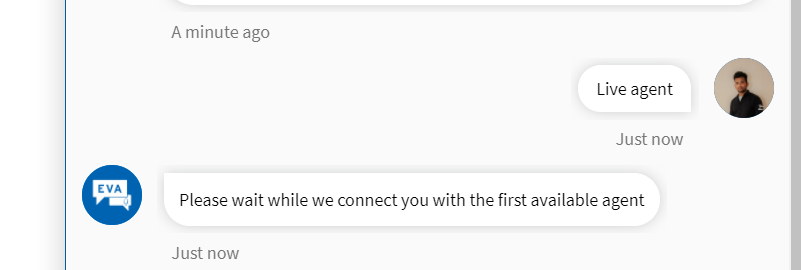
3.2 Once the live agent has accepted the request, here you can see the bot avatar image has been updated with the agent image

But the problem is, the agent image is updated for existing activities also. please check the below screenshot. You can see the bot avatar image for updates for previous activities also.

Here, we are expecting it to update the bot avatar image only for that activity, but rather it's updating for all the activities.
Please let us know if we are missing anything here.
Thanks, Sreekanth (Ecolab)

@SreekanthOAuth, apologies for the delay. In principle, the above suggested workaround should still serve you. It's just a matter of filtering on the incoming activity to update the associated avatar. I would expect there to be differences between the bot and agent activities. If not, you should be able to add a property to the channelData property to act as a flag into each bot activity that would separate them out.
FYI, I am working on a prototype of new chat adapter architecture that would allow bot developers to specify per-activity avatar. The mechanism is same as what @stevkan described above, leveraging the channelData property.
It's still in prototype phase, the design may change anytime. But here is how it looks:
type BaseActivity = {
  channelData: Expando<{
    /** Avatar initials of the sender. */
    'webchat:avatar:initials'?: string;

    /** Avatar image of the sender. */
    'webchat:avatar:image'?: string;
  }>;
}

@compulim - Thanks for the update.
Could you please provide the tentative date for this change.
@compulim - Could you please provide the tentative date for this change.
@stevkan,
We are able to update just the bot avatar image but the problem is the image is not updating for that activity rather it's updating for all the bot activities as we mentioned in the previous comment.
This question is asked by our member to update the user avatar image after they login. Here there is no problem because every user activity they should see the avatar image.
The middleware we are using is 'avatarMiddleware', which's to update the avatars for both USER and BOT. So by using the below snippet we are trying to update only the BOT avatar image. But it seems the middleware is global for all activities.
const avatarMiddleware = () => next => ({ fromUser, ...otherArgs }) => {
    const renderAvatar = next({ fromUser, ...otherArgs });

    if (otherArgs.styleOptions !== null && otherArgs.styleOptions !== undefined) {
      otherArgs.styleOptions.userAvatarImage = avatarImg.userAvatarImage;
      otherArgs.styleOptions.userAvatarInitials = avatarImg.userAvatarInitials;
      otherArgs.styleOptions.botAvatarInitials = avatarImg.botAvatarInitials;
      if (isLiveChatStarted) {
          otherArgs.styleOptions.botAvatarImage = 'data:image/png;base64,iVBORw=';
      }
    }

    if (!isLiveChatStarted) {
      otherArgs.styleOptions.botAvatarImage = eva.imageData;
    }
    return (
      renderAvatar &&
      (() => (
        <AvatarWithLPStatus lpStatus={isLiveChatStarted} fromUser={fromUser}>
          {renderAvatar()}
        </AvatarWithLPStatus>
      ))
    );
  };
And we have also tried using activityMiddleware but unfortunately, it's not giving options to update bot avatar image. Here, we are getting the activity object, but there is no property to update the avatar.
Could you please share a middleware that can only update the avatar for particular activities, not for all activities. Please suggest us.
Don't modify the otherArgs.styleOptions, the argument is expected to be read-only, not written to.
In your scenario, you should build your avatar rendering function, which should simply return an <img> element. Some readings:
- Custom rendering avatar, https://github.com/microsoft/BotFramework-WebChat/tree/master/samples/05.custom-components/k.per-message-avatar/
- A comprehensive demo of the customization, https://microsoft.github.io/BotFramework-WebChat/05.custom-components/k.per-message-avatar/comprehensive.html
- Type
1,2, and3to the bot, and see how the bot respond and what you can change
- Type
The code will be similar to:
const MyBotAvatar = () => {
  return <img src="data:image/png;base64,..." />;
};

const avatarMiddleware = () => next => (...args) => {
  const [{ fromUser }] = args;

  if (!fromUser) {
    // If it is from bot, render your own image.
    return () => <MyBotAvatar />;
  }

  // If it is from user, passthrough it to the next renderer.
  // I.e. let Web Chat default avatar renderer to render the user's avatar for you.
  return next(...args);
};
In your scenario, you will want to show online status. You should save the online status in a React context.
const LiveChatStartedContext = createContext(true); // Given you have a React context, which is a boolean.

const MyBotAvatar = () => {
  const liveChatStarted = useContext(LiveChatStartedContext);

  if (liveChatStarted) {
    // Avatar image showing online
    return <img src="data:image/png;base64,..." />;
  }

  // Avatar image showing offline
  return <img src="data:image/png;base64,..." />;
};
@compulim - Thanks for the information.
We have also implemented the same by following the same links which you have shared in your last comment.
But it's also updating for all the activities. But the demo looks very close to our case.
We will try again and let you know the outcome.
@SreekanthOAuth are you able to make it ?, if yes, can you please submit the solution?
