

 microsoft
Root bot when access skill bot ask user to login
Description
I followed all steps in the following article to add SSO to bot https://docs.microsoft.com/en-us/azure/bot-service/bot-builder-authentication-sso?view=azure-bot-service-4.0&tabs=csharp%2Ceml also this link to connect to skill bot https://docs.microsoft.com/en-us/composer/how-to-single-sign-on-skill Add app settings , Scopes and connection strings as document mentioned and test connection and it shows token correctly
when I open Web Chat or emulator and try to access People skill bot from the Root bot . I got the following screen

and this is the web chat output
[08:32:43 PM]POST200/v3/conversations/889f1a9d-eb6c-4ae8-bbfe-1a058fc344a5%7Clivechat/activities/d0d15be7-0218-45bb-af33-525ef03732f8
[08:32:43 PM]<-traceTransportIntelligentAssistant.OnEvent_ConnectToSkill
[08:32:43 PM]POST200/v3/conversations/889f1a9d-eb6c-4ae8-bbfe-1a058fc344a5%7Clivechat/activities/d0d15be7-0218-45bb-af33-525ef03732f8
[08:32:45 PM]<-typing
[08:32:45 PM]POST200/v3/conversations/889f1a9d-eb6c-4ae8-bbfe-1a058fc344a5%7Clivechat/activities/d0d15be7-0218-45bb-af33-525ef03732f8
[08:32:47 PM]<-typing
[08:32:47 PM]POST200/v3/conversations/889f1a9d-eb6c-4ae8-bbfe-1a058fc344a5%7Clivechat/activities/d0d15be7-0218-45bb-af33-525ef03732f8
[08:32:49 PM]<-typing
[08:32:49 PM]POST200/v3/conversations/889f1a9d-eb6c-4ae8-bbfe-1a058fc344a5%7Clivechat/activities/d0d15be7-0218-45bb-af33-525ef03732f8
[08:32:51 PM]<-typing
[08:32:51 PM]POST200/v3/conversations/889f1a9d-eb6c-4ae8-bbfe-1a058fc344a5%7Clivechat/activities/d0d15be7-0218-45bb-af33-525ef03732f8
[08:32:53 PM]<-traceLuisV3 Trace
[08:32:53 PM]POST200/v3/conversations/889f1a9d-eb6c-4ae8-bbfe-1a058fc344a5%7Clivechat/activities/d0d15be7-0218-45bb-af33-525ef03732f8
[08:32:53 PM]<-tracePeople.OnIntent_GetEmailAddress
[08:32:53 PM]POST200/v3/conversations/889f1a9d-eb6c-4ae8-bbfe-1a058fc344a5%7Clivechat/activities/d0d15be7-0218-45bb-af33-525ef03732f8
[08:32:53 PM]<-tracePeople.OnEvent_SetOptions
[08:32:53 PM]POST200/v3/conversations/889f1a9d-eb6c-4ae8-bbfe-1a058fc344a5%7Clivechat/activities/d0d15be7-0218-45bb-af33-525ef03732f8
[08:32:53 PM]<-traceAuthenticationDialog.BeginDialog
[08:32:53 PM]POST200/v3/conversations/889f1a9d-eb6c-4ae8-bbfe-1a058fc344a5%7Clivechat/activities/d0d15be7-0218-45bb-af33-525ef03732f8
[08:32:53 PM]<-typing
[08:32:53 PM]POST200/v3/conversations/889f1a9d-eb6c-4ae8-bbfe-1a058fc344a5%7Clivechat/activities/d0d15be7-0218-45bb-af33-525ef03732f8
[08:32:55 PM]<-typing
[08:32:55 PM]POST200/v3/conversations/889f1a9d-eb6c-4ae8-bbfe-1a058fc344a5%7Clivechat/activities/d0d15be7-0218-45bb-af33-525ef03732f8
[08:32:57 PM]<-typing
[08:32:57 PM]POST200/v3/conversations/889f1a9d-eb6c-4ae8-bbfe-1a058fc344a5%7Clivechat/activities/d0d15be7-0218-45bb-af33-525ef03732f8
[08:32:58 PM]<-message
[08:32:58 PM]POST501/v3/conversations/889f1a9d-eb6c-4ae8-bbfe-1a058fc344a5%7Clivechat/activities/d0d15be7-0218-45bb-af33-525ef03732f8
OAuth activities are not available for testing in Composer yet. Please continue using Bot Framework Emulator for testing OAuth actions.
[08:32:59 PM]<-messageOperation returned an invalid status code 'NotImplemented'
[08:32:59 PM]POST200/v3/conversations/889f1a9d-eb6c-4ae8-bbfe-1a058fc344a5%7Clivechat/activities/d0d15be7-0218-45bb-af33-525ef03732f8
[08:32:59 PM]<-traceSkill State
[08:32:59 PM]POST200/v3/conversations/889f1a9d-eb6c-4ae8-bbfe-1a058fc344a5%7Clivechat/activities/d0d15be7-0218-45bb-af33-525ef03732f8
[08:32:59 PM]<-traceBot State
[08:32:59 PM]POST200/v3/conversations/889f1a9d-eb6c-4ae8-bbfe-1a058fc344a5%7Clivechat/activities/d0d15be7-0218-45bb-af33-525ef03732f8
[08:32:59 PM]POST200/v3/directline/conversations/889f1a9d-eb6c-4ae8-bbfe-1a058fc344a5%7Clivechat/activities
Also I tried to use emulator as webchat mentions but I got same issue

can anyone advise me what is missing ???


Hi @EmadKhella
What do you have set for the allowed callers in the skill? If you have just the caller bot id, can you test with just *?
Also; do you have appid/apppassword set for both the caller/root and the skill? Even though they are being ran locally, do you have Azure bots created for them and using the id/password?

@axelsrz can you please open it I was away and I did not reply . Now I am back and I will check the solution. instead of taking the action directly you have to ask to close you don't know why I cannot reply specially in Lock-down and COVID isolation
@dmvtech
In the allow caller I put the root bot ID which is my parent BOT and I don't expect any calls outside that .even after I put * it did not help
for sure I am using id/Password. so I don't test that on emulator only even when I host it on teams it asked to sign in .
I expect bot knows my user info because it is hosted on my local team app.
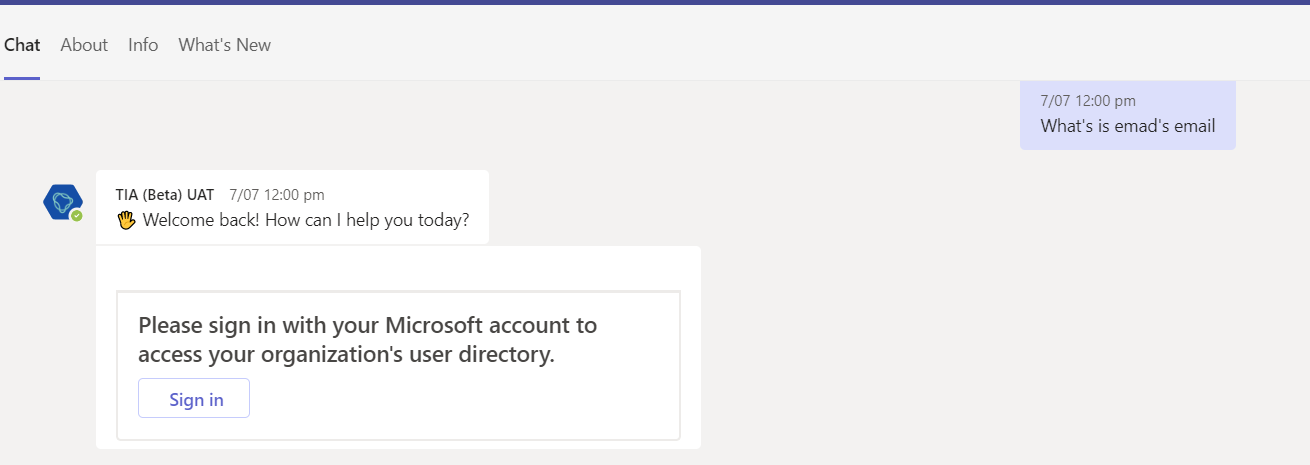
@dmvtech How can I generate silent token in composer instead of asking user to Login I found this article but It is for BOT FW . https://docs.microsoft.com/en-us/microsoftteams/platform/bots/how-to/authentication/auth-aad-sso-bots