

 microsoft
Typing indicator shown after bot has replied
Describe the bug
The bot shows typing indicator after it replies
Version
Version: 2.1.2 Electron: 8.2.4 Chrome: 80.0.3987.165 NodeJS: 12.13.0 V8: 8.0.426.27-electron.0
Browser
- [x] Electron distribution
- [ ] Chrome
- [x] Safari
- [ ] Firefox
- [x] Edge
OS
- [x] macOS
- [ ] Windows
- [ ] Ubuntu
To Reproduce
Steps to reproduce the behavior:
- Successfully deploy the Enterprise Assistant template and host it on a SharePoint site using BotFramework WebChat
- Open the bot and click on the 'You can ask me' button
- The bot will send a card
- The bot also sends a typing indicator after the card
Expected behavior
It should not show the typing indicator after it has finished processing a message
Screenshots
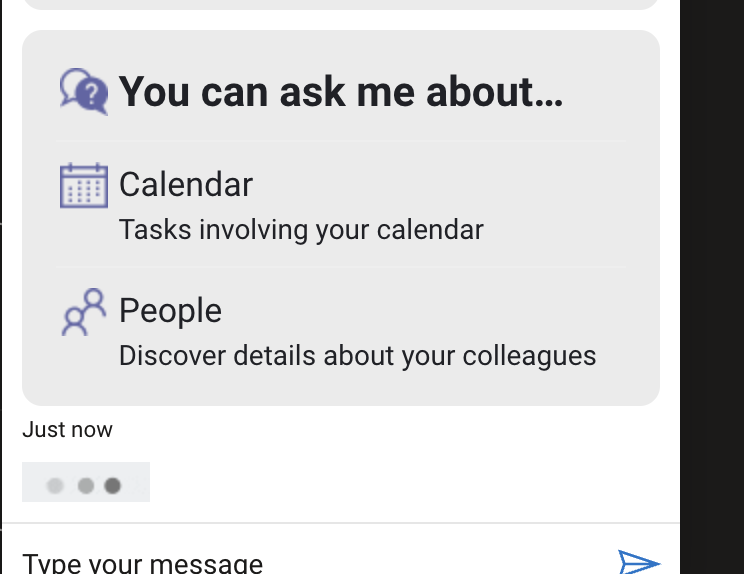

This is similar to #8840
But there is also another issue with the OAuth login card. I've used Directline Enhanced Authentication. After you click on the 'Sign in' button on the OAuth card it'll open a new tab to select the account to login. Once you select the account and it logs in, it closes the tab and returns to the bot but the bot doesn't show the typing indicator and there a long pause before the reply comes.
The typing indicator should be shown after the user logs in and before the reply is shown.

@ramfattah the channel is directline and I used BotFramework Webchat to host the bot on SharePoint

Hey @bensonjm
It should not show the typing indicator after it has finished processing a message
I'm not able to reproduce this issue with a fresh Enterprise Assistant Composer bot using direct line webchat.
After clicking You can ask me button, typing indicator doesn't show after a reply.
Video demo: https://i.gyazo.com/820f96105c593969e53aea470bfcf2dc.mp4
This is similar to #8840
But there is also another issue with the OAuth login card. I've used Directline Enhanced Authentication. After you click on the 'Sign in' button on the OAuth card it'll open a new tab to select the account to login. Once you select the account and it logs in, it closes the tab and returns to the bot but the bot doesn't show the typing indicator and there a long pause before the reply comes.
The typing indicator should be shown after the user logs in and before the reply is shown.
I'm also not able to reproduce this issue. After clicking Sign in button, I see typing indicator, then reply.
Video demo: https://i.gyazo.com/c9976d5929931ac7faf6aa0c66877b6c.mp4
Here are the steps I took:
- Created and deployed Enterprise assistant from this documentation
- In Azure bot, I added directline channel
- Used sample /k.direct-line-token/ to integrate webchat using Direct line.
@bensonjm perhaps I'm doing something wrong from my end? any additional steps I shall add to repro the issue?
@ramfattah, I used directline enhanced authentication and I hosted it over the internet (bot is on sharepoint) which is probably why the typing indicator is showing in the first place (slow internet perhaps) as locally even I'm unable to reproduce the issue.
@ryub3n
I was able to reproduce only once when the bot loaded the first time in published webchat, after refreshing my browser, I was not able to repro anymore.
Is this typing indicator behavior happening consistently or only sometimes for you?
Here's the proof. I can't predict when it happens but it's usually when I send the message/action for the first time. The typing indicator keeps on going even after the bot replies.
I've sent you proofs via mail too.
https://user-images.githubusercontent.com/24279903/166409279-d60e2f39-72fb-48e4-8fcd-64ae77a5748f.mov
Hi @ryub3n
Update: It appears I'm able to reproduce this typing behavior while running the enterprise-assistant locally. This only occurs after the template has been created for the first time. Afterward, I'm not able to repro anymore.
I followed this documentation to set up the enterprise-assistant template without using Direct Line.
For example, the extra typing activity shows up at 0:22 after the sign-in card:
https://user-images.githubusercontent.com/38049078/175469002-6d9fa104-c562-429f-8e88-cf02a7cd47cd.mp4
Perhaps related to https://github.com/microsoft/BotFramework-WebChat/issues/4344 ?

@ceciliaavila any update on this?
Hi @johnataylor, this issue is on our backlog. We'll be tackling it next week. Thanks.

