

 microsoft
There is a conflict dialog when cloning a file share that contains multiple hierarchies and files
Storage Explorer Version: 1.29.0 Build Number: 20230427.5 Branch: rel/1.29.0 Platform/OS: Windows 10/Linux Ubuntu 22.04/MacOS Ventura 13.3.1 (Apple M1 Pro) Architecture: ia32/x64/arm64 How Found: exploratory testing Regression From: Not a regression
Steps to Reproduce
- Expand one storage account -> File Shares.
- Create a file share that contains multiple hierarchies and files.
- Clone the file share.
- Check whether there is no conflict dialog.
Expected Experience
There is no conflict dialog.
Actual Experience
There is a conflict dialog.
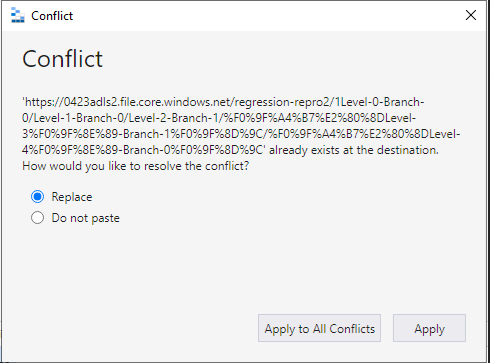
Additional Context
- We will figure out how to reproduce this issue with fewer files and update on here.
- Here is the log: 2023-04-26_190000.zip

@richardmsft please keep an eye on this as @v-xianya continues to look for a min repro. If we don't have one by 1.31, please spend some time yourself trying to find one. Once one is found, please determine a root cause.

Update: we haven't figured out to reproduce this issue with fewer number of files.
Update: Hi, I'm not sure if the number of files is still large. Totally 10642 files and a new created folder in the root directory of the file share. I tried pasting the file share to another storage account. A conflict dialog shows.
Hope this helps.
Here is the log.
2024-01-14_175002.zip
When trying to find a min repro, I found that I encounter a similar conflict when trying to clone a file share that contains a directory with a , character in the name. I'm not entirely sure if what I've found stems from the same problem that this issue represents.
@v-xianya Can you share with me a VM that has a file share that reproduces this issue? I'd like to see what the azcopy logs are saying when I try to recreate the azcopy copy job using the command line with your file share.

@richardMSFT somehow I missed this, sure, I will share a VM if I encounter this issue again.
@v-xianya please mention this in a testing update email if y'all reproduce.