

 microsoft
Error during opening a folder inside a blob where a .zip should be stored. Error message: "The first argument must be of type string or an instance of Buffer, ArrayBuffer, or Array or an Array-like Object. Received undefined"
Preflight Checklist
- [X] I have installed the latest version of Storage Explorer.
- [X] I have checked existing resources, including the troubleshooting guide and the release notes.
- [X] I have searched for similar issues.
Storage Explorer Version
1.25.0
Regression From
1.23.0 (maybe also 1.24, but i can't verify this)
Architecture
x64
Storage Explorer Build Number
20220803.8
Platform
Linux (snap)
OS Version
Ubuntu 22.04 LTS
Bug Description
I use npm package azurite with version 3.16.0
Through a node process i uploaded a .zip file to azurite. No Errors during this.
when i try open the folder where the .zip file should be stored i receive the error message "The first argument must be of type string or an instance of Buffer, ArrayBuffer, or Array or an Array-like Object. Received undefined" as a pop up.
 But the file was still receivable by accessing it through https://docs.microsoft.com/en-us/rest/api/storageservices/create-service-sas via a nodeJs process.
Steps to Reproduce
Upload a zip to azurite by using
https://www.npmjs.com/package/azurite/v/3.16.0
https://www.npmjs.com/package/@azure/storage-blob/v/12.8.0
with the method uploadStream from the storage-blob package. After successful upload, try to access the uploaded .zip file via the azure storage explorer. Now you should receive the error message The first argument must be of type string or an instance of Buffer, ArrayBuffer, or Array or an Array-like Object. Received undefined . Now try to access the file through NodeJS by using getBlobClient and generateSasUrl from storage-blob package. Through this way the .zip file was accessible.
I am unsure whether its expected to provide the some source code / code repository here in order to make reproducing easier. It is also my first bug report to any kind of open source software.
Actual Experience
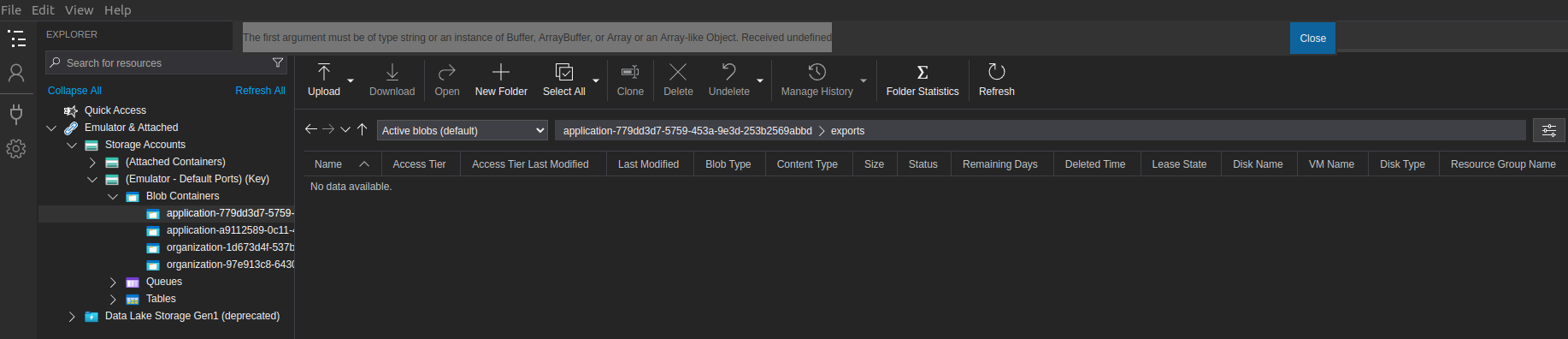
Expected Experience
Microsoft azure storage explorer can handle the data which is stored by azurite.
Additional Context
If there is source code required to reproduce it, please inform me and i will do my best to deliver it. Currently this problem occurs inside closed source, which i am not allowed to provide in its original form.

I believe this is a duplicate of this issue https://github.com/microsoft/AzureStorageExplorer/issues/6008.
To workaround it, you can add the Content MD5 to the blob by script and make sure in the future your upload code also handles setting the Content MD5 value on the blob after each upload.
