

 microsoft
Select tenant and then only few hundred subscriptions is cumbersome
Preflight Checklist
- [X] I have installed the latest version of Storage Explorer.
- [X] I have checked existing resources, including the troubleshooting guide and the release notes.
- [X] I have searched for similar issues.
Problem
All subscriptions of a newly selected tenant are automatically selected
Desired Solution
No subscriptions are selected by default, "(de)select all" actions available
Alternatives and Workarounds
No response
Additional Context
Hundreds of Azure subscriptions associated to the same AAD tenant

@thgossler I think we understand the oversight you are pointing out. To make sure though, are you talking about "deselect all" for your home tenant, a non-home tenant, or all types of tenants? For home tenant, you should be able to just click the checkbox for that tenant and all subscriptions would un-select. However, for non-home tenants you are correct that there is not an easy way to deselect all as clicking the tenant checkbox will filter-out the tenant.

You are right, my problem is with a non-home tenant. I think the behavior should be the same for all tenants independent of whether it is the home tenant or not.
@thgossler there should be any easy way to deselect all for the non-home tenants. Unfortunately our UI design has trouble with that as it would mean the top level checkbox has two purposes: tenant enabled & select/don't select all. We will need to revisit our UI design for this.
@syspro-chrisvogt @thgossler how would you feel if the behavior was this:
- Have non-home tenant
- Click the checkbox for the tenant
- Subscriptions for the tenant load - all are selected - the checkbox for the tenant is set to checked
- Click the checkbox for the tenant
- All subscriptions for the tenant are deselected - the checkbox for the tenant is set to indeterminate (box has a dash in it)
From this state specified in step 5 you can either:
- Click the checkbox for the tenant -> subscriptions are un-loaded and tenant is filtered out
- Click on checkboxes for subscriptions under the tenant -> the checkbox for the tenant continues to be indeterminate
Additionally, if you have all subscriptions for the tenant checked, and then you manually 1 by 1 uncheck them, then we would go to the state specified in step 5.
All of the above is a little antithetical with typical checkbox behavior, as the tenant checkbox can be in an indeterminate state when no children checkboxes are checked, but I think it is not too out of this world.
Anyways, thoughts from y'all?
Sounds OK. I also first thought that this is not usual checkbox behavior. But should be intuitively understandable.
Possible other option: Don't unload subscriptions/filter-out the tenant when unchecking the checkbox, just show it unchecked as usual. If somebody wants to unload subscription/filter-out the tenant, they would need to right-click on the item and select this from the content menu.
Sounds OK from my end too.
My ideal outcome for this would be to make it a more "normal" or intuitive approach, something like:
- All tenants are listed
- The subscriptions underneath are populated when the respective tenant is expanded (much like expanding the Tables in SQL Management Studio would then list the tables within the database); at this point no subscription is selected
- If selecting the tick box at tenant level would select all subscriptions, or if one or some subscriptions are selected the tenant level tick box is the partially selected greyed out tick (if I'm making any sort of sense with this)
Thoughts?

Update on this issue. We're going to make some changes to the account panel, to address this issue and some others.
Changes we're aiming to make:
- Don't have the top-level checkbox both be used for filtering/un-filtering tenants and select/de-select all subscriptions
- Do have the top-level checkbox only be used for select/de-select all subscriptions
- Add a "tenant settings" menu for each tenant
- Move filtering/un-filtering a tenant into its "tenant settings" menu
- Allow hiding of subscriptions
- Put un-hiding of subscriptions in the "tenant settings" menu
The initial, not final, thought of how this all will look is this:
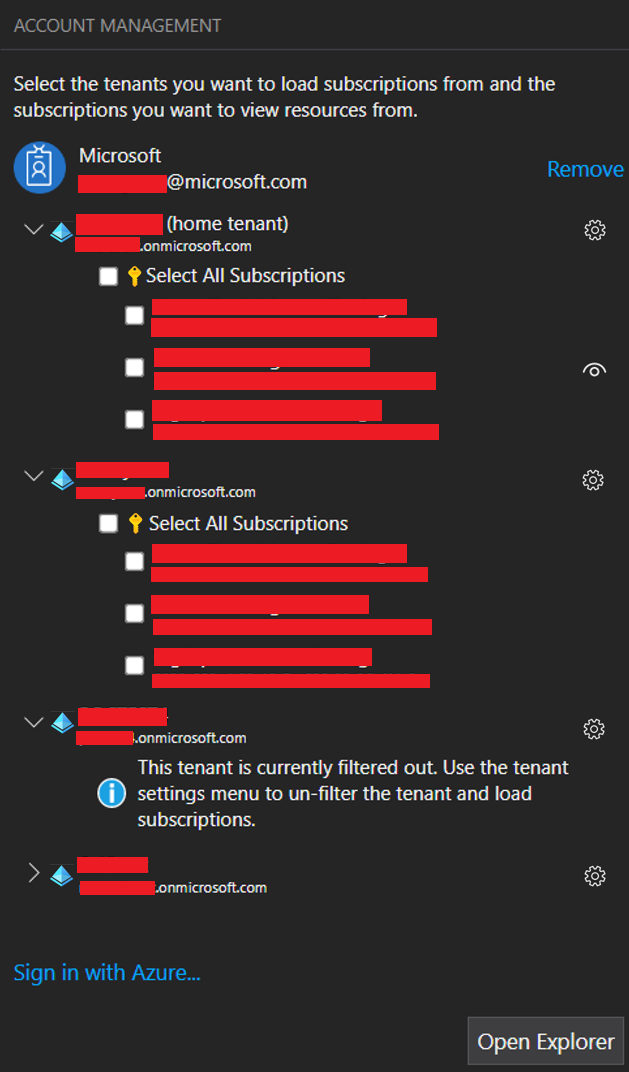 (apologies for all the redacting, I forgot to put in fake things when making this and I was too lazy to go back 😅)
If you have any feedback on the above feel free to share.
Notes for future me:
- Explore indentation levels
- Explore alignment of images next to dual-text lines
- Make sure images are similarly sized
- Revisit panel prompt
This looks like a good improvement, and at face value the way it is shown should make this more useable in alignment with what is expected (as was reported in issue 5887).
@syspro-chrisvogt I'm wrapping up the changes to the account panel. Do you think you would ever want the ability to un-hide all hidden subscriptions in one click?
Assuming the hide all is one click, then definitely, that would be extremely helpful and useful.