

 microsoft
401 errors are not ignored in any way
Hello, I have a problem.
(I already read it https://github.com/microsoft/ApplicationInsights-node.js#preprocess-data-with-telemetry-processors)
const appInsights = require('applicationinsights');

const clearErrors = (envelope, context) => {
  const {
    data: {
      baseData: { responseCode, resultCode }
    }
  } = envelope || { data: { baseData: {} } };

  const { statusCode, statusMessage } = context['http.ServerResponse'] || {};

  if (
    responseCode === 401 ||
    statusCode === 401 ||
    resultCode === '401' ||
    statusMessage === 'Unauthorized'
  ) {
    return false;
  }

  return true;
};

appInsights.setup().start();

appInsights.defaultClient.addTelemetryProcessor(clearErrors);
And usage:
function errHandler(err, req, res, next) {
  const status = error.status || error.statusCode;

  if (status < 500) {
    if (status !== 401) {
      logger.debug(err, 'Error');
    }
  } else {
    telemetry.trackException({ exception: err });
  }
}

...
const app = express();

app.use(errHandler);
But if I make a request to my API, where I check for authorization, and if we are not authorized, I throw
const { Unauthorized } = require('http-errors');
...
new Unauthorized()
Locally if I get 401 errors then they are not sent to applicationInsights (My filter sees responseCode === 401 || statusCode === 401 || resultCode === '401' || statusMessage === 'Unauthorized' and ignores).
But if I host the code in Azure. Then in my applicationInsights I see a lot of 401 errors, they are still being logged.

@AXLLLOW are you enabling Application Insights in Azure Portal?
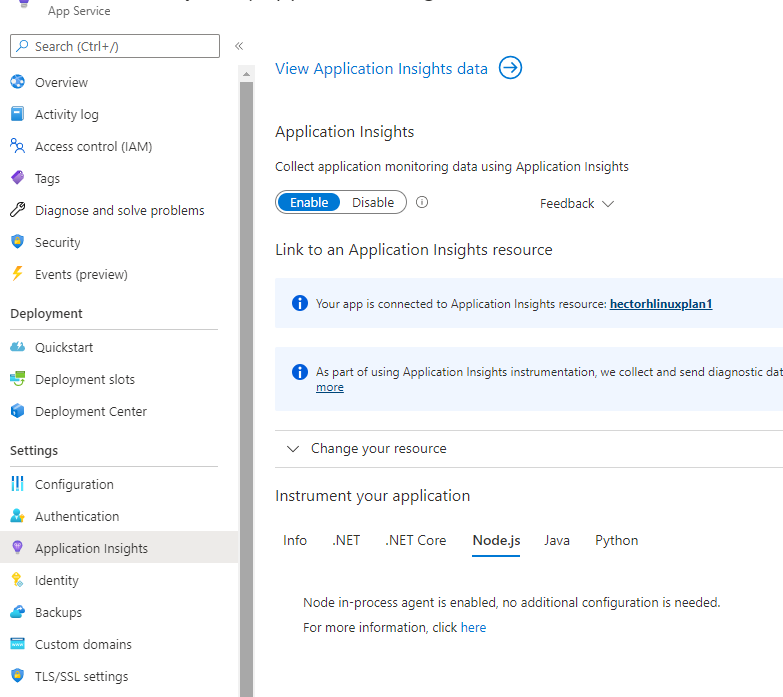 If you are running in Azure Windows App Service is possible .NET Application Insights SDK is generating the unexpected telemetry, you must be able to check the sdk version field as well in telemetry to confirm

According to docs, the azure auto-instrumentation will be disabled if AI SDK is found and running into the node.js app.
If both auto-instrumentation monitoring and manual SDK-based instrumentation are detected, only the manual instrumentation settings will be honored. This is to prevent duplicate data from being sent. To learn more about this, check out the troubleshooting section below. Azure Docs Source
In this case, I would recommend turn off auto-intrumentation (node in-processs) Application Insights, and let only the SDK enabled on app level.
