
AL

AL copied to clipboard
 microsoft
_ALException is <Out of Scope> in Section "Watch"
Please include the following with each issue:
1. Describe the bug You can insert _ALException in the Watch section, but instead of the contents of this variable, <Out of Scope> will be displayed.
2. To Reproduce Steps to reproduce the behavior:
- start the debugger and produce an error.
- expand Locals in the Variables section
- right-click on the variable _ALException and select Add to Watch
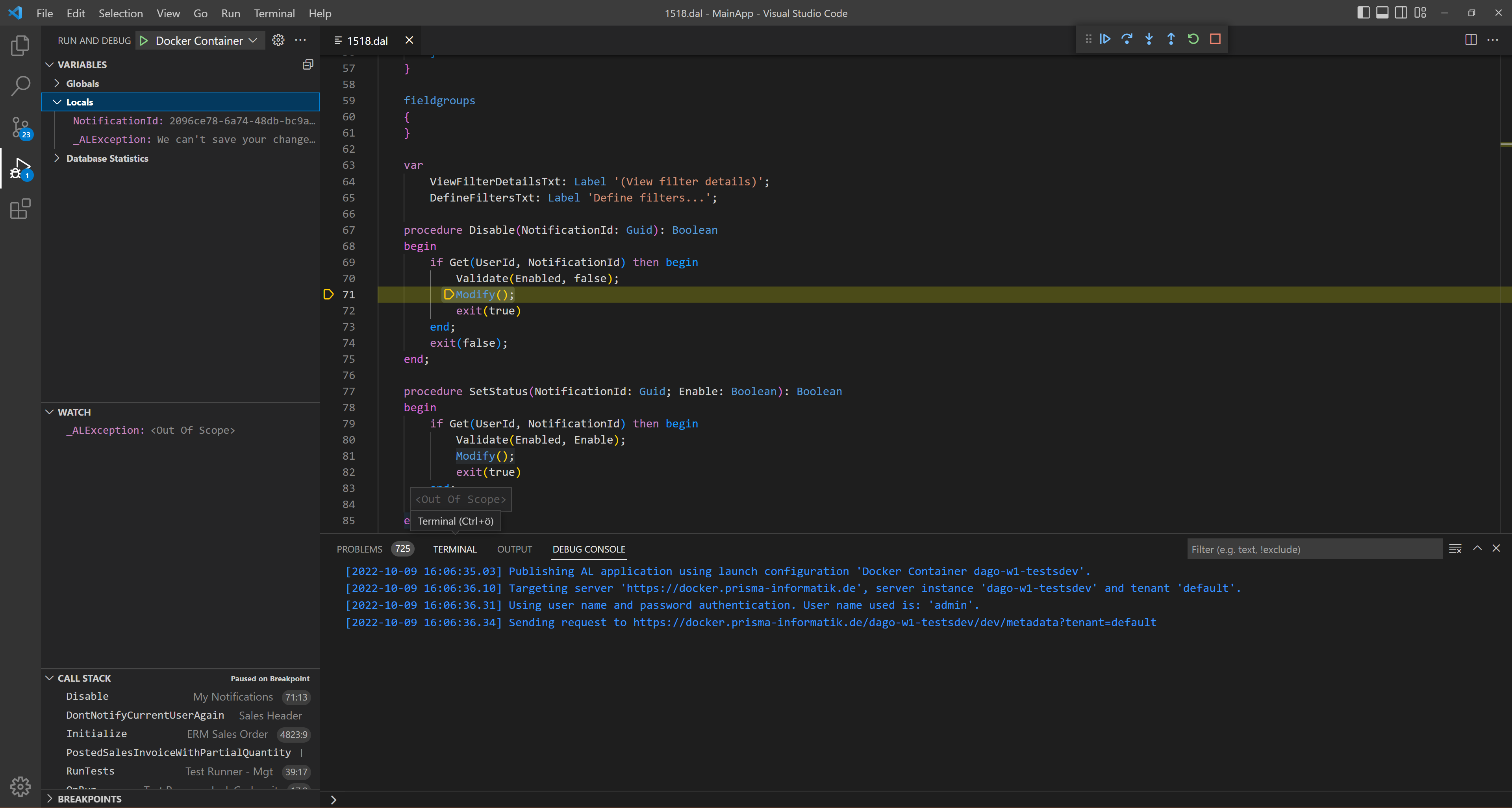
3. Expected behavior The value should be the error message as in the Variables section.
4. Actual behavior The value is <Out of Scope>.
5. Versions:
- AL Language: 10.0.687650
- Visual Studio Code: 1.72.0
- Business Central: W1 21.0 (Platform 21.0.46384.46844 + Application 21.0.46256.46853)
- List of Visual Studio Code extensions that you have installed:
- AL Language
Final Checklist
Please remember to do the following:
-
[x] Search the issue repository to ensure you are reporting a new issue
-
[x] Reproduce the issue after disabling all extensions except the AL Language extension
-
[x] Simplify your code around the issue to better isolate the problem
