microsoft
Support a PowerPlatform Solution in AL-Go PTE
Summary
Allow partners to host a PowerPlatform Solution in AL-Go and support the full development process of pulling changes from PowerPlatform Studio to GitHub, building a solution, releasing it, publishing to environments.
In the first iteration we will implement this in the PTE template. AppSource adds complexity and will be considered later.
We should also support for a new user to publish the solution to his Power Platform Studio for further development.
The PowerPlatform solution can be connected to Business Central, either through standard APIs or custom APIs from an App in an AL-Go Project.
Publishing to an environment will be able to publish the PowerPlatform solution to a connected PowerPlatform Environment, connected to the Business Central environment defined as well.
Build
In Repository settings, add a folder setting:
"PowerPlatformSolutionFolder" : "<foldername>"
Since the PowerPlatformSolution can contain multiple apps, we do not anticipate the need for multiple PowerPlatformSolution Folders, which would complicate the workflows considerably.
The PowerPlatform Solution will be treated as a project, building in parallel with the AL Apps (if a PowerPlatform Solution Folder is specified). If no changes was found on the project, it won't be rebuild. An AL-Go repository can contain AL Apps only, a PowerPlatform solution only or both. The CI/CD process will look like this:
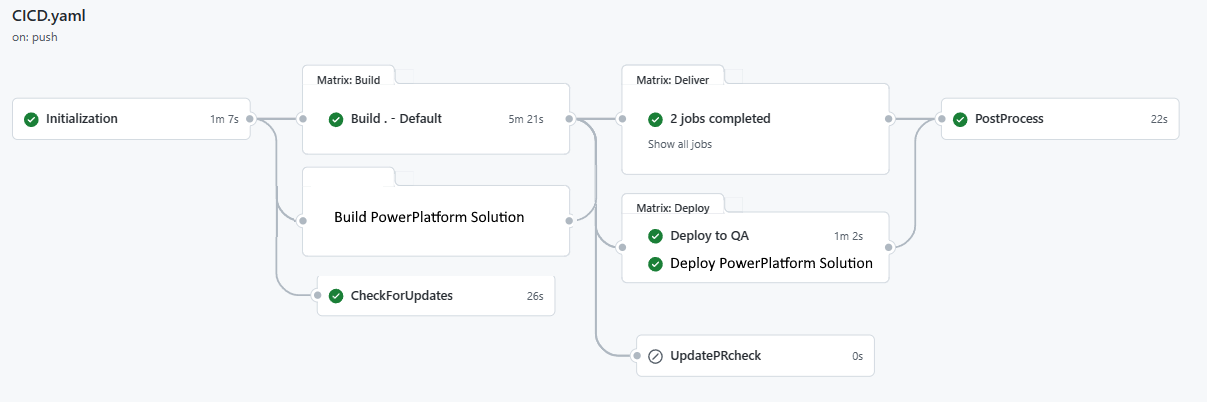
The Build process will create a PowerPlatform Solution artifact on the build, which is uploaded to the build and delivered through delivery mechanisms supporting PowerPlatform Solutions. Deliver To Storage should support this from day 1.
Release
Create Release will tag a release and publish the artifacts from the build on the release (just as with AL Apps)
Deploy/Publish
There are some current limitations in the way Power Apps connect to Business Central environments that means that a Power App is hardcoded to work with a certain BC company and environment. During Deployment we will modify the connection to point to the Business Central environment specified in the deployment.
Publish To Environment (+ Continuous Deployment) will look in the Deploy settings for this Environment. Today, the DeployTo setting for the GitHub defined QA environment looks like this:
"DeployToQA" : {
  "branches": [ "main" ],
  "projects":  "*",
  "environmentName":  "<Business Central Environment Name>",
  "runs-on":  "<github runner>"
}
and beside this you need to add a secret called QA_AUTHCONTEXT (or just AUTHCONTEXT), which needs to contain the Authorization Context for connecting to Business Central and deploying the app (either impersonation or S2S). AuthContext with impersonation can be created using the latest BcContainerHelper and this comment:
New-BcAuthContext -includeDeviceLogin | New-ALGoAuthContext | Set-Clipboard
and with S2S:
New-BcAuthContext -clientID $clientID -clientSecret $clientSecret -tenantID $tenantID | New-ALGoAuthContext | Set-Clipboard
The AuthContext secret today consists of a compressed json structure with TenantID and either a refreshtoken or a clientId/clientsecret valuepair.
When deploying the PowerPlatform solution to the QA environment, we need to know which PowerPlatform Environment to connect to and we need an AuthContext for this. We will add some properties to the DeployTo structure:
"powerPlatformEnvironmentUrl": "<environment URL>",
"powerPlatformForceOverwrite": true,
"powerPlatformPublishChanges": true
and we will add additional properties to the QA_AUTHCONTEX with either a PowerUser/PowerPassword or PowerClientID/PowerClientSecret construct.
We will also add functionality in BcContainerHelper (and BC.Auth (future name after split) powershell module to add these properties in the AL-Go AuthContext.
During deploy, we will find the artifact created, modify the connections to connect to the BC environment specified and publish the PowerPlatform solution to the PowerPlatform environment specified.
Development
Every user who will be developing the PowerPlatform solution will have to create a user specific AuthContext secret containing his username/password or clientID/clientSecret for deploying to the development environment. Furthermore, there needs to be a developer setting, specifying environmentUrl and other values. These settings can be specified in settings files or in GitHub Variables.
We will have 2 workflows - one which uses these settings to pull changes from a PowerPlatform Studio environment into GitHub (based on these settings) - and one, which deploys to development. Every developer also needs to specify which Business Central environment should be used for the connection in the development environment - needs to be an online sandbox in the first version.
Get Started
It is also the idea to add a Create New PowerPlatform solution workflow, which should make it easier for people to get started. Ideally this could help you create the PowerPlatform connection settings and secrets.
Things we will NOT do in the first iteration
- We will not have support for multiple PowerPlatform solutions in one repository
- We will not support connecting the PowerPlatform solution to a docker environment - needs to be sandbox while developing
- We will not support develop or publish a PowerPlatform solution twice to the same PowerPlatform Studio, connected to different Business Central environments.
- We will not support PowerPlatform solutions in the AppSource template.

Great write up!
There are a couple of things I think we should consider calling out more explicitly:
1. Flexibility
- The workflows should support having just an AL solution or just a Power Platform solution as well as having both
- Along with the added flexibility of supporting either, this means that when you start up a repo, you can build the AL app first, and add Power Platform components or vice versa
2. Power Apps connector limitations
- There are some current limitations in the way Power Apps connect to Business Central environments that means that a Power App is hardcoded to work with a certain BC company and environment
- I think it would be good to call this out, and maybe mention our work around
3. The "Create Power Platform solution workflow"
- This one might be a little premature, since we have not fully designed the behavior yet, but we also plan on adding a workflow to make it easy to set up your first Power Platform solution (similar to the "Create new * App" actions for AL)
- This work could also be part of a vNext issue, as it is pretty decoupled from the other workflows

Great write up!
There are a couple of things I think we should consider calling out more explicitly:
1. Flexibility
- The workflows should support having just an AL solution or just a Power Platform solution as well as having both
- Along with the added flexibility of supporting either, this means that when you start up a repo, you can build the AL app first, and add Power Platform components or vice versa
2. Power Apps connector limitations
- There are some current limitations in the way Power Apps connect to Business Central environments that means that a Power App is hardcoded to work with a certain BC company and environment
- I think it would be good to call this out, and maybe mention our work around
3. The "Create Power Platform solution workflow"
- This one might be a little premature, since we have not fully designed the behavior yet, but we also plan on adding a workflow to make it easy to set up your first Power Platform solution (similar to the "Create new * App" actions for AL)
- This work could also be part of a vNext issue, as it is pretty decoupled from the other workflows
I have incorporated these comments in the above write-up.
Can you please support having Power Platform solutions in a different repo? Many Power Platform partners now uses Github actions for Power Platform to export unmanaged solutions to a repo. My ideal workflow will be maintaining this scenario for Power Platform developers, then in AL-Go having the possibility to create a pipeline for a PTE that takes a Power Platform solution from another repo and release it.

Very much like the approach and on a meta level also that this is open for discussion before the first release 👍
The initial process makes sense to me, but I have a couple of questions for "day 2":
-
Can we do continuous or even better event triggered deployments to next releases? E.g. a new minor or major becomes available in BC Online, then we trigger the upgrade of a certain sandbox and deploy the AL and Power Platform solution. (I have seen that you explicitly excluded this from the first iteration, but on a side note, this would also be great for nextMinor / nextMajor container compatibility checks)
-
You mention builds as parallel and I fully agree with that. But for deployment, in my opinion it would makes sense to at least optionally allow a dependency: First deploy a new version of the AL solution and only if that succeeds, also deploy the Power Platform solution. That way, if you create a new feature in both AL and Power Platform, but the AL deployment fails, the Power Platform deployment that might be broken without the AL update wouldn't break.
-
Versioning: From my point of view, I would probably prefer to have separate tags for AL and Power Platform, especially in a scenario as @demiliani describes where you have different repos. If I then have to repro something, it would be great to know which version of the AL solution is supposed to be compatible with which version of the Power Plaform solution
A lot of additional question pop up once you think about repeatable solutions, maybe connected to AppSource apps, but I guess that is a discussion for a later stage

@freddydk I like the approach of integrating Power Platform solutions into AL Go. Sorry for my late reply on this topic.
Pipelines
Supporting the full development process of pulling changes from PowerPlatform Studio to GitHub, building a solution, releasing it, publishing to environments is a huge task for Complex Power Apps. Currently there are 2 solutions that "almost completely" cover these scenarios. These solutions are:
- Power Platform Pipelines (only in managed environments)
- ALM Accelerator for Power Platform a Pro-Developer Solution including Azure DevOps and a Power App (Part of the Center of Excellence Starter Kit)
Both existing approaches struggle with the complexity of Power Platform solutions and their dependencies. Here are some examples where the existing solutions have more or less solved the problems:
Configuration
- Setting up Environment Variable Values in Target environments
Connectivity for Apps & Flows
- Custom Connectors (Security Setup)
- Setting up Connections for Connection References with a dedicated account
- Virtual Table Data Sources
Power Automate Flows
- Order of Activation
- Ownership
Security
- Ownership of Components after importing with an Application Account
- Sharing of Apps & Flows
Accordingly, AL Go must also cover this to avoid manual work after each deployment.
Deployment
When we look at Business Central, there are currently 3 valid scenarios to combine both worlds. These are:
- Standard Connectors
- Environment Variables can be used for Power Automate Flows
- Hard coded connections in Canvas Apps @andersgMSFT I guess there will be an update in Spring release, which fix the hard coded connection problem for CanvasApps
- Custom Connectors (environment & company can be set up as parameters)
- Virtual Tables (no configuration needed, when the virtual table is already added to the target environment)
The deployment order is important, because there are dependencies between Dataverse and Business Central. Here is an example:
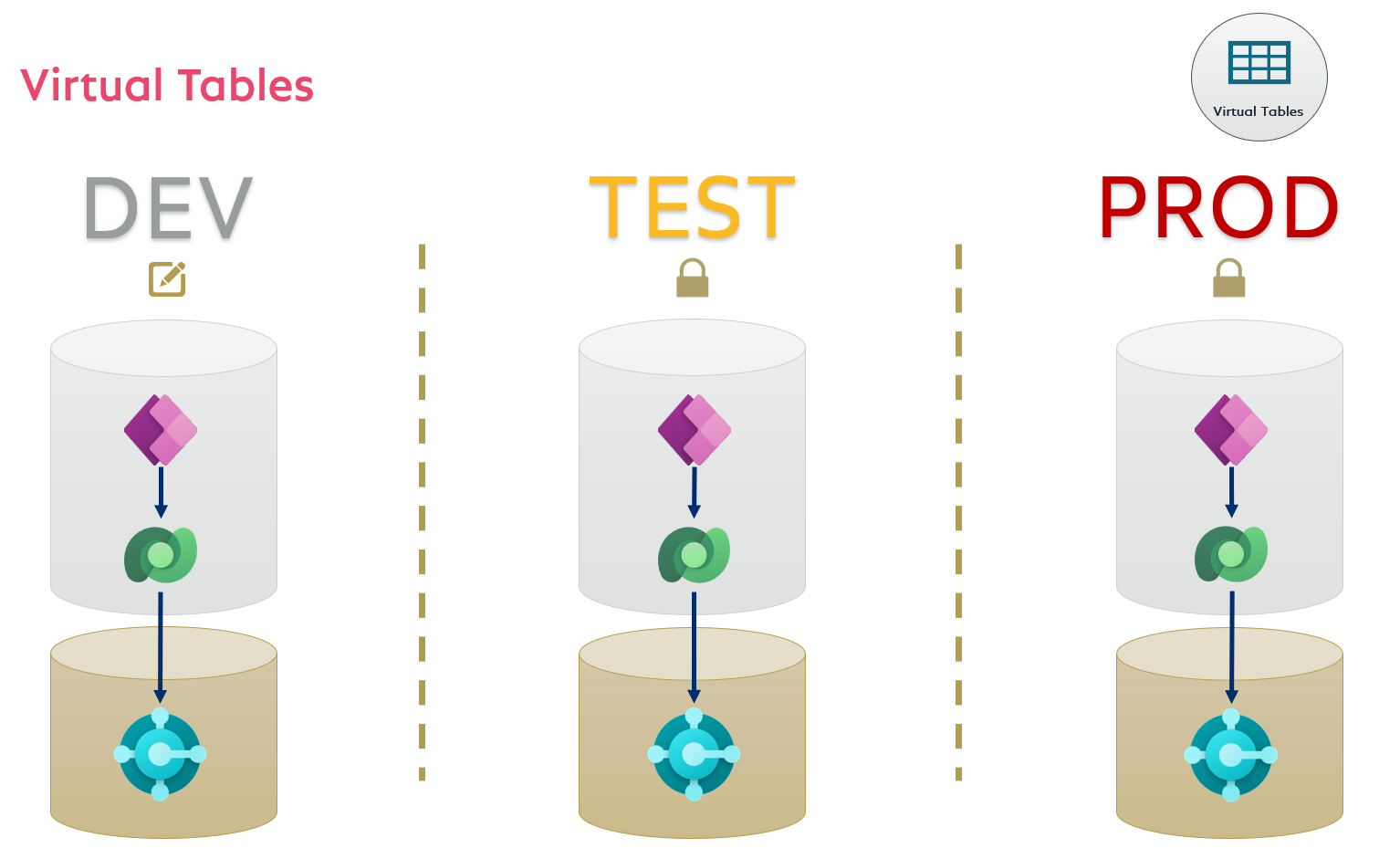
Virtual Tables
Before you can use VTs, you must setup these VTs in your DEV environment. Using VTs in Canvas Apps, Model-Driven-Apps, or Power Automate Flow create a dependency to the VT, which you must include into your solution. That means, this VT must exist in the target environment during import of your Power Platform Solution. You must currently, setup this manually by using the Business Central VT Solution (https://never-stop-learning.de/dyn365bc-virtualtables-in-dataverse/)
The benefit is, you don't need connections to Business Central from your Apps or Flows: