

 mdn
mdn
types: filter-function: drop-shadow() — Not actually supported well by Safari (very buggy)
What type of issue is this?
Browser bug (a bug with a feature that may impact site compatibility)
What information was incorrect, unhelpful, or incomplete?
https://caniuse.com/mdn-css_types_filter-function_drop-shadow lists drop-shadow as completely supported by Safari. However, when trying to use the drop-shadow filter in Safari, it has pretty severe stochastic rendering bugs (often wrong on first render, then correct. Sometimes flickering as the user scrolls).
What browsers does this problem apply to, if applicable?
Safari
What did you expect to see?
I expected to see a note about how Safari often renders drop-shadows incorrectly, seemingly at random per render.
Did you test this? If so, how?
https://jsfiddle.net/ftn0ph4k/2/
in Chrome:

in Safari (sometimes) — the exact behavior of how it fails varies quite a lot.
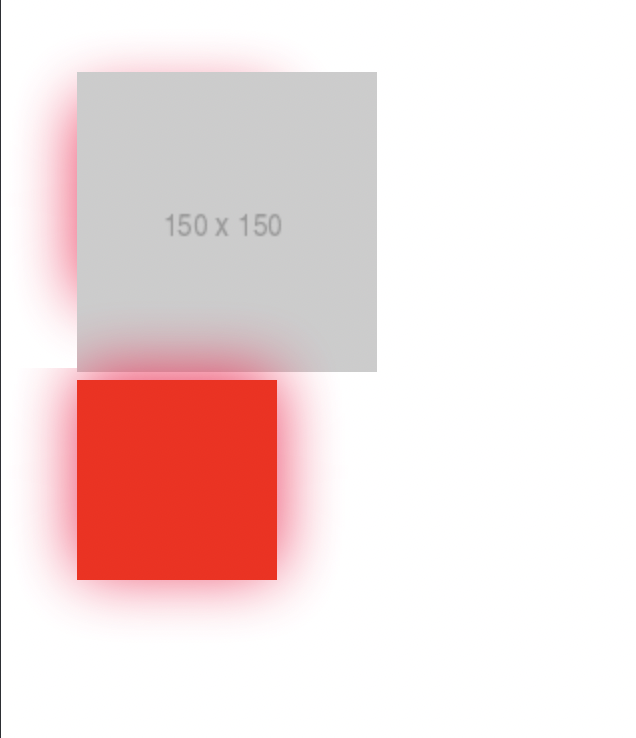
This particular render came when I added the placeholder image. I haven't yet figured out exactly when this bug happens, but it was happening so reliably on our own website in every place we were using it (still, randomly, but most of the time) that we had to stop using drop-shadow entirely.
Some more examples from our own website, that I unfortunately can't share the code for yet:
Safari, first render:

Safari, after resizing the window 1px so it re-renders:

Can you link to any release notes, bugs, pull requests, or MDN pages related to this?
Closest I've found is this. https://stackoverflow.com/questions/69170035/drop-shadow-not-showing-on-sides-on-first-load-in-safari-when-using-a-border-rad
Do you have anything more you want to share?
I'm unclear on what exact conditions cause this to happen. Our page has a lot of CSS going on (and it's unfortunately not public yet, so I can't link it here).
This applies on iOS safari as well; it has about the same rendering behavior. This does not occur in Chrome or Firefox or iOS Brave.
I'm on a Macbook Pro with an M1 Pro processor. My coworker with the same computer sees the same behavior. My old iPhone 7 also sees this rendering bug.
Latest OS is on all devices. (iOS 15.6, macOS 12.5, macOS safari Version 15.6 (17613.3.9.1.5))
MDN URL
No response
MDN metadata
No response

I found your page while researching a similar issue on my website (tech.svija.love).
This page suggests using box-shadow rather than filter:drop-shadow.
It fixed my problem, and according to the Mozilla page it has good support.
Note that parentheses are no longer required.

Something which can be done here is utilizing transform: translateZ(0) to fix the render issue. Refer to this Stack Overflow for general context

For those who use TailwindCSS, you can simply add the "transform-gpu" class to force the drop-shadow filter to render correctly with the gpu.
Edit: Longer Stack Overflow post here.

We are using "drop-shadow" as well and had a similar problem. I couldn't reproduce the above error, but we use the drop-shadow on some buttons and on iOS the shadow sometimes "stuck", even if the drop-shadow css rule was removed.
Very strang - and even stranger: the transform-gpu-class fixed it. Thanks @e-simpson

I'm experiencing problems as well. I'm adding an underline to a link with ::after and adjusting it on hover. I was originally experiencing rendering errors which I fixed by adding backdrop-filter: blur(0); per @e-simpson linked Stack Overflow post. Now, every time the link is hovered or unhovered, the container's drop shadow flickers in and out of existence for a second. I assume it's being re-rendered for some reason. I can make a codepen if anyone cares.

@Jothsa hmm, I wonder if there is a hover affect that is removing the backdrop-filter. Perhaps try to assert it on hover.
Alternatively, you could create a css class to mimic the Tailwind transform-gpu. This is how Tailwind v2.x.x did it:
--tw-translate-x: 0;
--tw-translate-y: 0;
--tw-rotate: 0;
--tw-skew-x: 0;
--tw-skew-y: 0;
--tw-scale-x: 1;
--tw-scale-y: 1;
transform: translate3d(var(--tw-translate-x), var(--tw-translate-y), 0) rotate(var(--tw-rotate)) skewX(var(--tw-skew-x)) skewY(var(--tw-skew-y)) scaleX(var(--tw-scale-x)) scaleY(var(--tw-scale-y));
Thanks! Here's the codepen if you're interested. https://codepen.io/Jothsa/pen/JjaNQzX I'm using css nesting which codepen doesn't have great support for, but it should work. I tried the transform rule and it didn't help. I am not sure how to assert it on hover since the child link is being hovered, but the container has the shadow. I tried using div:has(nav a:hover) but it doesn't seem affect it.
Edit: It looks like it's disappearing during the transition where I scaleX the a::after element. I'll keep playing around with it.
E: applying any transition3d to the child elements make the drop shadow of the parent disappear.
The drop shadow disappears whenever the a::after element's scaleX is less than 1.
Something which can be done here is utilizing
transform: translateZ(0)to fix the render issue. Refer to this Stack Overflow for general context
this one fix the issue for me in 2023 - thanks a lot! you are a lifesafer

Something which can be done here is utilizing
transform: translateZ(0)to fix the render issue. Refer to this Stack Overflow for general context
Thankssss, great.

I'm experiencing problems as well. I'm adding an underline to a link with ::after and adjusting it on hover. I was originally experiencing rendering errors which I fixed by adding
backdrop-filter: blur(0);...
Adding a backdrop-filter: blur(0) helped in my case. Thanks!

Something which can be done here is utilizing
transform: translateZ(0)to fix the render issue. Refer to this Stack Overflow for general contextthis one fix the issue for me in 2023 - thanks a lot! you are a lifesafer
for me too! thx a lot 💋
