

 mbruel
Windows, upload slows to a crawl
Hi, Using your software for the first time - I like it very much!
I'm seeing a pretty big issue on Windows, with v 4.14 where the upload slows to a crawl after the first large item in the posting queue completes. I go from ~20mbit/sec down to hardly anything.
-
I have a slightly different vcredist installed "Microsoft Visual c++ 2015-2019" version 14.25.28508. (the vcredist you specify won't install alongside this one.)
-
I'm using SSL to talk to the news server
-
The system and network aren't especially busy
-
I have tried this with different news servers, and see the same behavior. (I do not think they're throttling my uploads, but you do not seem to expose what the servers are 'saying', even at debug level 2)
Please let me know what other information I can provide.
thanks!

where the upload slows to a crawl after the first large item in the posting queue completes.
I don't understand what you mean
I have a slightly different vcredist installed "Microsoft Visual c++ 2015-2019" version 14.25.28508. (the vcredist you specify won't install alongside this one.)
don't know what you're talking about. I use mingw not msvc.

Sure, What I am seeing is that when I create a 'quick post', the program creates the rar/par just fine. It creates a list of those items in the window on the left and begins uploading.
The first .par2 file uploads rapidly, and the first rar file (...part1.rar) uploads rapidly.
When that completes and the software starts on the 3rd line, the posting speed is reduced from a fairly constant 20mb/second to a very intermittent speed:
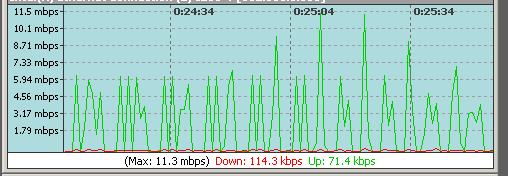
-- I mentioned the Microsoft VCRedist installation because it is mentioned as a potential issue in the installation notes for windows: "Know Issue with non SSL support: you may need to install msvc2015 redistribuables as libssl depends on its APIs", and thought it might be useful information related to this issue.
thanks!
hum don't know.
if the posting starts well I don't see any reason to have an issue after.
I'd say the issue is from on your connection...
Try somewhere else or at a different time.
ngPost doesn't regulate the bandwidth.
Do you see any disconnections? error message starting with Error: disconnected connection:
By the way, thanks for the quick replies!
I do not see any disconnections or error messages in the log pane.
Testing using YencPowerPost, I do not see the same slowdown:
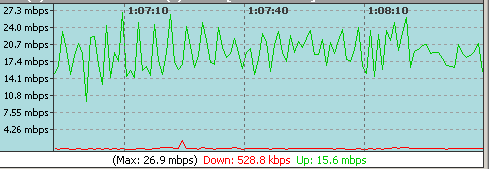
thanks, -S
I don't know... is ngPost doing it every time? Try to play on the number of connections. How many do you use? some firewall issue maybe?
ngPost is doing it every time. If it was a firewall issue, I would expect to see the same issue when using any posting software, and I do not see this issue when using YencPowerPost.
I only use 4 connections, since I only have ~20mbit upload.
I have tried it in a new clean install of Windows 10 in a Virtual Machine as well, with the same results.
Turning off SSL does not seem to make any difference.
try with more connections I don't know about windows firewall, I suppose you can do rules per port and/or by software

same issue sadly Sorry for not replying to my own issue for a while.
This issue appears to be related to the news provider that is being posted to. For example, both astraweb and usenetnow have the issue
But, changing providers to newsxs.nl - then ngpost does not slow down.