

 mbrn
mbrn
Width issues with Actions column
Describe the bug
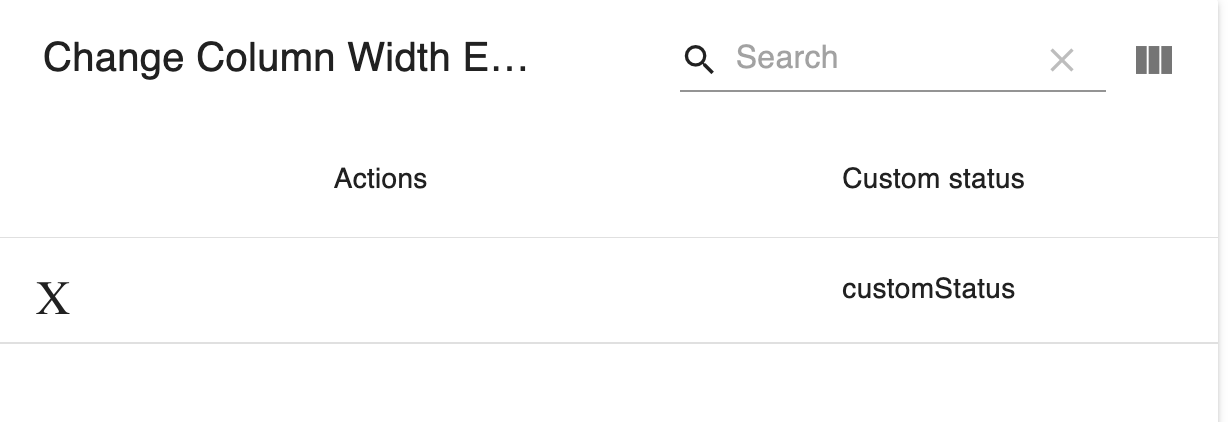
When using actions, the header cell respects some styling elements, but not all of them. For instance, text cannot be left-aligned. It will always be centered, even if headerStyle specifies textAlign: 'left', which will work for all other columns.
Additionally, when columnsButton is set to true, column sizes seem to adjust automatically, except for the Actions column, which will get very wide, and, because of the centered header, will look misaligned.
To Reproduce Steps to reproduce the behavior:
- Go to this code sandbox
- Replace the contents with the snippet below
- You will see a very narrow actions column
- Use the show columns button to remove a couple of columns
- See how the actions column gets wider and the header text remains centered, even though header styles specify left text alignment.
Snippet:
import React from "react";
import MaterialTable from "material-table";

export default function CustomEditComponent(props) {
  const tableRef = React.createRef();

  const tableColumns = [
    { title: "Lorem ipsum", field: "lorem" },
    { title: "Name", field: "name" },
    { title: "Custom status", field: "customStatus" }
  ];

  const tableData = [
    {
      lorem: "lorem",
      name: "name",
      customStatus: "customStatus"
    }
  ];

  return (
    <MaterialTable
      tableRef={tableRef}
      actions = {[{icon: "X", tooltip: "delete", onClick: (event, rowData) => {console.log("nothing to see here")}}]}
      columns={tableColumns}
      data={tableData}
      title="Change Column Width Example"
      options={{
        tableLayout: "fixed",
        columnsButton: true,
        headerStyle: {textAlign: 'left'}
      }}
    />
  );
}
Expected behavior Alignment defined in header styles should apply to actions column. Actions column should resize as columns get added/removed
Screenshots
Desktop (please complete the following information):
- OS: OSX
- Browser: Firefox
- Version: 102.0.1
