

 matze
matze
Title of Plain frame has too large spaces between words under Linux
When I make a plain frame, the title looks strange. The words are spread evenly across the whole title line and each word is aligned left.
This happens on Linux with TeXLive 2016; while on Mac with MacTeX, things are all correctly displayed.


The code below should be simple enough.
\documentclass[9pt, compress, aspectratio=169]{beamer}
\usetheme[background=dark]{metropolis}
\title{A Small Example}
\date{\today}
\begin{document}
\maketitle
\plain[Note this place]{Blank...}
\end{document}
And the screenshot:
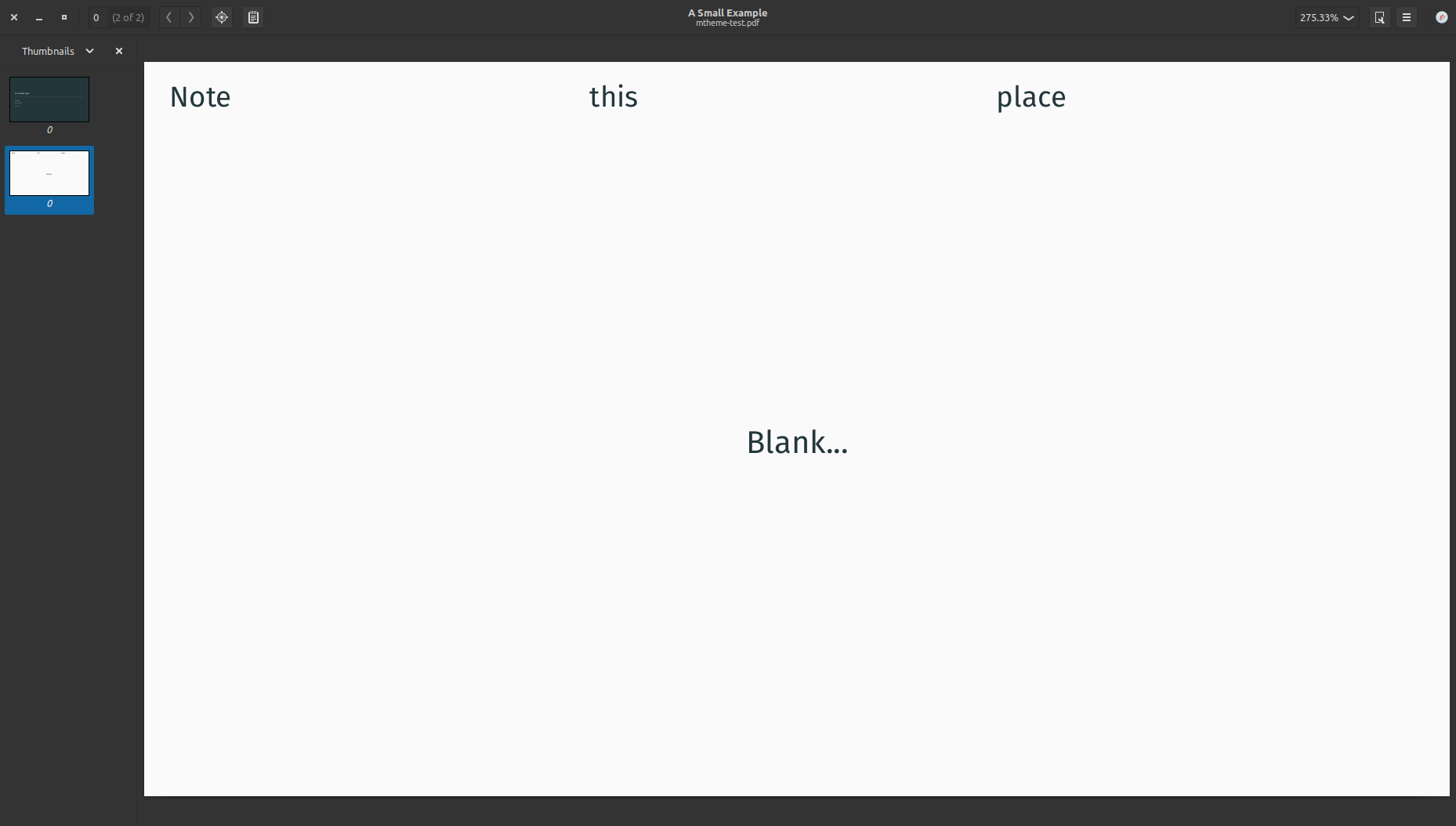
Here is a (not so nice) workaround:
\documentclass[9pt, compress, aspectratio=169]{beamer}
\usetheme[background=dark]{metropolis}
\title{A Small Example}
\date{\today}

\makeatletter
\define@key{beamerframe}{standout}[true]{%
  \booltrue{metropolis@standout}
  \begingroup
    \setkeys{beamerframe}{c}
    \setkeys{beamerframe}{noframenumbering}
    \ifbeamercolorempty[bg]{palette primary}{
      \setbeamercolor{background canvas}{
        use=palette primary,
        bg=-palette primary.fg
      }
    }{
      \setbeamercolor{background canvas}{
        use=palette primary,
        bg=palette primary.bg
      }
    }
    \setbeamercolor{local structure}{
      fg=palette primary.fg
    }
    \usebeamercolor[fg]{palette primary}
    \usebeamerfont{standout}
}
\makeatother
\begin{document}
\maketitle
\begin{frame}[standout]{Note this place}
\centering%
Blank...
\end{frame}
\end{document}
Apart from this issue: please consider using the newer standout frame syntax anyway. The \plain[...]{...} command is only for reasons of backwards compatibility still available.
@matze The problem is, that the \centering is already active when the frametitle box is created. We could somehow redefine the frametitle template and force a left alignment, but that is not very nice as we lose the rightskip. Have a look at the Beamer user guide on page 123 why. Do you have another idea?
\defbeamertemplate{frametitle}{plain}{%
  \nointerlineskip%
  \begin{beamercolorbox}[%
      wd=\paperwidth,%
      sep=0pt,%
      left,%
      leftskip=\metropolis@frametitle@padding,%
    ]{frametitle}%
  \metropolis@frametitlestrut@start%
  \insertframetitle%
  \nolinebreak%
  \metropolis@frametitlestrut@end%
  \end{beamercolorbox}%
}

@benjamin-weiss Thanks for your reply! It works well! :+1: And I will use the new standout frame syntax in the future~