

 matrix-org
Advanced audio processing settings
autoGainControl, echoCancellation, and noiseSuppression are audio processing options that are usually enabled by default on WebRTC input tracks.
This PR adds the possibility to enable/disable them, as they can be undesirable in some cases (audiophile use cases). For example, one might want to stream electronic dance music, which is basically noise, so it should not be suppressed in that specific case.
Audio processing features sometimes work and are useful, sometimes they make conversations completely inaudible and disturbing.
- Noise suppression is good for canceling static noises, but produces terrible results when a TV or radio is playing in the background.
- Auto gain control is a well-hated feature in non-standard use cases (e.g. sensitive condenser microphones), there is even a plugin to disable it in Chrome "globally", in case applications do not support disabling it: https://chrome.google.com/webstore/detail/disable-automatic-gain-co/clpapnmmlmecieknddelobgikompchkk
- Echo cancellation seems to be the least disturbing audio processing feature, that's the only one I would leave on when I have a voice conversation, but I would disable it for anything else (music, audio streaming, etc.).
These features will always have their pro and cons. Discord and other Electron-based clients provide a way to enable/disable those separately. They are certainly advanced options, but enabling/disabling them dynamically usually comes in handy even for average users.
Fixes https://github.com/vector-im/element-web/issues/6278 Depends on matrix-org/matrix-js-sdk#2434
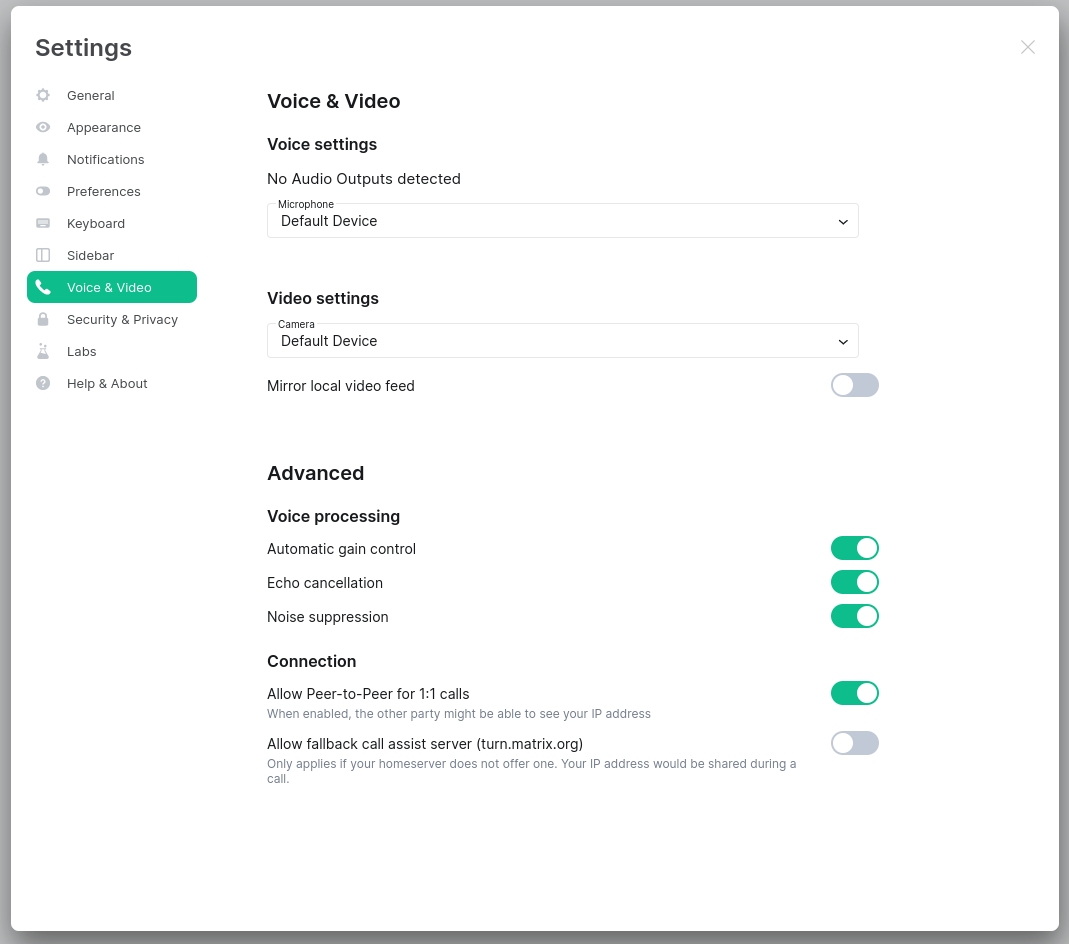
| Before | After |
|---|---|
 |
 |
Type: enhancement
Here's what your changelog entry will look like:
✨ Features
- Advanced audio processing settings (#8759). Fixes vector-im/element-web#6278. Contributed by @MrAnno.


@MrAnno, when you're done with the changes, click the little wheel next to my name in the upper-right corner to re-request my review
No need to rebase as it is lossy for review status, and we squash merge anyway

Hi,
This feature (to be precise, the ability to disable audio processing) is the last reason I sometimes have to fall back to Discord.
I was able to convince many of my friends to migrate to Matrix, which is a huge thing since most of them are non-technical people. It's all thanks to you all and to the amount of work the community has put into the UX/UI of Element (and other possible matrix-react-sdk-based interfaces) in recent years, making Matrix accessible to average users as well.
I'm currently using a custom build of Element based on this branch, but I don't feel comfortable distributing this build among my friends.
Is there anything I can do/help you with to move this PR forward?
Is there anything I can do/help you with to move this PR forward?
Will try to move this forward internally
@gaelledel @SimonBrandner While it's inheriting all the debt from the current settings UI (right edge alignment is off for dropdown/combobox and switches, inconsistent way of displaying advanced settings, spacing, etc.) I'd suggest moving forward with this PR. We'll be fixing the existing debt in the ongoing settings redesign anyway.
The grouping for "Voice settings" and "Video settings" seems logical, helping parse/scan the settings more easily.
To improve on the proposed redesign I'd suggest moving the context for switches to a separate, secondary line as in the example below for Spaces:

So, instead of:
[✓] Allow Peer-to-Peer for 1:1 calls (if you enable this, the other party might be able to see your IP address)
We'd have:
[✓] Allow Peer-to-Peer for 1:1 calls
    When enabled, the other party might be able to see your IP address
And instead of:
[✓] Allow fallback call assist server turn.matrix.org when your homeserver does not offer one (your IP address would be shared during a call)
We'd have:
[✓] Allow fallback call assist server (turn.matrix.org)
    Only applies if your homeserver does not offer one. Your IP address would be shared during a call.
Similarly, it would be nice to add some context for the advanced audio options, but I'd need to know first what streams are affected by those settings.
@MrAnno Do all of them (auto gain control, noise suppression, echo cancellation) apply to just your outgoing audio stream (microphone, or whatever hardware/virtual audio input you have chosen) or are any of those also applied in any way to incoming audio from other people?
Thanks!

Hi @janogarcia,
Thank you very much for the review.
I'll add the secondary line descriptions soon.
Do all of them (auto gain control, noise suppression, echo cancellation) apply to just your outgoing audio stream (microphone, or whatever hardware/virtual audio input you have chosen) or are any of those also applied in any way to incoming audio from other people?
All three audio options affect input tracks (microphone, etc.) only.
I've added the secondary line descriptions and updated the screenshot in the PR description.
@janogarcia @SimonBrandner Hey guys,
What do you think, is this ready to get merged?
@janogarcia @SimonBrandner Hey guys,
What do you think, is this ready to get merged?
Hey! I'll try to do some pushing internally
All three audio options affect input tracks (microphone, etc.) only.
If the only/main use case we have feedback about is the audio streaming use case, maybe we should consider just bundling those actions into a single one?
[✓] Disable input processing
    When enabled, all audio input processing will be turned off (automatic gain control, noise suppression, and echo cancellation). Recommended only for streaming music or when using professional recording equipment.
Otherwise, it may be lacking a bit of context, plus you need to disable three settings instead of just one. I'd recommend starting with the simplest setting for a use case we've identified already, and reconsider in the future if we need to add more granular controls (standalone toggles for automatic gain control, noise suppression, and echo cancellation) based on feedback.
What do you think @gaelledel? Unsure if you've already discussed a similar issue/setting when working on other VoIP projects.
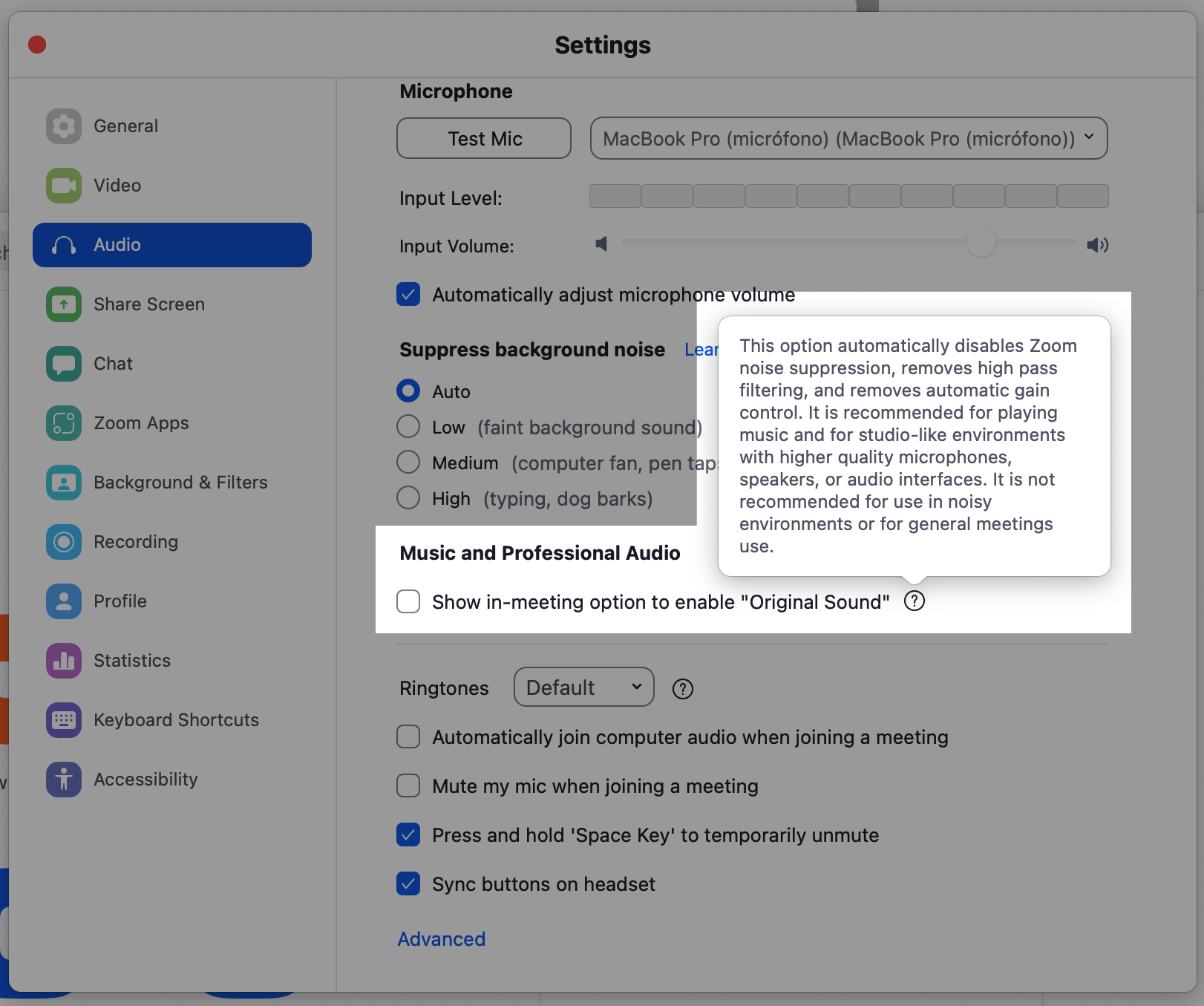
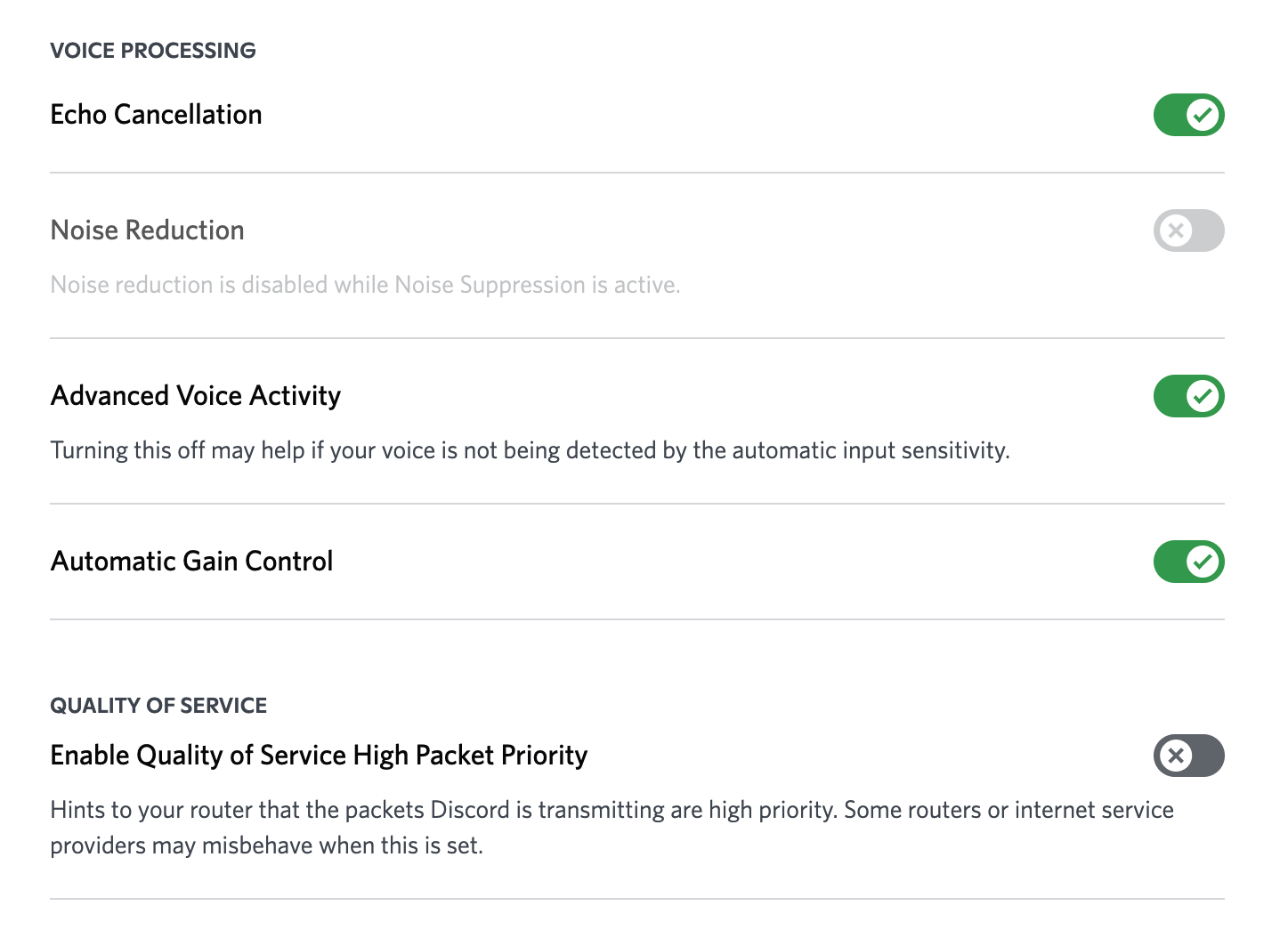
Some context/benchmarking from other apps:
Zoom is doing a similar stuff (bundling it), while Discord offers individual controls but without further/any context.
Zoom
Discord
@janogarcia My original PR description was phrased as a joke. Sorry about the confusion.
To clarify the situation, I think it would be really important to have fine control over these features one by one. My reasoning in more serious terms:
These are features provided by Chromium/Electron. They sometimes work and are useful, sometimes they make conversations completely inaudible and disturbing.
- Noise suppression is good for canceling static noises, but produces terrible results when a TV or radio is playing in the background.
- Auto gain control is a well-hated feature in non-standard use cases (e.g. sensitive condenser microphones), there is even a plugin to disable it in Chrome "globally", in case applications do not support disabling it: https://chrome.google.com/webstore/detail/disable-automatic-gain-co/clpapnmmlmecieknddelobgikompchkk
- Echo cancellation seems to be the least disturbing audio processing feature, that's the only one I would leave on when I have a voice conversation, but I would disable it for anything else (music, audio streaming, etc.).
These features will always have their pro and cons. Discord and other Electron-based clients usually provide a way to enable/disable those separately. These are certainly advanced options, but enabling/disabling them dynamically usually comes in handy even for average users.
@MrAnno Just shared this internally with the team to check if we want to go with the single setting or use the more granular one.
@MrAnno @SimonBrandner @t3chguy Also, is this Chromium/Electron only or are those settings also available for Firefox and Safari? Or only partially supported?
Almost all known browsers seem to have an implementation of these audio processing features.
See the browser compatibility matrix:
https://developer.mozilla.org/en-US/docs/Web/API/MediaTrackSettings/echoCancellation https://developer.mozilla.org/en-US/docs/Web/API/MediaTrackSettings/autoGainControl https://developer.mozilla.org/en-US/docs/Web/API/MediaTrackSettings/noiseSuppression
@MrAnno @SimonBrandner @t3chguy Also, is this Chromium/Electron only or are those settings also available for Firefox and Safari? Or only partially supported?
Safari lacks the support of noise impression and auto gain control, otherwise these are widely supported
@MrAnno @SimonBrandner Thanks guys for providing further details on the context and device support! The discussion is happening. I'll try to get back soon, today or tomorrow, with a decision.
@janogarcia @SimonBrandner Thank you very much for your time, guys.
Matrix seems to involve a very wide community, gathering gamers, programmers, enterprise users, and other non-technical private users. I guess it can be really hard to find a good UX for all of them. :)
@MrAnno @SimonBrandner After discussing it internally, we'd prefer to move with the single/bundled setting for now. Based on feedback, we may reevaluate this decision in the future, but we would prefer to keep it simple for now, as described in a previous comment.
Okay, thank you, guys.
Feel free to use my work for implementing the bundled setting, if needed.
Since my use case requires separate options, I'm going to use my own fork and binaries until we can revisit this topic.
@MrAnno @SimonBrandner Actually, I'm thinking about unbundling them, but with a slight change.
- Under the microphone dropdown show a toggle that reads "Automatically adjust the microphone volume" (which would replace the more cryptic "Automatic gain control" label).
- Keep the more advanced options "Noise suppression" and "Echo cancellation" toggles in the advanced section.
- Place the "Noise suppression" control before the "Echo cancellation" one.
Awesome, thanks! Just let's make sure we don't render a control when the RTC property is not supported by the browser. 👍
@MrAnno Just a quick heads up that I added this one to the list of tiny changes to perform:
- Place the "Noise suppression" control before the "Echo cancellation" one.
@SimonBrandner Can I ask for your help one last time? :) I think I've implemented everything requested for this PR.