

 matplotlib
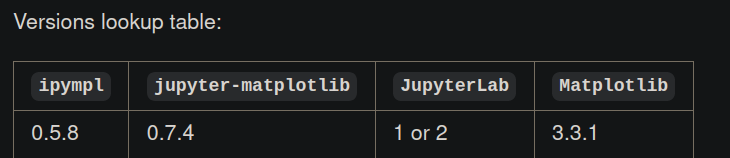
loading widget issues 2.2.9 with matched versions from readme
Describe the issue
loading widget on jupyter lab (version 2.2.9) when plotting, e.g.
%matplotlib widget
from matplotlib.pyplot import subplots
fig, ax = plt.subplots()
fig.show()
Versions
JupyterLab v2.2.9
Known labextensions:
   app dir: /home/casper/miniconda3/share/jupyter/lab
        @axlair/jupyterlab_vim v0.12.4  enabled  OK
        @jupyter-widgets/jupyterlab-manager v2.0.0  enabled  OK
        jupyter-leaflet v0.13.3  enabled  OK
        jupyter-matplotlib v0.7.4  enabled  OK
        jupyterlab-plotly v4.14.1  enabled  OK*
        plotlywidget v4.14.1  enabled  OK
conda list ipympl lists
 (master) ✗ conda list | egrep "matplotlib|ipympl"
ipympl                    0.5.8                    pypi_0    pypi
matplotlib                3.3.1                    pypi_0    pypi
which should work according to the readme


No output is generated; it states loading widget under jupyerlab, for
notebook works flawlessly.
On Tue, 5 Jan 2021 at 23:05, Thomas Aarholt [email protected] wrote:
Could you clarify what exactly your issue is?
— You are receiving this because you authored the thread. Reply to this email directly, view it on GitHub https://github.com/matplotlib/ipympl/issues/289#issuecomment-754930604, or unsubscribe https://github.com/notifications/unsubscribe-auth/AEUVDV2PEP7ZG53XQK3FZITSYOELDANCNFSM4VWGFEAA .
--
- Checkout my website https://cvanelteren.github.io/ for contact info and current projects!
Could you please open the dev tools console of your browser and report any error you see in there?

@martinRenou Could you clarify 'dev tools'? The console is empty (no errors) with jupyter lab consoleit states that dev-mode loads no extensions which is probably not what you mean.
I think he is referring to the javascript console in the browser: https://www.digitalocean.com/community/tutorials/how-to-use-the-javascript-developer-console

Ah ok thanks! I get many errors but the main would be
Error: Module jupyter-matplotlib, semver range ^0.7.4 is not registered as a widget module
Above your jupyter labextension list shows that extension is installed and enabled. Are there errors indicating why it failed to load? The error you copied above is just saying that that extension hasn't been loaded by the time we needed it, and is likely a symptom of earlier errors.
I seem to have the same issue. Tried it with two browsers (Firefox and Falkon) and two different JupyterLab installations. ipywidgets IntSlider works, but the matplotlib widget always gets stuck at "Loading widget..." I've attached the output of the js console. There are a few more errors in addition to the one @cvanelteren mentioned. errors.txt
