

 mathoudebine
The ability to "Auto split text if outside the frame" Option.
Is your feature request related to a problem? If so, please describe the problem.
Sometimes the text go outside of the frame aka the screen, Depdning on how long it is, And it's not cool to make the font size smaller just to fit it lol
Describe the feature / solution to your problem you'd like
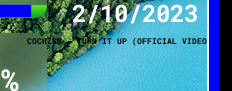
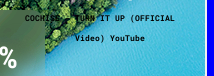
The ability to "Auto split text if outside the frame" Option. Where if the text goes outside the frame, The last word that has the letters that went out of the frame get's split and shown in the middle under the text, Something like this:
~~~~~~~~~~~~~~~~~~~~~~~~~~~~~~~~~~~~~~~~~~~~~~~~~~~~~~~~~~~~~~~~~~~~~~~~~~~~~
| | = the screen frame
| This is ftk 789 doing some nice feature request as exp | laining how to do this
And should be like this:
| | = the screen frame
| This is ftk doing some nice feature request as | "space " explaining how to do this
~~~~~~~~~~~~~~~~~~~~~~~~~~~~~~~~~~~~~~~~~~~~~~~~~~~~~~~~~~~~~~~~~~~~~~~~~~~~~
Describe alternatives you've considered / and or tested
Tried to manually split the text but don't work. made the font size smaller but that's a downside.
Screenshots / photos & mockups of the Turing screen
Before the feautre:
After the feature:
Environment:
Windows 10
Python 3.X
Additional context
Thank you for an amazing project!
