

 mathjax
How do I set the unit to em when I output SVG
Hello, I want to know how to set up the ex transform em when output SVG. Or the ex becomes px. I wonder if this is feasible? Sorry, I didn't find how to set it in the document.

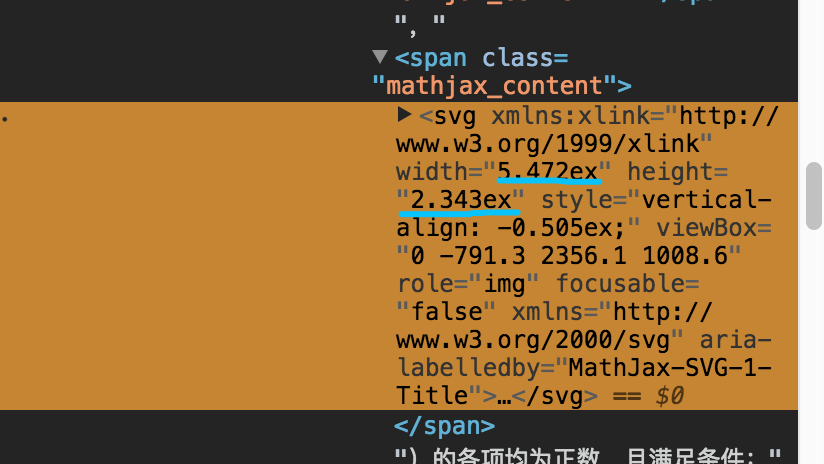
As is shown in I want to change the unit of generated SVG from ex to em or px
Can you be more specific about the use-case you have in mind? Why do you need to use em's or px's rather than ex's?

Thank you for your reply. My project has a special need to synchronize the doodles on different ends. Let's say I draw a line on the PC side that needs to be displayed in the same place on the ipad side Ex is the height of the character 'x'. There is no problem with that in itself. But the height and width of SVG rendered by a PC or ipad are different in different end environments. Because ex is a relative unit. So I wonder if I can set the unit of exported SVG to px instead of ex. Can it be realized?

LibreOffice Draw does not handle "ex" unit very well. I'm having trouble importing SVG with "ex" unit. an option to use px or pt will be very good.

@cuixiaorui, @spiderhands, @bibhas2, here is a version 3 configuration that uses px rather than ex for the output:
MathJax = {
  startup: {
    ready() {
      MathJax.startup.defaultReady();
      const fixed = MathJax.startup.document.outputJax.fixed;
      MathJax.startup.document.outputJax.postFilters.add(({math, document, data}) => {
        const svg = data.querySelector('svg');
        const [x, y, w, h] = svg.getAttribute('viewBox').split(/ /);
        const em = document.outputJax.pxPerEm;
        svg.setAttribute('width', fixed(w / 1000 * em) + 'px');
        svg.setAttribute('height', fixed(h / 1000 * em) + 'px');
      });
    }
  }
}
Perhaps that will do the trick for you.