

 material-shell
Keybindings don't reset after uninstall
Describe the bug After disabling or uninstalling (even resetting dconf with the provided command), the previous GNOME keybindings are not restored. I could restore them manually, but one behaviour remained broken: Usually Super+1 activates the first item in the dock, Super+2 the second etc. That still doesn't work. Please tell me where that option sits so that I can restore!
Expected behavior When deactivating/uninstalling, precious behaviour should be restores completely - especially stuff that can't be fixed easily.
Screenshots
To Reproduce
- Occurs on:
- [ ] X.Org
- [X] Wayland
- GNOME Shell version: 40.1.0
- Distro: Fedora 34
- Steps to reproduce, if applicable:
- Install
- Maybe change some key bindings, I don't know if that is necessary
- Uninstall
- Press Super+1 to activate first item in the dock. - nothing happens (a 1 is put if some text field is active)
Current commit
Output from git rev-parse --short HEAD: c7803af
Log data
Output from journalctl /usr/bin/gnome-shell:
example log data

I'm having this exact issue (e.g. Super + 1) no longer launches items from my dock in gnome. I was able to reset some shortcuts in Gnome Tweaks.
I also would like to know how to reset the short cut and other binding changes made by this extension.
Environment: Kernel: 5.10.67-1-lts x86_64 bits: 64 Desktop: GNOME 40.4 Distro: EndeavourOS

Hi @matthiasheuser
It looks like after installing this extension a bunch of shortcuts and settings get changed that do not get changed back when you uninstall the plugin. I will be filing a separate defect to have the developer update their uninstall steps to include a more through method to reset the settings (one I know what his extension has changed).
To fix your immediate issue you should do the following which the people from the EndeavourOS forum helped me find:
(1) Install the dconf-editor so you can see what settings were changed:
sudo pacman -S dconf-editor
(2) Navigate to "“/org/gnome/shell/keybindings”" in dconf and you will see the dock launch settings like in the screen shot:
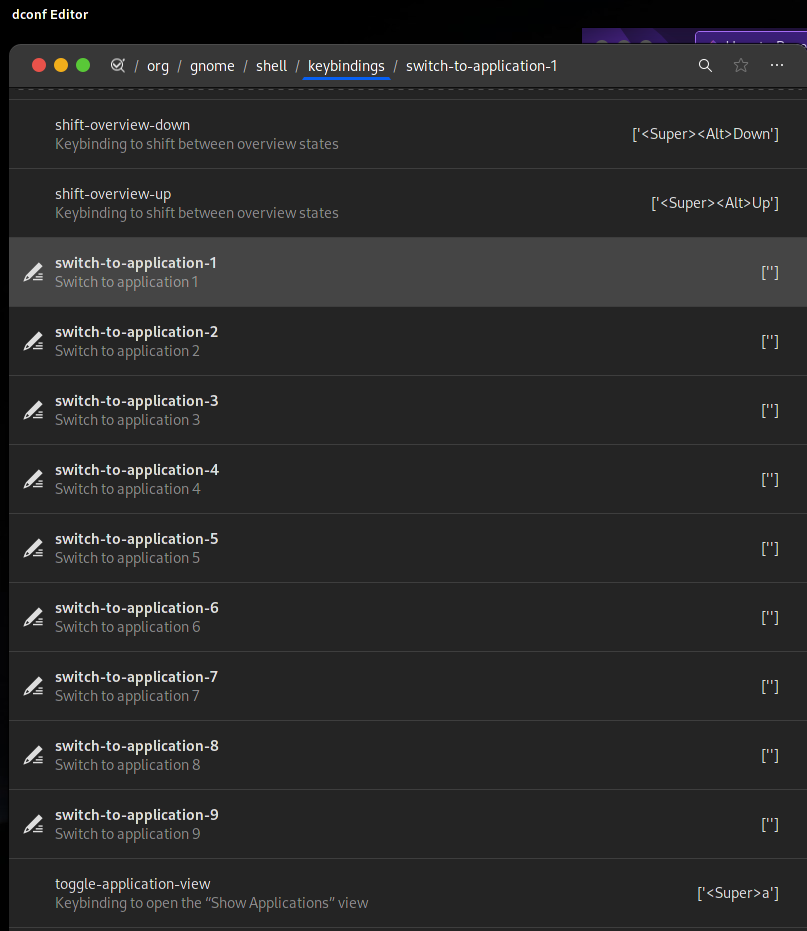
(3) You can then edit each of the settings and use the switch to set them to the default values:
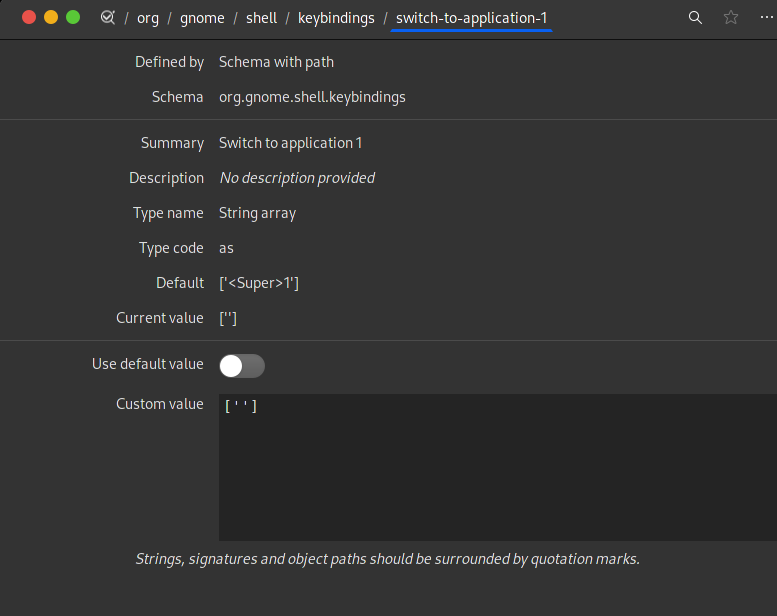
There are more details in the EndeavourOS post if you wish to review them. Good luck.
Source: https://forum.endeavouros.com/t/how-to-reset-the-gnome-keyboard-shortcuts-after-they-were-altered-by-an-extension/18314/3
https://forum.endeavouros.com/t/how-to-reset-the-gnome-keyboard-shortcuts-after-they-were-altered-by-an-extension/18314/2
