

 material-components
[Slider] The label is scrolled when it's in the scroll view and LABEL_VISIBLE
Description:
This issue comes when the slider is placed inside ScrollView and labelBehavior is set as LABEL_VISIBLE. When the user scrolled down, the label is scrolled too.

Expected behavior: The Expected behavior is the label is not scrolled and is still in the slider position
Android API version: Android 10 (API level 29) and Android 11 (API level 30)
Material Library version: Tested on 1.6.0 and 1.7.0-alpha03
Device: Tested on Google Pixel 3A (Emulator) and Xiaomi Redmi 10S


I have the same problem. Any updates?
Temporary solution, I just set the label visibility based on scrollChangedListener. The downside is sometimes the transition between labels shows up and disappear is not smooth
Something like this
binding.scrollView.apply {
            viewTreeObserver.addOnScrollChangedListener {
                if (scrollY == 0) {
                    binding.slider.labelBehavior = LABEL_VISIBLE
                } else {
                    binding.slider.labelBehavior = LABEL_WITHIN_BOUNDS
                }
            }
        }
I have the same problem. Any updates?
Temporary solution, I just set the label visibility based on
scrollChangedListener. The downside is sometimes the transition between labels shows up and disappear is not smoothSomething like this
binding.scrollView.apply {
            viewTreeObserver.addOnScrollChangedListener {
                if (scrollY == 0) {
                    binding.slider.labelBehavior = LABEL_VISIBLE
                } else {
                    binding.slider.labelBehavior = LABEL_WITHIN_BOUNDS
                }
            }
        }
Your solution works but has a side effect (I imagine that was not what was mentioned). A value tooltip is a burst layout overlay. I think that solution can be something reletaded with relative layout with property layout_below, but it does not work
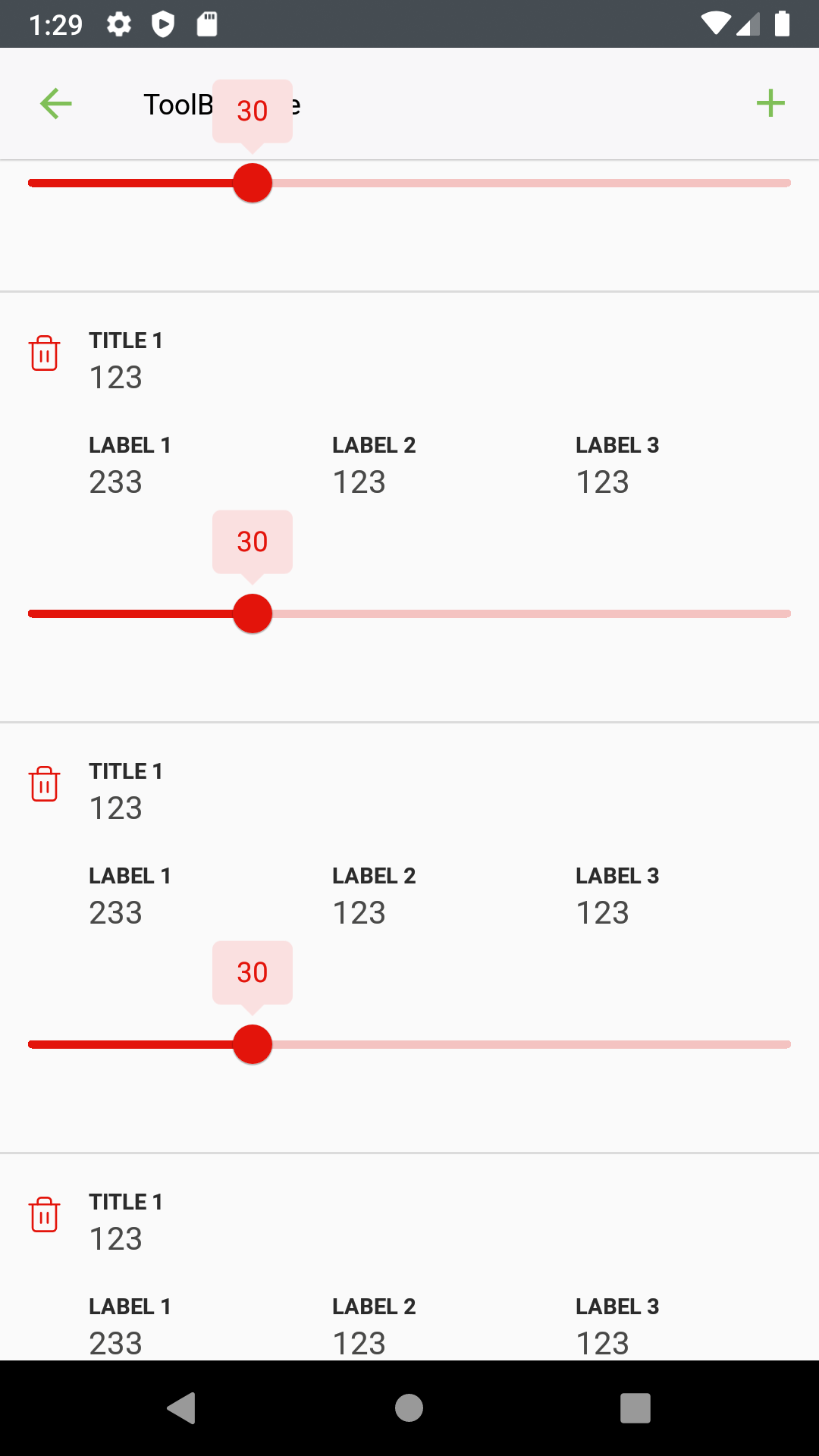
A slight change of your code for my context
customRecyclerView.addOnScrollListener(object : RecyclerView.OnScrollListener() {
                    override fun onScrolled(recyclerView: RecyclerView, dx: Int, dy: Int) {
                        super.onScrolled(recyclerView, dx, dy)
                        sliderBarRed.labelBehavior = LabelFormatter.LABEL_WITHIN_BOUNDS
                        sliderBarRed.labelBehavior = LabelFormatter.LABEL_VISIBLE

                    }
                }
)
In my context, I need to block the move of the slider bar (thumb). Solution:
 val sliderValue = sliderBarRed.value

      sliderBarRed.addOnChangeListener { slider, value, fromUser ->
          slider.value = sliderValue
      }
You can imagine any solution for a new problem? :sweat_smile:
Now is it possible to hide the value label from the thumb when he gets the close toolbar.
First get a height from Toolbar
Here I'm use Kotlin Extensions by use the Context
fun Context.getToolBarHeight(): Int {
    val attrs = intArrayOf(android.R.attr.actionBarSize)
    val ta: TypedArray = this.obtainStyledAttributes(attrs)
    val toolBarHeight = ta.getDimensionPixelSize(0, -1)
    ta.recycle()
    return toolBarHeight
}
Check if the top of the item is so closed the toolbar
Inside that method addOnScrollListener put in. Here I'm using the item from the view holder and getting the top value
It's important to highlight that uses that double height toolbar for this purpose. When staying so closed I hide the label value
val itemViewTop = itemView.top

                        if (itemViewTop <= -itemView.context.getToolBarDoubleHeight()) {
                            sliderBar.labelBehavior = LabelFormatter.LABEL_WITHIN_BOUNDS
                        }

None of this would have been possible without the strong help of Manoel Leite @lenoln / @manoelleiteufal
Issue is also present in the bottom sheet https://github.com/material-components/material-components-android/issues/3124


I'd also like to mention, that the labels also don't move when using a navGraph animation between different pages. The labels stay in the middle of the screen, then disappear once the next view is loaded.

@dsn5ft Although closed with 5e5eee0 this bug seems not to be fixed when using BottomSheet - as initially mentioned in #3124.
Steps to reproduce:
- Cloned the latest state of the repo (2439dc0) assuming that the catalog app is also using the latest state (so at least 1.12.0-alpha01)
- Added the following code snippet to
cat_bottomsheet_standard_content.xmlat the bottom after the MaterialSwitch:
<com.google.android.material.slider.RangeSlider
  android:layout_width="match_parent"
  android:layout_height="wrap_content"
  android:layout_below="@id/cat_bottomsheet_enabled_switch"
  app:labelBehavior="visible" />
Result:
- Label not initially visible when opening the BottomSheet - only after dragging the thumb handle
- Label doesn't move properly when dragging the BottomSheet
- Label stays visible when slider is already out of view
https://github.com/material-components/material-components-android/assets/2598617/2dfbb9bf-bcf0-4d46-8bc1-06286ba7ead7
@mhettig, this is a workaround (#3665). https://github.com/material-components/material-components-android/blob/master/catalog/java/io/material/catalog/bottomsheet/BottomSheetMainDemoFragment.java#L154-L156
    persistentBottomSheetBehavior.addBottomSheetCallback(
        createBottomSheetCallback(bottomSheetText));
+   persistentBottomSheetBehavior.addBottomSheetCallback(new BottomSheetCallback() {
+     @Override
+     public void onStateChanged(@NonNull View bottomSheet, int newState) {
+     }
+
+     @Override
+     public void onSlide(@NonNull View bottomSheet, float slideOffset) {
+       bottomSheet.findViewById(R.id.rangeslider).invalidate();
+     }
+   });
    bottomSheetPersistent.post(
