material-components
[MaterialButton] Why Button rendering one more layer than TextView?
Description: Sorry, maybe it's not a bug, I just don't understand and couldn't find any clue to explain it.
I wrote a demo to illuminate it.

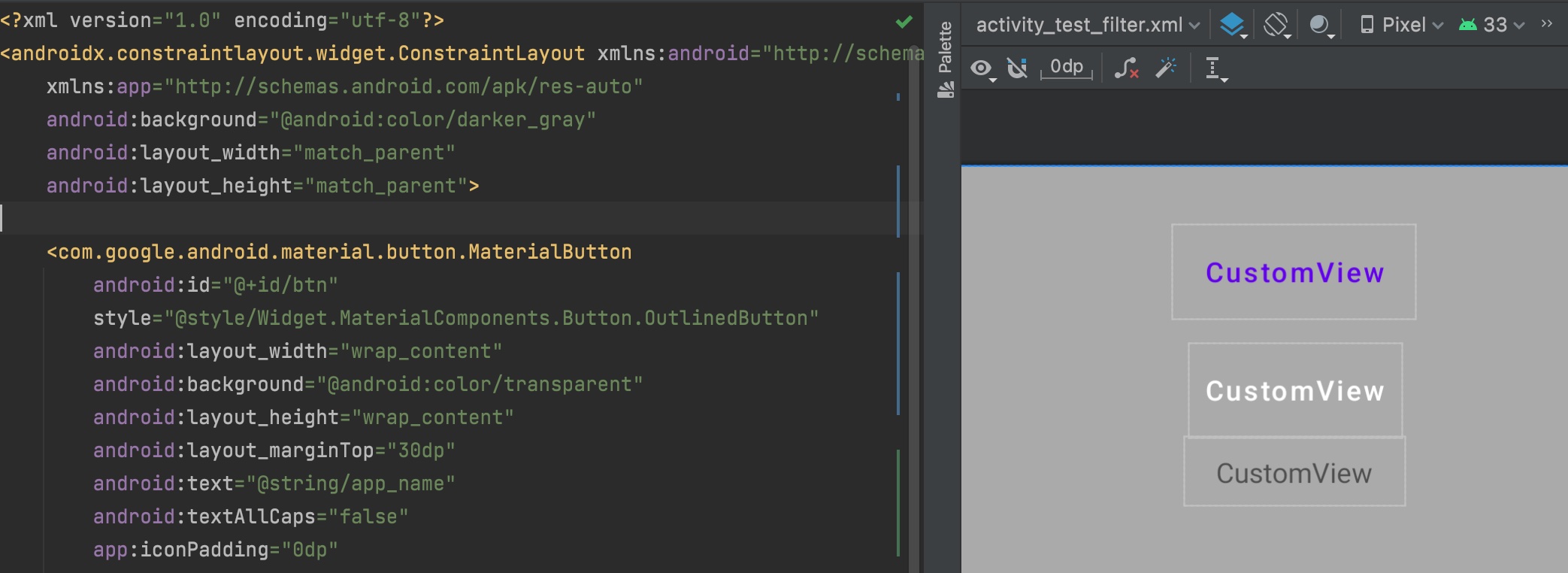
According to Official Site, here's the result.
| Top => Bottom | Behavior |
|---|---|
OutlinedButton ( background = TRANSPARENT ) |
Blue - Overdrawn 1 time |
TextButton ( background = TRANSPARENT ) |
Blue - Overdrawn 1 time |
TextView |
No overdraw |
So
- What causes this?
- Is there any way to avoid this overdraw?
Source code:
<com.google.android.material.button.MaterialButton
    android:id="@+id/btn"
    style="@style/Widget.MaterialComponents.Button.OutlinedButton"
    android:layout_width="wrap_content"
    android:background="@android:color/transparent"
    android:layout_height="wrap_content"
    android:layout_marginTop="30dp"
    android:text="@string/app_name"
    android:textAllCaps="false"
    app:iconPadding="0dp"
    app:iconSize="0dp"
    app:layout_constraintEnd_toEndOf="parent"
    app:layout_constraintStart_toStartOf="parent"
    app:layout_constraintTop_toTopOf="parent" />

<com.google.android.material.button.MaterialButton
    android:id="@+id/btn2"
    style="@style/Widget.MaterialComponents.Button.TextButton"
    android:layout_width="wrap_content"
    android:layout_height="wrap_content"
    android:layout_marginTop="12dp"
    android:background="@android:color/transparent"
    android:checkable="true"
    android:text="@string/app_name"
    android:textAllCaps="false"
    android:textColor="@android:color/white"
    app:iconPadding="0dp"
    app:iconSize="0dp"
    app:layout_constraintEnd_toEndOf="parent"
    app:layout_constraintStart_toStartOf="parent"
    app:layout_constraintTop_toBottomOf="@id/btn" />
<TextView
    android:id="@+id/btn3"
    android:paddingHorizontal="16dp"
    android:paddingVertical="8dp"
    android:layout_width="wrap_content"
    android:layout_height="wrap_content"
    android:elevation="8dp"
    android:text="@string/app_name"
    app:layout_constraintEnd_toEndOf="parent"
    app:layout_constraintStart_toStartOf="parent"
    app:layout_constraintTop_toBottomOf="@id/btn2" />
Android API version: compileSdk 31
Material Library version: com.google.android.material:material:1.6.1
Device: Google Pixel 3 - Android 12

Hi @oOJohn6Oo,
Thanks for filing.
I don't quite understand what you're referring to. Is the overdraw you're talking about the blue tinted background for each button? I'm assuming this is just the background drawable given to MaterialButton but it would be good to get additional details from you.

Hi @oOJohn6Oo,
Thanks for filing.
I don't quite understand what you're referring to. Is the overdraw you're talking about the blue tinted background for each button? I'm assuming this is just the background drawable given to MaterialButton but it would be good to get additional details from you.
Thanks for reply, I opened "Debug GPU Overdraw" in developer settings, the tint color is rendered by system, but it shouldn't have, because I removed the background for these buttons.
What I expected is no overdraw in "no background or transparent background" MaterialButton, just like the TextView.
Add below is a layout preview screenshot for your reference.