

 mas-cli
Install newest version supported by the running macOS without requiring dialog
If I try to install an app from Apple (Keynote) in the MAS Frontend, it tells me that the current version requires a newer OSX than installed but I can download the last compatible version for my OSX. Can you implement this in MAS?
Keynote 6.6.2 (runs on OSX 10.11) vs 7.0 (macOS 10.12 required)
If I try to update with the ID with mas, I only get an unknown error.

If the AppStore.app can do this, there might be a way for mas to tap into that functionality.
Does anyone have an example of an older app+version which is compatible with 10.13 but not 10.14? Note, it should have a latest version that is compatible with 10.14.

I currently see this with Xcode on System Version: macOS 11.2.3 (20D91):
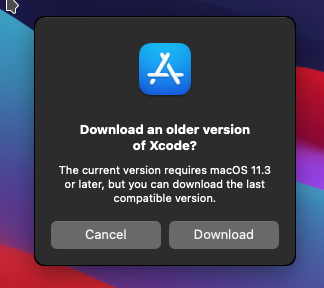
hope this helps

Worst aspect of this is, that even after installing the last compatible version mas upgrade does not detect it's the most current compatible version installed and tries to install it again and again. We're having mas upgrade in our ansible scripting and it currently needs someone to manually click download in that popup for mas upgrade to succeed - and even then it always runs for about half an hour to install xcode again and again...
Interesting: I had to install updates from software update center and accept new license terms there. Now mas reports
▶ mas upgrade
Warning: Nothing found to upgrade
Is it not possible to skip the confirmation popup and automatically install the last compatible versions?
