
Maptz.VSCode.Extensions.CamelCaseNavigation
 Maptz.VSCode.Extensions.CamelCaseNavigation copied to clipboard
 maptz
maptz
Visual Studio Camel Case Navigation Extension

This extension provides camel-case navigation to the Visual Studio Code editor.
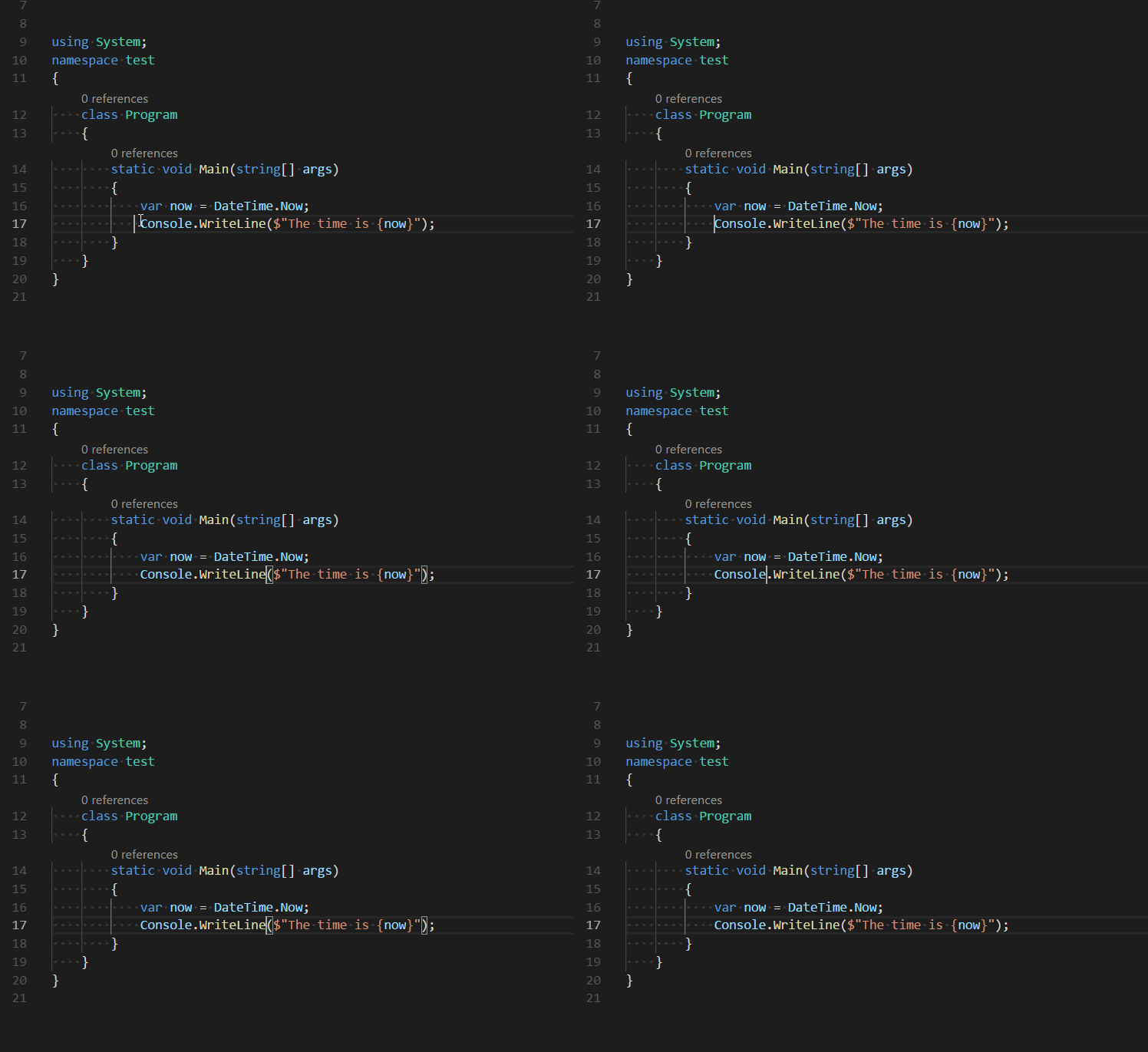
It works by adding four extension methods to the IDE which override the default actions for the left and right arrow keys.
- MoveCamelLeftCommand (Ctrl+Left)
- MoveCamelRightCommand (Ctrl+Right)
- ExtendCamelLeftCommand (Ctrl+Shift+Left)
- ExtendCamelRightCommand (Ctrl+Shift+Right)
Installing
You can install the latest version of the extension is available on the Visual Studio Marketplace here.
Alternatively, open Visual Studio code, press Ctrl+P and type:
ext install camelcasenavigation
Toggle mode
A new feature in version 1.0.2 is toggle mode. By using the command camelcasenavigation.toggleCamelMode, you can turn camel case navigation on or off. When camel case navigation is off, the arrow keys revert to their default behaviour.
This command is not currently mapped to a default keybinding. To map it to a default keybinding add the following to your keybindings.json file:
    {
        "key": "ctrl+shift+l",
        "command": "maptz.camelcasenavigation.toggleCamelMode"
    }
Configuration
The extension provides configuration settings, allowing you to turn on or off features. Create a settings in your vscode settings file (either user or workspace) that conforms to the following specification:
    "maptz.camelcasenavigation": {
      "allowToggleMode" : true,                 //Allows you to use toggle mode
      "isCamelNavigationOnByDefault" : true     //When toggle mode is on, determines whether Camel Navigation is on (true) or off (false) when the application starts.
    }
Source Code
The source code is available on GitHub here.
Release Notes
Version 1.1.3
- Fixed
console.logissue.
Version 1.1.2
- Updated configuration settings.
Version 1.1.1
- Added deprecated messages for the previous command names.
Version 1.1.0
- There is a breaking change in this version. The commands exposed by the extension has been renamed, so any hotkeys need to be updated.
Extensions were previously named extension.[command-name], but this has now been changed to camelcasenavigation.[command-name].
You will need to update any custom keyboard hotkeys you have re-assigned to match the new command names:
- maptz.camelcasenavigation.deleteCamelLeftCommand
- maptz.camelcasenavigation.deleteCamelRightCommand
- maptz.camelcasenavigation.extendCamelLeftCommand
- maptz.camelcasenavigation.extendCamelRightCommand
- maptz.camelcasenavigation.moveCamelLeftCommand
- maptz.camelcasenavigation.moveCamelRightCommand
- maptz.camelcasenavigation.toggleCamelMode
So your keybindings might look like this:
    {
        "key": "ctrl+j",
        "command": "maptz.camelcasenavigation.deleteCamelRightCommand",
        "when": "editorTextFocus"
    }
Version 1.0.2
- Added ability to toggle camel mode on or off.
Version 1.0.1
- Updated npm dependencies.
Version 1.0.0
- This version is bumped to an official version.
Version 0.3.53
- Fixed a bug that prevented the selection from scrolling into view when the cursor moves out of view.
Version 0.3.51
- Added a feature for interface definitions in CSharp and Typescript modes. By default an interface definition like
ISomeThingis treated as three camel parts:I-Some-Thing. This feature can be turned off by setting "maptz.camelCaseNavigation.csharpmode" tofalsein your user settings.
 maptz
maptz