

 mapbox
Mapbox LocationBasedGame Map not loading in Android (but is perfectly fine in unity play mode)
- Unity version: unity 2019.2.5f1
- Mapbox SDK version: 2.1.1
- The platform you're building to: Android
- A description of what you're trying to do: Load the map on the android device
Hello community, I wanted to ask about a problem that I have not been able to solve in the last 4 days. I am very new to programming (I am still a student) and I am making an application for the university using the mapbox provider The problem I am having is that the mapbox map is not showing up in the android build. When I load the map into the application, the only thing that appears is the playerTarget object (without the map). Also it seems that the map is loading because the application slows down which leads me to think if it is a rendering problem, a camera problem or perhaps a lack of permissions in the android manifest. Another strange thing that happened to me is that sometimes when I rotated the screen and the landscape is horizontal, the map would appear, but it would disappear again if I returned to the vertical landscape (WTF)
I am using the latest version of mapbox (2.1.1) for unity 2019.2.5f1. My template is configured to use LWRP and I already made all the preparations to implement the native materials of the pipeline (the configuration change in the UnityTile script in charge of assigning the textures to the basemap). I have also checked the camera settings to see if I have something strange and I have not been able to find anything strange. I have also tried downloading the application on other devices and the problem persists I have tried without the LWRP and the problem persists I have tried to change the camera from orthographic to perspective and the problem persists I have even tried to change the version of unity (initially I had started this project in a more current version 2020.3.4.f1) and the problem persists I have cleared the cache (I think so) through the mapbox menu and the problem persists
I've been looking and apparently hardly anyone has this problem :(
And sorry for the bad writing, English is not my native language

When I enter the application they appear, it asks me for the permissions of the location and the cell phone camera but it still does not solve the problem. Build in android:
this is the map configuration
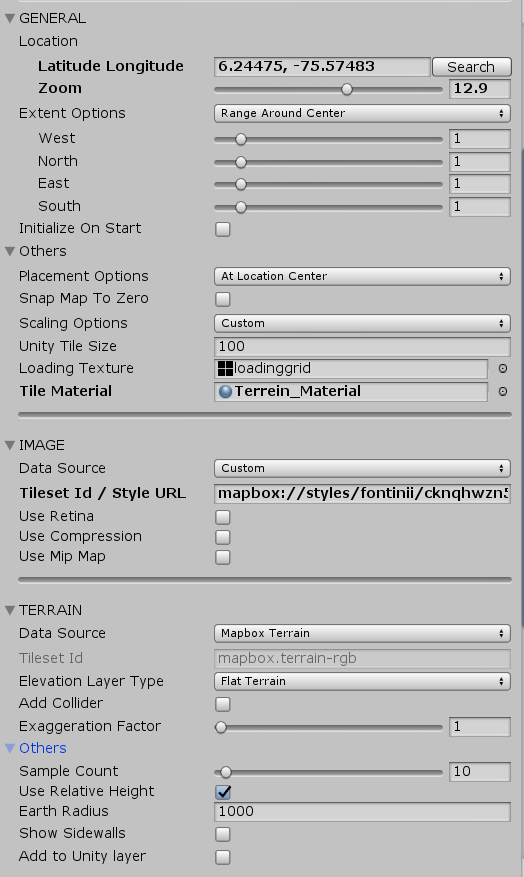

I made some changes in the map provider because I wanted a specific coordinate to appear, but I don't know if this has to do with the problem ...

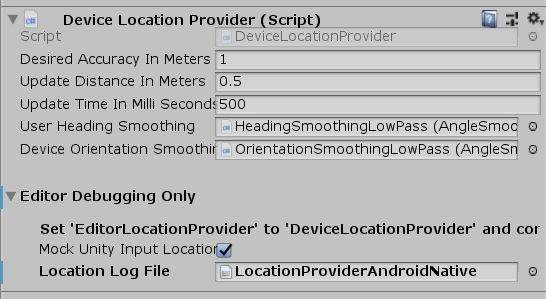


first of all there's a bug in the locationprovider which causes the map not to show up on first startup. More details about this in here: https://github.com/mapbox/mapbox-unity-sdk/issues/1760
maybe you should consider starting with a sample scene not using locationprovider (city simulator) to get rid of configuration issues connected to the location service.
the next step would be to check your renderer setup:
- in terms of lwrp you will most likely mean URP
- Mapbox in the latest stable version is not supporting this pipeline officially. In the worst case you converted the materials but some scripts are accessing shader propertys which are named differently in URP compared to legacy pipeline (most likely Color property name). There's a upcoming release branch including a working URP setup. Maybe you should compare this one if it's totally necassary to use URP instead of the (legacy) standard pipeline: https://github.com/mapbox/mapbox-unity-sdk/tree/performance
- @brnkhy released a blog post some time ago about this topic of the pipeline conversion: http://barankahyaoglu.com/dev/mapbox-unity-sdk-with-urp/ (but keep in mind that this post is old and maybe not compatible with the latest release)
