

 mapbox
Some questions about Speed Limit
Feedback on some recent problems
I found the limit speed feature could work in your master branch. So I can’t wait to try and see if this feature is stable now.
I selected a route in Westfield, US from 124 Barchester Way to 416 Colonial Avenue that was got from Mapbox service and replace the default route, but I don’t know why I didn’t see the speed limit prompt as I wished. This aroused my curiosity, I spent some time doing some tests. In the end, there is no way to explain why the SpeedLimitView cannot be displayed. So I write this open issue, I hope you can give me some suggestions or help and next I'll show you my whole testing process.
- Obtain the corresponding route information according to the local JSON file
At first, I compared the file named 'sample_route_2_token_replacement' that you put in the raw directory. The route generated from this document can display the speed limit normally. I wrote a demo to show it on the mapview.
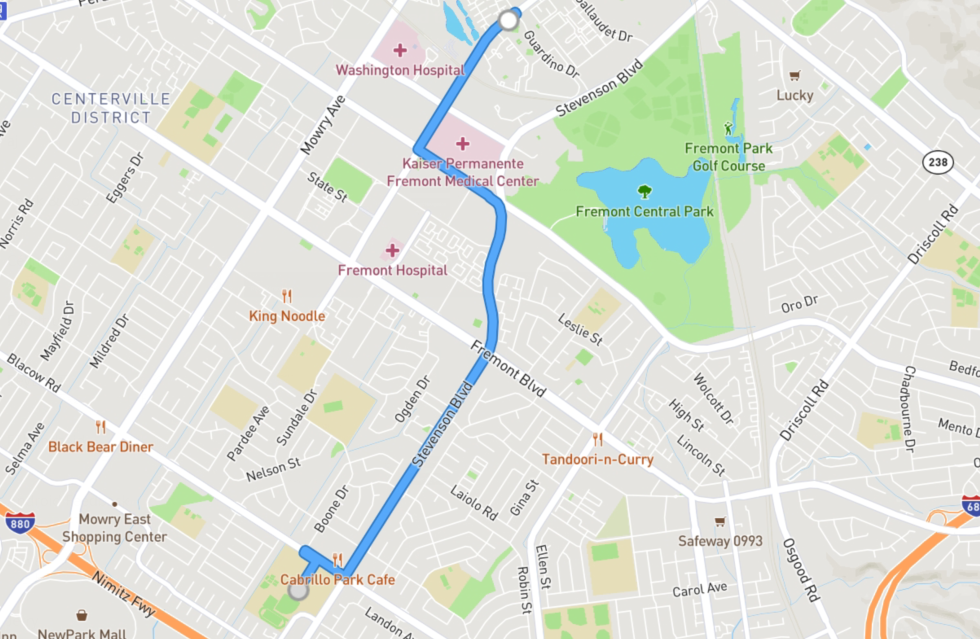 I could get the route option info from the JSON, including the coordinates, some request parameters of the route direction.
	"routeOptions": {
		"baseUrl": "https://api.mapbox.com",
		"user": "mapbox",
		"profile": "driving-traffic",
		"coordinates": [
			[
				-121.9716267,
				37.558815
			],
			[
				-121.9864957,
				37.5276826
			]
		],
		"alternatives": true,
		"language": "en",
		"continue_straight": false,
		"roundabout_exits": false,
		"geometries": "polyline6",
		"overview": "full",
		"steps": true,
		"annotations": "maxspeed,duration,congestion",
		"voice_instructions": true,
		"banner_instructions": true,
		"voice_units": "imperial",
		"access_token": "$tokenHere",
		"uuid": "dISvH4q1SoHAjBIhYAor3PjTnRKv4cqyQpKLmA6tUCiYcQ5t7xW6Iw=="
	}
Next, I used the coordinates to get the routes through the Mapbox service.
https://api.mapbox.com/directions/v5/mapbox/driving-traffic/-121.9716267,37.558815;-121.9864957,37.5276826?access_token=$myselftoken&steps=true&geometries=polyline6&overview=full&voice_instructions=true&voice_units=imperial&banner_instructions=true&roundabout_exits=false&enable_refresh=false&alternatives=true&continue_straight=false&language=en&annotations=maxspeed,duration,congestion
It returned two different routes and I display these two routes on the mapview as below:
 The interesting thing is that these two routes are inconsistent with the above route and I used these two routes to navigate.
Unfortunately, I still didn’t see the speed limit prompt. The gray route on the right is more similar to the route in the top picture, so I attached the
The interesting thing is that these two routes are inconsistent with the above route and I used these two routes to navigate.
Unfortunately, I still didn’t see the speed limit prompt. The gray route on the right is more similar to the route in the top picture, so I attached the routeOptions of this route:
  "routeOptions": {
    "baseUrl": "https://api.mapbox.com",
    "user": "mapbox",
    "profile": "driving-traffic",
    "coordinates": [
      [
        -121.9716267,
        37.558815
      ],
      [
        -121.9864957,
        37.5276826
      ]
    ],
    "alternatives": true,
    "language": "en",
    "continue_straight": false,
    "roundabout_exits": false,
    "geometries": "polyline6",
    "overview": "full",
    "steps": true,
    "annotations": "congestion,duration,maxspeed",
    "voice_instructions": true,
    "banner_instructions": true,
    "voice_units": "imperial",
    "access_token": "$myselfToken",
    "uuid": "ckllrgxqa05d177uqaz3i864o"
  }
I sent two emails to Mapbox Support, they guys reminded me to pay attention to two parameters, overview=full and annotations=maxspeed. I checked my request parameters and the response data, Either of them returned maxspeed info.
I intercepted the annotations information of the gray route and attached it to this issue.
"maxspeed": [
{
"speed": 56,
"unit": "km/h"
},
{
"speed": 56,
"unit": "km/h"
},
{
"speed": 56,
"unit": "km/h"
},
{
"unknown": true
},
{
"speed": 56,
"unit": "km/h"
},
{
"speed": 56,
"unit": "km/h"
},
{
"speed": 56,
"unit": "km/h"
},
{
"speed": 56,
"unit": "km/h"
},
{
"speed": 56,
"unit": "km/h"
},
{
"speed": 56,
"unit": "km/h"
},
{
"speed": 56,
"unit": "km/h"
},
{
"speed": 56,
"unit": "km/h"
},
{
"speed": 56,
"unit": "km/h"
},
{
"speed": 56,
"unit": "km/h"
},
{
"speed": 56,
"unit": "km/h"
},
{
"speed": 56,
"unit": "km/h"
},
{
"speed": 56,
"unit": "km/h"
},
{
"speed": 56,
"unit": "km/h"
},
{
"speed": 56,
"unit": "km/h"
},
{
"speed": 56,
"unit": "km/h"
},
{
"speed": 56,
"unit": "km/h"
},
{
"speed": 56,
"unit": "km/h"
},
{
"speed": 56,
"unit": "km/h"
},
{
"speed": 56,
"unit": "km/h"
},
{
"speed": 56,
"unit": "km/h"
},
{
"speed": 56,
"unit": "km/h"
},
{
"speed": 56,
"unit": "km/h"
},
{
"speed": 56,
"unit": "km/h"
},
{
"speed": 56,
"unit": "km/h"
},
{
"speed": 56,
"unit": "km/h"
},
{
"speed": 56,
"unit": "km/h"
},
{
"speed": 56,
"unit": "km/h"
},
{
"speed": 56,
"unit": "km/h"
},
{
"speed": 56,
"unit": "km/h"
},
{
"speed": 56,
"unit": "km/h"
},
{
"speed": 56,
"unit": "km/h"
},
{
"speed": 56,
"unit": "km/h"
},
{
"speed": 56,
"unit": "km/h"
},
{
"speed": 56,
"unit": "km/h"
},
{
"speed": 56,
"unit": "km/h"
},
{
"speed": 56,
"unit": "km/h"
},
{
"speed": 56,
"unit": "km/h"
},
{
"speed": 56,
"unit": "km/h"
},
{
"speed": 56,
"unit": "km/h"
},
{
"speed": 56,
"unit": "km/h"
},
{
"speed": 56,
"unit": "km/h"
},
{
"speed": 56,
"unit": "km/h"
},
{
"speed": 56,
"unit": "km/h"
},
{
"speed": 56,
"unit": "km/h"
},
{
"speed": 56,
"unit": "km/h"
},
{
"speed": 56,
"unit": "km/h"
},
{
"speed": 56,
"unit": "km/h"
},
{
"speed": 56,
"unit": "km/h"
},
{
"unknown": true
},
{
"unknown": true
},
{
"unknown": true
},
{
"unknown": true
},
{
"unknown": true
},
{
"unknown": true
},
{
"unknown": true
},
{
"unknown": true
},
{
"unknown": true
},
{
"speed": 64,
"unit": "km/h"
},
{
"speed": 64,
"unit": "km/h"
},
{
"speed": 64,
"unit": "km/h"
},
{
"speed": 64,
"unit": "km/h"
},
{
"speed": 64,
"unit": "km/h"
},
{
"unknown": true
},
{
"unknown": true
},
{
"speed": 64,
"unit": "km/h"
},
{
"speed": 64,
"unit": "km/h"
},
{
"speed": 64,
"unit": "km/h"
},
{
"speed": 64,
"unit": "km/h"
},
{
"speed": 64,
"unit": "km/h"
},
{
"speed": 64,
"unit": "km/h"
},
{
"speed": 64,
"unit": "km/h"
},
{
"unknown": true
},
{
"unknown": true
},
{
"speed": 64,
"unit": "km/h"
},
{
"speed": 64,
"unit": "km/h"
},
{
"unknown": true
},
{
"speed": 64,
"unit": "km/h"
},
{
"speed": 64,
"unit": "km/h"
},
{
"speed": 64,
"unit": "km/h"
},
{
"unknown": true
},
{
"unknown": true
},
{
"unknown": true
},
{
"unknown": true
},
{
"speed": 64,
"unit": "km/h"
},
{
"speed": 64,
"unit": "km/h"
},
{
"speed": 64,
"unit": "km/h"
},
{
"speed": 64,
"unit": "km/h"
},
{
"speed": 64,
"unit": "km/h"
},
{
"unknown": true
},
{
"unknown": true
},
{
"speed": 64,
"unit": "km/h"
},
{
"speed": 64,
"unit": "km/h"
},
{
"speed": 64,
"unit": "km/h"
},
{
"speed": 64,
"unit": "km/h"
},
{
"speed": 64,
"unit": "km/h"
},
{
"speed": 64,
"unit": "km/h"
},
{
"speed": 64,
"unit": "km/h"
},
{
"speed": 64,
"unit": "km/h"
},
{
"speed": 64,
"unit": "km/h"
},
{
"speed": 64,
"unit": "km/h"
},
{
"unknown": true
},
{
"unknown": true
},
{
"speed": 64,
"unit": "km/h"
},
{
"speed": 64,
"unit": "km/h"
},
{
"speed": 64,
"unit": "km/h"
},
{
"speed": 64,
"unit": "km/h"
},
{
"speed": 64,
"unit": "km/h"
},
{
"speed": 64,
"unit": "km/h"
},
{
"speed": 64,
"unit": "km/h"
},
{
"unknown": true
},
{
"speed": 64,
"unit": "km/h"
},
{
"unknown": true
},
{
"unknown": true
},
{
"unknown": true
},
{
"unknown": true
},
{
"unknown": true
},
{
"unknown": true
},
{
"unknown": true
},
{
"unknown": true
}
]
I am very confused about this result. I don’t know whether the reason is my own problem or this feature is still under development.


@JayJiangCT Thank you for the detailed explanation.
I would suggest you to check 2 things:
- Are you able to see the speed limit in
examples/BasicNavigationActivity.java? - Are you able to see the speed limit in
examples/NavigationViewActivity?
Using the both examples I can see that speed limit is being shown
Also make sure that in your activity you are registering to MapMatcherResultObserver
private val mapMatcherResultObserver = object : MapMatcherResultObserver {
        override fun onNewMapMatcherResult(mapMatcherResult: MapMatcherResult) {
            ifNonNull(mapMatcherResult.speedLimit) {
                speedLimitView.setSpeedLimit(it)
            } ?: speedLimitView.hide()
        }
    }

This issue has been automatically marked as stale because it has not had recent activity. It will be closed if no further activity occurs. Thank you for your contributions.
![stale[bot] avatar](https://avatars.githubusercontent.com/in/1724?v=4 "Published by a pub.dev verified publisher")
Hi I have the same problem. Mapbox Directions API returns speed limits in USA (in my case CA) in km/h with this weird values like 64, 48, etc. Of course I can divide them by k/m coefficient, but if Mapbox returns speed limit units for each step, then why can't they return normal value for speed limits?
