

 mapbox
Draggable point annotations are no longer considered part of a cluster when dragged
Environment
- Android OS version: 13
- Devices affected: Samsung SM-G781B
- Maps SDK Version: 10.12.1
General Info
I have an app that allows the user to add point annotations to a map and also being able to drag them. One of my requirements is to display the point annotations in clusters depending on the zoom levels. I have this cluster configuration:
pointAnnotationManager = mapView.annotations.createPointAnnotationManager(loadClusterAnnotationConfig())
...
private fun loadClusterAnnotationConfig(): AnnotationConfig {
    return AnnotationConfig(
        annotationSourceOptions = AnnotationSourceOptions(
            clusterOptions = ClusterOptions(
                textColorExpression = Expression.color(Color.YELLOW),
                textSize = 20.0,
                circleRadiusExpression = literal(12),
                colorLevels = listOf(
                    Pair(100, Color.RED),
                    Pair(50, Color.BLUE),
                    Pair(0, Color.GREEN)
                )
            )
        )
    )
}
The code that enables the user to add points to the map and be able to drag them is this:
override fun onMapClick(point: Point): Boolean {
    val drawable = ...
    addMarkerAtPosition(point, drawable)
    return true
}

private fun addMarkerAtPosition(point: Point, @DrawableRes drawable: Int) {
      val bitmap = BitmapUtils.bitmapFromDrawableRes(applicationContext, drawable)
      val pointAnnotationOptions: PointAnnotationOptions = PointAnnotationOptions()
          .withPoint(point)
          .withIconImage(bitmap!!)
          .withDraggable(true)

      pointAnnotationManager.create(pointAnnotationOptions)
}
Steps to reproduce
-
Add two (or more) annotation points close to each other to create a cluster
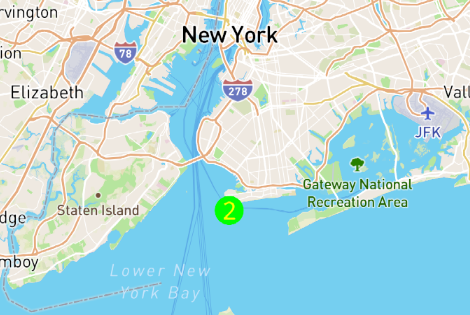
-
Zoom on the cluster to reveal the individual points

-
Drag any of the points slightly, bringing it closer to the other point

-
Zoom out. At this point, the annotation points are no longer part of a cluster group
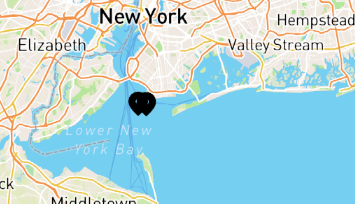
NOTE: This bug can be easily reproduced on the MapBox demo app in PointAnnotationsCustomActivity when you set the Annotation options to have draggable set to true:
PointAnnotationClusterActivity.kt
...
      .withIconImage(ICON_FIRE_STATION)
      .withDraggable(true)
Expected behavior
At step 4, I would expect the annotation points to remain in the same cluster group when zooming out, even if an annotation point was dragged. For example, this is the correct behaviour (note that on the image bellow, I didn't dragged any of the points)


Thanks @ivoGanev for your detailed report.
We'll investigate it further and report back.
