

 magic-script
Multi-Prism Support
Description
Lumin RT LandscapeApp supports more than one prism. Components should support multiple prisms as well.
Examples
Main app component:
<MyApp
    type="landscape"
    volumes={[
        { id: 1, size: [1.4, 1.2, 1], position: [...] },
        { id: 2, size: [1.4, 1.2, 1], position: [...] },
        { id: 3, size: [1.4, 1.2, 1], position: [...] },
    ]}
    message="Hello Components"
/>
Sample scene:
<View volumeId={2}>
    <Button volumeId={3}>Click me</Button>
</View/>
Completion status

The idea is:
- Prisms are defined by an App component (
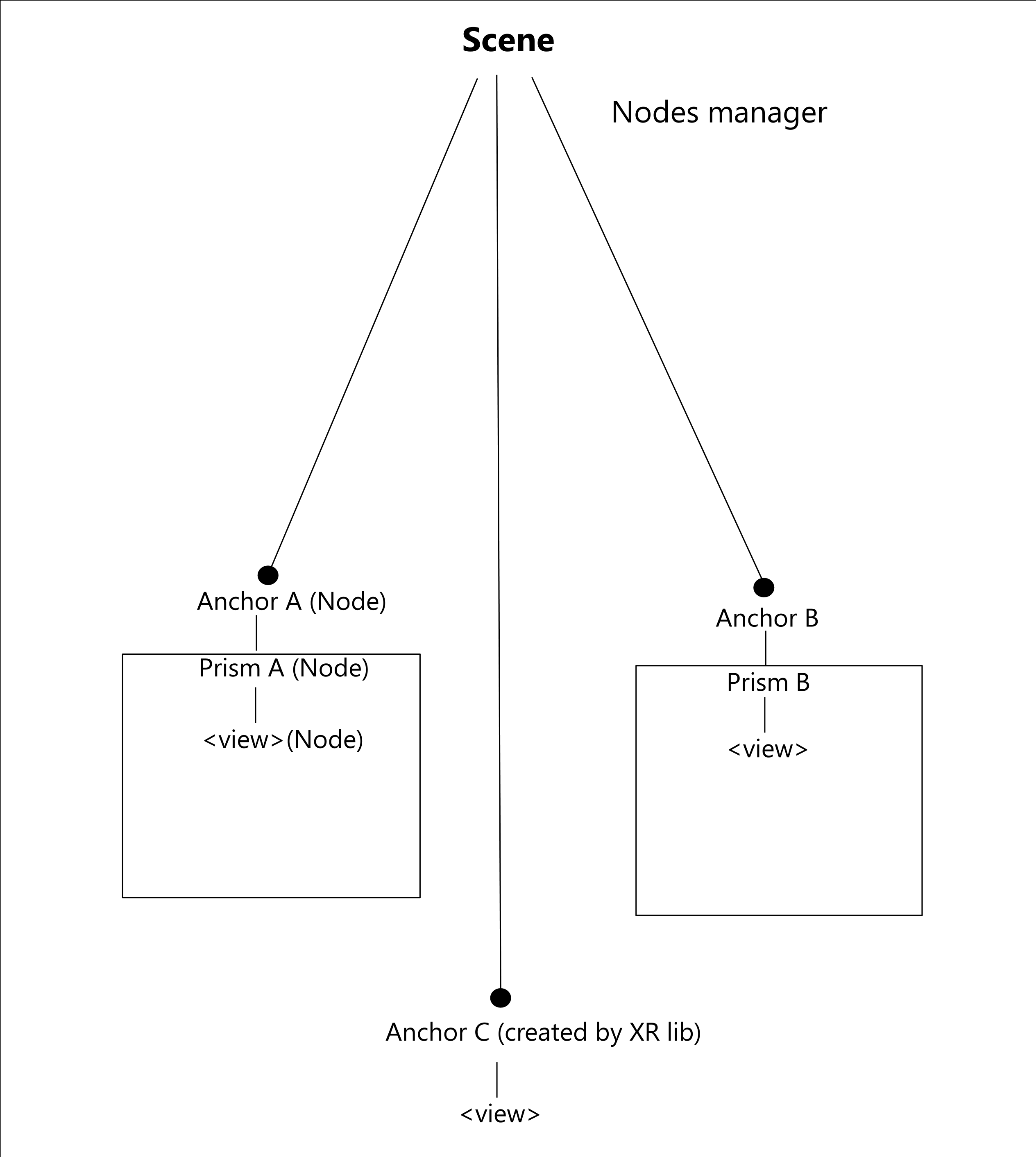
MyApp type="landscape" volumes={...}) - For every prism we create an anchor node in order to keep it in a stable place.
- By setting the prism's position we actually set the anchor position.
- For immersive apps we would use the current solution (the root anchor node located at world center is a parent for entire nodes hierarchy, unless the XR lib creates additional anchor nodes).
Questions:
- How to handle prisms positioning on mobile? On Android's PoC we use camera movements in order to reposition the prism and fingers (multitouch) to rotate it - this works quite good.
- Should we have a default Prism when user do not specify any prisms?
- When the XR library creates an anchor node, should we create a Prism for it so that content is added to this prism instead of directly to the anchor node?
- What about sub-prisms and do we really need them?

How to handle prisms positioning on mobile? On Android's PoC we use camera movements in order to reposition the prism and fingers (multitouch) to rotate it - this works quite good. I think it could work in a similar way as in Lumin (in Follower mode):
- use camera movement to keep the prism in front of the camera
- use pan left/right to rotate the prism
- use pan up/down to move further/closer
Antoher approach could be to have a "custom touch view" which mimics Control's touchbar.
Should we have a default Prism when user does not specify any prisms? User must specify at least one prism.
When the XrClient library creates an anchor node, should we create a Prism for it so that content is added to this prism instead of directly to the anchor node? I'm not sure here. ~~I guess no, we should not make anchors dependent on prisms (because of immersive mode).~~ @kpiascik ?
What about sub-prisms and do we really need them? There are no sub-prisms in Lumin. You can create another prism from the given prism. Both such prisms should behave in the same way (they can be moved/scaled/rotated separately).
// main.js - Lumin
mxs.bootstrap(<MyApp />);
// index.js - ReactNative
MagicScript.registerApp('MyApp', <MyApp />, false);
class MyApp extends React.Component
   render() {
    <Scene type='landscape' debug={true} planeDetection onPrismClosed={}>
      <Prism size={[0.5, 0.5, 0.5]} >
        <View />
      </Prism>
      <Prism size={[1,1,1]} position={[0.5,0.5,0]} >
        <View />
      </Prism>
      <Prism size={[]} >
        <View />
      </Prism>
    </Scene>
  }
}
1. Prism closing
- how to close?
- how to sync JSX hierarchy of prisms with real prisms(Lumin)?
2. Prism selection
- activate prism in front of the camera (like in Lumin)
- long tap to select prism (turn on the "prism manipulation" mode)
3. Prism manipulation:
- planes & tap (like in initial placement)
- gestures (move, rotate, scale) - reticle interaction
4. Initial placement
- do we need it?
- how to handle multiple prisms?
@pleszkiewicz I really like this idea/approach. I especially like the idea of a long press to enter "Prism Manipulation" mode. This is similar to how Lumin enters the mode, however this should be optional. The developer should be able to prevent prism manipulation.
Closing prisms can be done when in "Prism Manipulation" mode. We can present either an X or have a specific closing gesture. Prism placement might also be initiated this way. When a prism is in "Prism Manipulation" mode then it can be placed again.
The biggest open question would be how to exit "Prism Mainpulation" mode?

The proposed JSX:
<Scene type='landscape' debug={true} planeDetection onPrismClosed={}>
  <Prism size={[0.5, 0.5, 0.5]} >
    <View />
  </Prism>
  <Prism size={[1,1,1]} position={[0.5,0.5,0]} >
    <View />
  </Prism>
  <Prism size={[]} >
    <View />
  </Prism>
</Scene>
Would be very difficult to support with the current version of Lumin Runtime 1.0 due to the requirement to provide instance of Prism when creating a node. Except traversing the scene graph twice, there is no way to support the proposed JSX. Traversing the scene graph twice and caching all the operations for building the nodes would lead to complicated and difficult to maintain code.

I suggest to define all the prisms upfront as property of the app component. React-Reconciler provides hooks to create container and host context which can be used to:
- Create all the prisms in the beginning and store them in the container
- Access the prisms from the container in order to create nodes
Example of JSX:
<MyApp
    type="landscape"
    volumes={[
        { id: 1, size: [1.4, 1.2, 1], position: [...] },
        { id: 2, size: [1.4, 1.2, 1], position: [...] },
        { id: 3, size: [1.4, 1.2, 1], position: [...] },
    ]}
    message="Hello Components"
/>
Content for prism 1
export function Scene1(props) {
    return (<Text volumeId={1}>Scene 1</Text>
}
Content for prism 2
export function Scene2(props) {
    return (<View volumeId={2}>...</View>);
}
Content for prism 3
export function Scene3(props) {
    return (<Button volumeId={3}>Scene 3</Button>);
}
MyApp code:
export default function MyApp (props) {
  return ({[
    <Scene1 volumeId={1}/>,
    <Scene2 volumeId={2}/>,
    <Scene3 volumeId={3}/>
  ]});
}
This way the MyApp component will aggregate all the prisms (scenes).