

 madMAx43v3r
Stop without any error ?
Plot not finish without any error.
C:\madmax>chia_plot.exe -n 1 -r 12 -u 7 -t G:\ -2 G:\ -d E:\ -p keykey -f keykey
Final Directory: E:\
Number of Plots: 1
Process ID: 4820
Number of Threads: 12
Number of Buckets: 2^7 (128)
Pool Public Key:   keykey
Farmer Public Key: keykey
Working Directory:   G:\
Working Directory 2: G:\
Plot Name: plot-k32-2021-06-11-20-00-892584886e324d0bb6d9b42fb305997f627de0db32f8b9b5d26d6b2b1296c05e
[P1] Table 1 took 19.6584 sec

C:\madmax>
Edit: I did solve my problem. My cpu (ryzen 3600) overclocked (3600 to 4200) already. I did cancel overclock. Cpu is not 3600 mhz original clock. Now, I have not any problem, plot process completed, Cpu temperature is 80-83 around.

This exact same issue happens to me, It just exit without any error after Phase 1 Table 1, restart the pc fixes for me.
Also before this happened, after I finished couple plots. It just freezes for some reason, all cpu and ram utilization gone, I thought the Windows terminal hanged and I randomly pressed enter. after I pressed enter the next line appeared (Table scan finished, phase2 finished with xxxx very long seconds). Task manager was showing 0% CPU before I pressed enter and then boom! 100% utilization after I pressed it.

This exact same issue happens to me, It just exit without any error after Phase 1 Table 1, restart the pc fixes for me.
Also before this happened, after I finished couple plots. It just freezes for some reason, all cpu and ram utilization gone, I thought the Windows terminal Asıl and I randomly pressed enter. after I pressed enter the next line appeared (Table scan finished, phase2 finished with xxxx very long seconds). Task manager was showing 0% CPU before I pressed enter and then boom! 100% utilization after I pressed it.
Can you write step by step what do you did ? Because my pc not freezed. Only exit without error, and I did not complete any plot yet.
This exact same issue happens to me, It just exit without any error after Phase 1 Table 1, restart the pc fixes for me. Also before this happened, after I finished couple plots. It just freezes for some reason, all cpu and ram utilization gone, I thought the Windows terminal Asıl and I randomly pressed enter. after I pressed enter the next line appeared (Table scan finished, phase2 finished with xxxx very long seconds). Task manager was showing 0% CPU before I pressed enter and then boom! 100% utilization after I pressed it.
Can you write step by step what do you did ? Because my pc not freezed. Only exit without error, and I did not complete any plot yet.
maybe I shouldn't use the word freeze, its just 0% cpu utilization. not freezing
This exact same issue happens to me, It just exit without any error after Phase 1 Table 1, restart the pc fixes for me. Also before this happened, after I finished couple plots. It just freezes for some reason, all cpu and ram utilization gone, I thought the Windows terminal Asıl and I randomly pressed enter. after I pressed enter the next line appeared (Table scan finished, phase2 finished with xxxx very long seconds). Task manager was showing 0% CPU before I pressed enter and then boom! 100% utilization after I pressed it.
Can you write step by step what do you did ? Because my pc not freezed. Only exit without error, and I did not complete any plot yet.
belki de dondurma kelimesini kullanmamalıyım, sadece% 0 işlemci kullanımı. donmamak
I see, but my process exit to command line, if I press enter while processing then get the result like this :)
blablabla
Working Directory:   G:\PLOT\
Working Directory 2: G:\PLOT\
Plot Name: plot-k32-2021-06-11-21-19-ece97e2c59d52b895ee8010728ceac5bd8e6e232d3f8023b259f3f86d7867045
[P1] Table 1 took 21.0213 sec
PS C:\madmax>
PS C:\madmax>
PS C:\madmax>
PS C:\madmax>
PS C:\madmax>
other note, after "[P1] Table 1 took 21.0213 sec", cpu up to %99 in 5 sec then exit to command line.

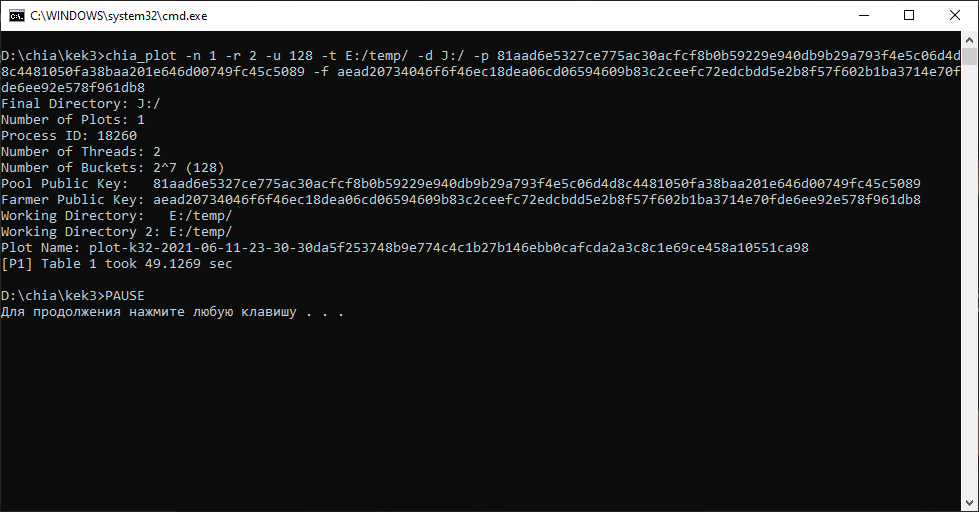
Same stuff, but ends when I utilize CPU for 90%+. So using amount of threads that will use almost all of your CPU power or trying to run plots in parallel drops this plotter without any error

Same stuff, but ends when I utilize CPU for 90%+. So using amount of threads that will use almost all of your CPU power or trying to run plots in parallel drops this plotter without any error
I tried less threads but nothing changed.
I set thread to 1 then now no problem and process continue.
I check every value from 2 to 12 threads, but always my cpu up to 76 celcius then plot stopped or system crash.
tomorrow I will change my overclock setting, and test again with 12 thread.
I set thread to 1 then now no problem and process continue.
I check every value from 2 to 12 threads, but always my cpu up to 76 celcius then plot stopped or system crash.
tomorrow I will change my overclock setting, and test again with 12 thread.
New firmware update ..
bios have latest firmware. but cpu is 3600 mhz to 4200 overclocked.
Madmax new update try download bro
Official chia plotter also crashes sometimes, any possibility there is a bug upper way? What do you think @madMAx43v3r ?

I think its related to CPU degrees. I will test tomorrow.
I slightly doubt it. I've tested this on many machines, some of them are virtual and never virtual or bare metal OS has crashed, only plotter (all target drives had sufficient space).
that looks like some CPU instruction issue again, @stotiks post all your CPU models please

that looks like some CPU instruction issue again, @stotiks post all your CPU models please
Ryzen 5 1600
I am also join the bandwagon. Same thing the other anon's are seeing. I am also using @stotiks fork. Last version.

This prints more info https://github.com/stotiks/chia-plotter/releases/download/v0.0.4/catchmeifyoucan.zip
On Sat, Jun 12, 2021 at 9:16 AM piedealer @.***> wrote:
I also join the bandwagon. Same thing the other anon's are seeing. I am also using @stotiks https://github.com/stotiks fork. Last version.
— You are receiving this because you were mentioned. Reply to this email directly, view it on GitHub https://github.com/madMAx43v3r/chia-plotter/issues/274#issuecomment-860007185, or unsubscribe https://github.com/notifications/unsubscribe-auth/ALGV2WFWROWXAIDR5FJWXW3TSL3VNANCNFSM46REA4SQ .

@madMAx43v3r I have Ryzen 5 3600. If I try to run some plots in parallel or if I use 4+ threads, one of them always crash on 1st phase.

Also, when I use 4 threads, it uses 100% of my CPU and 3 threads - 75%, so it seems like threads are tripled.
I have this issue from time to time as well. If I specify n>1 (e.g. n=6), 3-4 plots might run perfectly and the 5th fails silently after [P1] Table 6... Will run your debug build now to see if I get more output.
I remember it sometimes stops silently on "out of disk space". But this one must be something else.

I did solve my problem. My cpu (ryzen 3600) overclocked (3600 to 4200) already. I did cancel overclock. Cpu is now 3600 mhz original clock. Now, I have not any problem, plot process completed, Cpu temperature is 80-83 around.
@stotiks
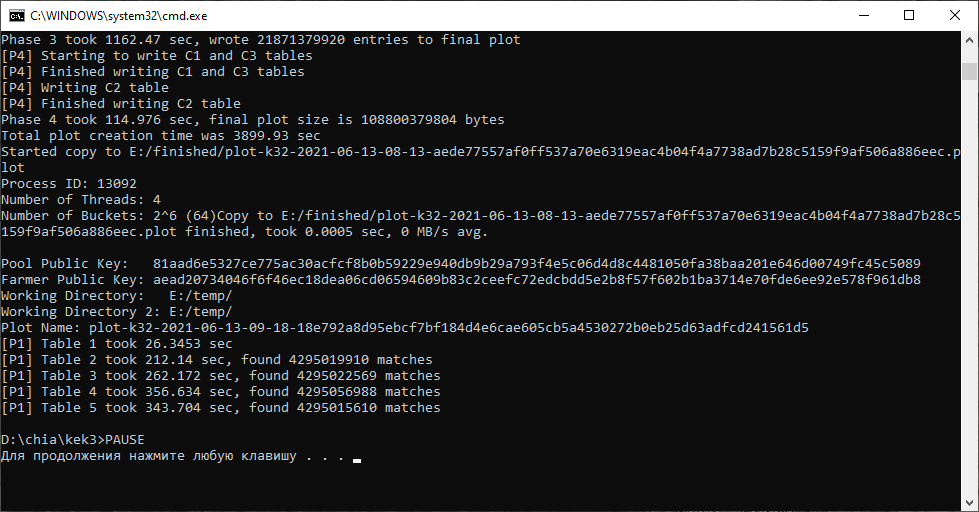 Unfortunately, yours one also crushes without any exceptions :(
@madMAx43v3r @stotiks I ran memtest (no errors) and also tried to plot in stock settings. Still same issue. However, I managed to find the error in win logger:
Exception code 0xc0000409 Faulting application path: D:\chia\kek3\chia_plot.exe Faulting module path: C:\WINDOWS\System32\ucrtbase.dll
I hope it should help finding the possible issue.
CPU/RAM settings: Ryzen 5 3600 [email protected] 32 GB DDR4 3333 (18-20-20-38) @ 1.35V
I have a similar issue, but using ubuntu 20.04.
CPU: Intel Xeon E7- 4850, 24 Cores
RAM: 32GB

Hello, @madMAx43v3r @stotiks
I'm having the same difficulty as it stops @ P1 - Table 1 without warning. Ryzen 2700, 16gb PC3200 @3000. I did not have problem first time I use madmax, but now I can hardly made a plot. Somehow it's getting worse...

Update, it actually not frozen, but extremely slow. It’s been running for over 24 hours and it just started phase 4. I’m using nvme drives for both temp dirs.
hi, it used to work like charm before on my plotting pc, today just stop working "process exit" at phrase 1 table 4, looks like the same problem here. has anyone found the solution? appreciate any helps.
