

 macmade
MacBook Air M2 Hot stuck at 52 C
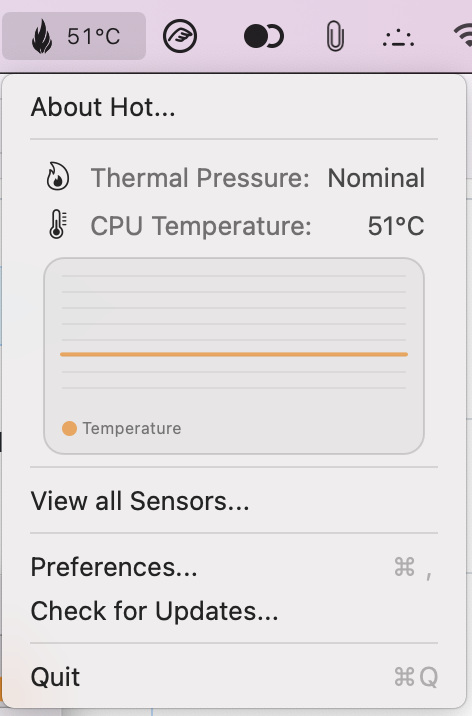
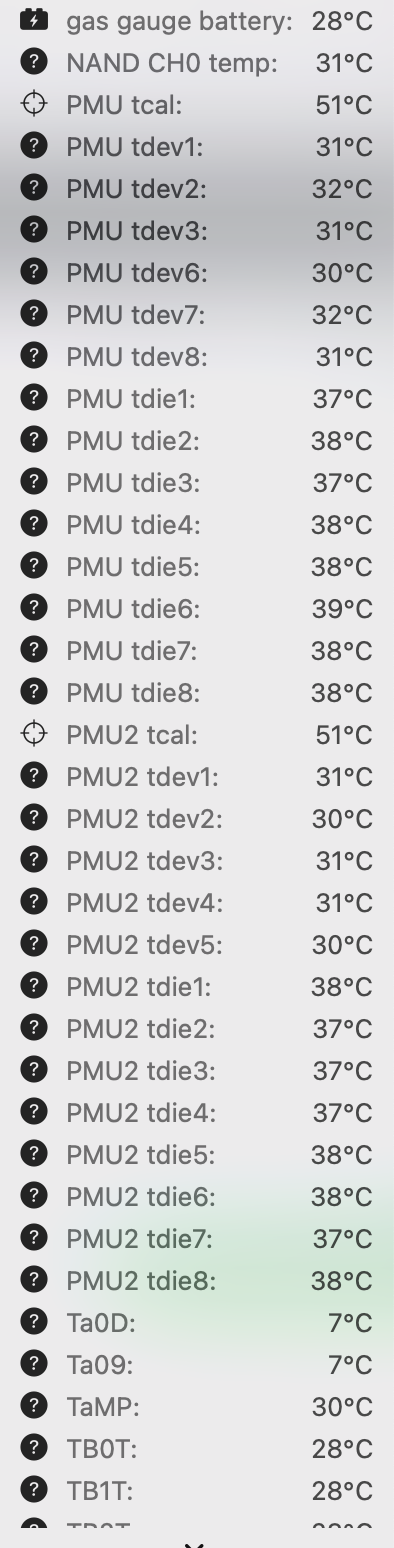
Hi, I'm testing a MacBook Air M2 (8/512) with macOS Monterey 12.4 (I'm planning to upgrade to Ventura Public Beta). Hot is giving always a 51 C. I include a screenshot of the thermal sensors output

It's maybe a bug


Thanks for reporting this.
Unfortunately, I haven't received my M2 yet.
I'll update the app as soon as I can test this on some hardware.

I've been using an Air M2 for a short time with Hot installed. Hot shows constant 51°C during light use, but when doing more CPU-intensive tasks Hot does show a higher temperature reading (I've seen it increase to the 60-65° range). In my case, 51°C is acting as a baseline temperature, but it isn't necessarily the only temperature that Hot will show, in contrast to what the other commenters experienced.

@sbdevelops Thanks for the report. My Air M2 will arrive next week, so hopefully I'll be able to check this.
OK folks, first experience with my M2 MacBook Air.
It looks like 51°/52° is the nominal temperature for the M2. Mine also reports this temperature - but it does change when doing stuff.
It's a bit warmer than my M1, which runs around 40° in standby. But the M2 also looks much more stable when it comes to temperature. This is probably why it feels like the temperature is not updating.
I did a test build with an Xcode project:
M1: 4 minutes 30 seconds, CPU at 99°. M2: 3 minutes 32 seconds, CPU stable at 80°.
I'll keep the issue open, as I have additional tests to perform.
The 51-52° nominal temperature theory doesn't seem right to me. When I run the iOS Simulator, the temperature shown by Hot raises to around 60°, but the temperature shown fluctuates by ±1-2°, which is especially apparent when I set Hot's refresh interval to one second. Wouldn't I still see similar fluctuations at a lower temperature, perhaps triggered by short bursts of activity (that aren't enough to raise the CPU temp above 51°)? Instead Hot maintains a steady temperature reading of 51℃.
I downloaded a trial of the iStatistica app for comparison, and here are two scenarios of what that app showed in comparison to Hot (note the CPU core temperatures):
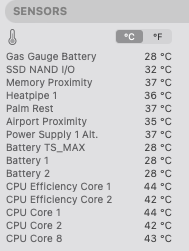 First scenario: when Hot showed 51℃, during low CPU usage. The iStatistica readings suggest that the CPU temp goes lower than 51°
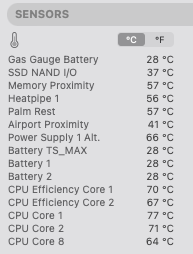 Second scenario: when Hot showed 57℃, after opening Xcode
Added via edit: Similar scenario with the app TG Pro, which shows lower than Hot at low CPU usage, and higher than Hot at high CPU usage (higher by 20℃, for example!).
@sbdevelops Thanks for the details!
The CPU temperature sensors have other names compared to the M1, meaning Hot does not actually detect CPU sensors. In such a case, it does the average of all available sensors.
This leads to a higher temperature in standby, mainly because of the PMU, and also probably a lower one with high computations.
I'll make an update for the new sensor names a soon as possible.
@sbdevelops That being said, I don't really think the values from iStatistica can be trusted as well, since it reports 2 efficiency cores and 3 performance cores. The M2 Air has 4 of each...
@macmade Got it. And actually I just looked in the App Store and saw that iStatistica hasn't been updated for the last 6 months, which explains why it wasn't seeing CPUs properly. On the other hand, the TG Pro app, which I hadn't found until I already posted my first comment (and quickly edited it), claims to be fully compatible with M2 and shows the proper number of efficiency/performance CPUs. It's showing 39-40℃ during light use, matching what you said your M1 runs at.
So to clarify, you're saying that right now, since Hot doesn't know which are the CPU sensors, it's taking an average of all sensors, but once you make the update with the new sensor names, it'll properly display what I assume will be an average of just the CPU sensors, which should give the correct reading?
I just got the M2 to a high-temp state (by exporting from Final Cut while running two iOS simulators - obviously not daily use anyway) and Hot was not reporting thermal pressure accurately. Hot showed "Nominal" while sudo powermetrics --samplers thermal showed "Heavy". Not sure if this is the same issue as CPU sensor names discussed earlier, but in case it's a different problem I wanted to mention it.
This one has been fixed in 942bb2e17464337e4087846a41ce915df049d104, but not released yet 😉
I believe that it is fixed after updating to macOS Ventura. It shows 39–40°C during light use or idle.

Version 1.7.0 has just been released: https://github.com/macmade/Hot/releases/tag/1.7.0
The names of sensors from the SMC are not documented by Apple, so it's quite difficult to know which is which. Every Mac also has different sensors.
An M1 MacBook Air has completely different sensors comparing to an M2 MacBook Air, for instance.
With version 1.7.0, you can now choose which sensor to use for the displayed temperature, from the Preferences' window.
You can also choose to display an average temperature, instead of the highest one.
I have the same problem on my MacBook Pro M2. I understand that there are other sensors which could accomplish what we want, and I understand that there are multiple cores with multiple purposes, and from what you wrote, we could use an average temperature, but it's the average of what ? All the readings ? If so, can't we have averages of cpu gpu ssd etc ?
Also, when I put it under load, the temperature goes above 51.
Screenshots for reference.
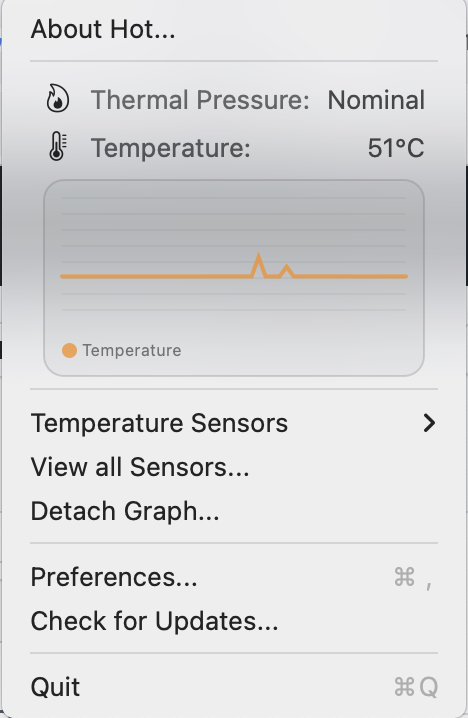

Up the issue, using it on MacBook Air M2 and it's always on 51 degrees.
