macdroid53
some notes on 1_0_StartingToDesignWithFreeCAD.pdf
A few notes from a new user, wrt the first tutorial.
Having had problems with setting constraints, from earlier, it would be useful for me, if you showed the list of constraints just before the sketch is closed, possibly mention the highlighting/selection process and the fact that they do not always all appear as icons, possibly the e,v,h shortcuts/whatever. Explain that when the sketch is closed, that the object may apparently vanish - you may need to fit the content on the screen. page 13 & 14, there is no 'block counterbore' at that stage, but name appears in model view. page 15 and elsewhere, the new sketch icon that you show does not look like my new sketch icon - icons in general are not very distinct in freecad, so I spent some time looking for a red blob. in 13, a mention of your black rendered lump would be better if made earlier, as would a note somewhere on setting the grids. Perhaps expand the few pages at the beginning, explaining how to set it up, and where the commands/icons, etc can be found.
Not sure if it is a good idea, but as you may recall, I was getting into a right mess with sketches not being dags, trying to install graphviz, etc. Perhaps a tutorial (maybe it has to be an encyclopedia!), on recovering from errors. Anyway, thanks for providing a path through the jungle, I hope I learn enough to be able to return to it when needed.
By the time I had done the first version, I had sort of had enough. I did complete the second version fairly quickly. I'm thinking more background for the first version, then possibly have the second approach coupled with another (using the part workbench, working directly with solids, as a separate tutorial, say.)

I have some questions and things I want to make sure I understand. Mixed in below:
Having had problems with setting constraints, from earlier, it would be useful for me, if you showed the list of constraints just before the sketch is closed, possibly mention the highlighting/selection process and the fact that they do not always all appear as icons, possibly the e,v,h shortcuts/whatever.
Do you mean, in general review the constraints list in the Tasks view? Do you refer to selection in the list? You say "they do not always all appear as icons". "They" would be the icons in the list, the icons on the gemetry in the 3D view? I ask because I'm not sure I've experienced this, ormaybe just my looking right at it and never noticing.
Explain that when the sketch is closed, that the object may apparently vanish - you may need to fit the content on the screen.
It could be because I have restore camera position checked in preferences. But, not a bad thing to mention.
page 13 & 14, there is no 'block counterbore' at that stage, but name appears in model view.
Umm...yeah I gues I should note that BLock_Counterbore is a separate document in the tree, and not the one the user should be creating.
page 15 and elsewhere, the new sketch icon that you show does not look like my new sketch icon - icons in general are not very distinct in freecad, so I spent some time looking for a red blob.
I don't know what red blob you describe. THe icon used reference to "new sketch" is the standard icon:
https://wiki.freecadweb.org/images/f/f1/Sketcher_NewSketch.svg
in 13, a mention of your black rendered lump would be better if made earlier, as would a note somewhere on setting the grids. Perhaps expand the few pages at the beginning, explaining how to set it up, and where the commands/icons, etc can be found.
And, in fact, this should be mentioned, since it is there because section view has been toggled so you don't have the part of the block that is infront of the sketch plane.
Not sure if it is a good idea, but as you may recall, I was getting into a right mess with sketches not being dags, trying to install graphviz, etc. Perhaps a tutorial (maybe it has to be an encyclopedia!), on recovering from errors. Anyway, thanks for providing a path through the jungle, I hope I learn enough to be able to return to it when needed.
Hmm...the graphviz seems to be a Windows issue. In Linux, typically there by default, even if not, a single terminal command and it's just done.
Have to think how to address this. Though, I hope the new user doesn't get into DAG issues following this tutorial...but, always possible.

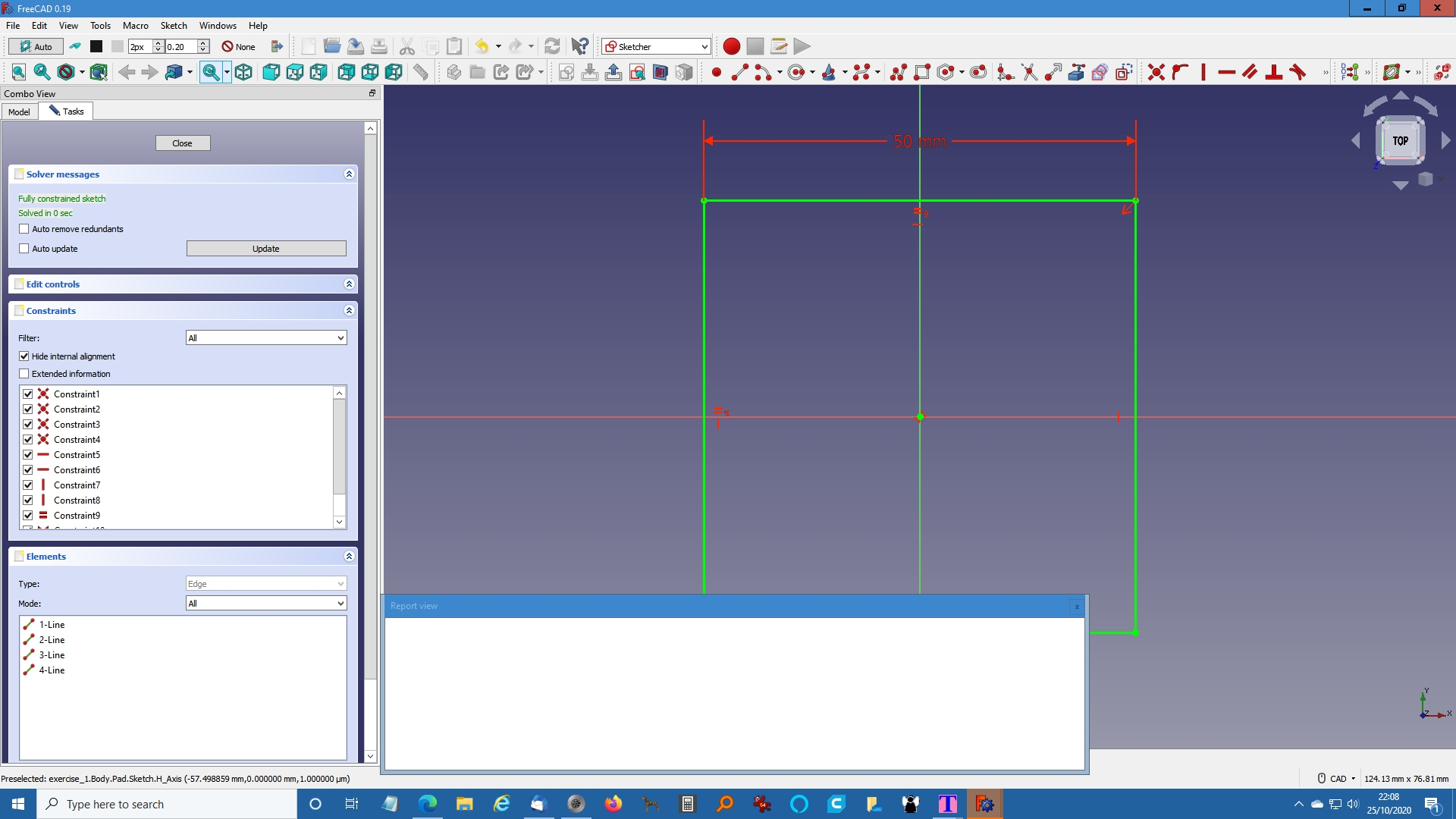
Thanks for your interest. I've commented a bit below, and attached a screen shot (con1.jpg)
Do you mean, in general review the constraints list in the Tasks view? Do you refer to selection in the list?
in con1.jpg as listed under constraints and elements, but you'll need to show all of them, the constraints window is 'constrained' .
You say "they do not always all appear as icons". "They" would be the icons in the list, the icons on the gemetry in the 3D view? I ask because I'm not sure I've experienced this, ormaybe just my looking right at it and never noticing.
If you look at the icon row in con1.jpg, there is a hardly noticeable arrow next to tangent constraint . Unless you know, about that, you'll miss the other constraint options. Larger icons, afaik, show fewer.
I don't know what red blob you describe. THe icon used reference to "new sketch" is the standard icon:
I opened the pdf in libre office writer, the icon does not always render correctly. In firefox, it's OK, and edge. Not your problem, but until I tried another viewer, I thought it was.
If I'd known about your sketch tutorial before I started out, I most likely would not have had the problems. As it is, it seems to be OK for me, going back and forth. I would not use sketches for this sort of model, I was able to very quickly use the parts workbench, (cube and two cylinders) to achieve the same, in about 1 minute, but I understand you were showing sketches as solutions to more complex shapes.
I think, if this is aimed at newcomers, then a separate module on setting up the system in some detail would be useful setting grid, how to get image to fill screen, etc. It would be quite lengthy, but could be tailored towards this type of problem. What I would really like to be able to do, would be to drag the object around, scale, rotate, etc, using the mouse, as in openscad, cura, meshlab, etc.
btw, the second tutorial, using hole - doesn't work for me, the counterbore does not show when window closed. I mentioned it on the forum. https://forum.freecadweb.org/viewtopic.php?f=8&t=51522&p=442713#p442713 Also, I think you, all of you guys helping with tutorials, need to state which version you are using. In fact, on the hole window, I have a reverse tick box, bottom right corner, not shown in your image.