

 lovasoa
How we save and load safe text?
This component returns HTML. Is there a way to get it to return (and accept) plain text?
I don't want to save HTML to our server, because then any simple hacker can inject any HTML tags they want into this component.

It's your responsability to sanitize the output of this component to your needs. Even if this component returns plain text, it does not prevent a hacker to send HTML and script tags in api payloads to your server, by using curl.

function stripHTML ( htmlString ) {
  const tmp = document.createElement('div');
  tmp.innerHTML = htmlString;
  return tmp.textContent;
}


@thomfoolery line breaks are lost with this method
stripHTML('line1<br>line2') => 'line1line2'

Hi! I've a problem using the solution proposed by @thomfoolery.
Inside my component I have an editable div, and its value is bind to a state variable.
<ContentEditable
html={this.state.entries[entryIndex].rawText}
disabled={this.state.entries[entryIndex].disabled}
onChange={this.entryChange.bind(this, entryIndex)}
/>
entryChange(entryIndex, event) {
    const entries = this.state.entries.slice();
    entries[entryIndex].rawText = this.stripHTML(event.target.value);
    this.setState({
        entries : entries
    });
}

stripHTML ( htmlString ) {
    const tmp = document.createElement('div');
    tmp.innerHTML = htmlString;
    return tmp.textContent;
}
When I write inside the div all works fine until I type the space bar, because the caret goes at the start of the div.
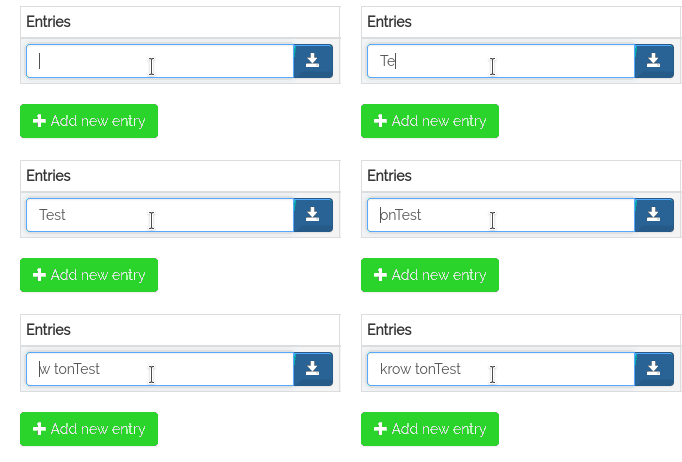 .
.
How can I solve this problem?
Thank you.

@SilvioMessi, because you are changing the content the caret position is being reset. To combat this you need to measure, and then save the current caret position and then restore it after the content has been replaced.
here is some sample code to help
// no operation
const noop = () => null

/**
 * @function
 * @description
 * @param  {DOMElement} container The container in which the cursor position must be saved
 * @return {Function}             A function used to restore caret position
 */
function selectionSaveCaretPosition(container) {
    const selection = window.getSelection();

    if (!selection || selection.rangeCount === 0) {
        return noop;
    }

    const range = selection.getRangeAt(0);
    const clone = range.cloneRange();

    // find the range start index
    clone.selectNodeContents(container);
    clone.setStart(container, 0);
    clone.setEnd(range.startContainer, range.startOffset);
    const startIndex = clone.toString().length;

    // find the range end index
    clone.selectNodeContents(container);
    clone.setStart(container, 0);
    clone.setEnd(range.endContainer, range.endOffset);
    const endIndex = clone.toString().length;

    return function restoreCaretPosition() {
        const start = getTextNodeAtPosition(container, startIndex);
        const end = getTextNodeAtPosition(container, endIndex);
        const newRange = new Range();

        newRange.setStart(start.node, start.position);
        newRange.setEnd(end.node, end.position);

        selection.removeAllRanges();
        selection.addRange(newRange);
        container.focus();
    };
};

/**
 * @function
 * @description This function is used to determine the text node and it's index within
 * a "root" DOM element.
 *
 * @param  {DOMElement} rootEl The root
 * @param  {Integer} index     The index within the root element of which you want to find the text node
 * @return {Object}            An object that contains the text node, and the index within that text node
 */
function getTextNodeAtPosition(rootEl, index) {
    const treeWalker = document.createTreeWalker(rootEl, NodeFilter.SHOW_TEXT, function next(elem) {
        if(index > elem.textContent.length) {
            index -= elem.textContent.length;
            return NodeFilter.FILTER_REJECT;
        }
        return NodeFilter.FILTER_ACCEPT;
    });
    const node = treeWalker.nextNode();

    return {
        node: node ? node : rootEl,
        position: node ? index : 0,
    };
};
@sharpensteel, this is in congruence with the method name, stripHTML.
It strips out any markup, including line breaks defined with markup.
i ended up with variation of this solution: https://stackoverflow.com/questions/22677931/react-js-onchange-event-for-contenteditable#answer-27255103
it's just simple wrapper component around pure <div>. it monitors changes in div and emmits text version of html content (converter: html-to-text)
What would be the interest of using a contenteditable element if you only want plain text ? A simple <input> or <textarea> would be simpler, wouldn't it ?

See here for an example of how to sanitize the html input : https://codesandbox.io/s/n067mmwjym
Hi I have a problem with ave and load safe text I am sending the text to a redux store to send it an API and response with other text when I save it in redux it looks like the following
__ this is how it looks & nbsp; & n bsp ; lik& n bsp;"

@ramisalem And what do you expect ? If you do not want html, then you could use a simple textarea. I you want to sanitize the html or reformat it, then you can use a js library for that.
What would be the interest of using a contenteditable element if you only want plain text ? A simple
<input>or<textarea>would be simpler, wouldn't it ?
And what do you expect ? If you do not want html, then you could use a simple textarea. I you want to sanitize the html or reformat it, then you can use a js library for that.
Elements marked withe contenteditable that aren't input / text naturally expand to the size of their content. With input / textarea you would have to use JavaScript to do that. I.e: https://css-tricks.com/auto-growing-inputs-textareas/
Regardless, supplying this use case would help wary developers from otherwise creating something that has a security risk attached. I see no reason that you can't support this by providing alternative props or some sort of a toggle. This is a valid use case and I don't think it should go ignored.
Also if the text going into the component has HTML (or something that looks like it) then it might get processed as such even though it's just plain text. So as a user of this component I would have to make sure everything is encoded. In addition to that, say I wanted to remove HTML completely and used something like DOMParser or created an element and called textContent: then I would run in to small bugs such as when I start typing <a but through those methods the text would come back as blank because it thought it was HTML. Another hiccup manifests when all text is removed from the element. You would expect that it would become an empty string but it returns <br /> instead.
Without hassle on the user's side, if all innerHTML in this library could be toggled to innerText then this issue would be resolved. Here is my makeshift component using that StackOverflow answer as a base:
class ContentEditable extends React.Component {

    getDOMNode() {
        return ReactDOM.findDOMNode(this);
    }

    shouldComponentUpdate(nextProps) {
        return nextProps.value !== this.getDOMNode().innerText;
    }

    componentDidUpdate() {
        if (this.props.value !== this.getDOMNode().innerText) {
           this.getDOMNode().innerText = this.props.value;
        }
    }

    emitChange() {
        const value = this.getDOMNode().innerText;
        if (this.props.onChange && value !== this.lastText) {
            this.props.onChange({
                target: {
                    value: value
                }
            });
        }
        this.lastText = value;
    }

    render() {
        return <div {...this.props} onInput={() => this.emitChange()} onBlur={() => this.emitChange()} contentEditable>
            {this.props.value || ""}
        </div>;
    }

}

@k3zi : This does not work. This prevents the user from typing text anywhere but at the very end of the contentEditable div. Trying to write something in the middle would cause a cursor jump.
@lovasoa I'm not seeing that issue. Could you share your setup? I have it working here: https://codesandbox.io/s/simple-rich-text-editor-in-react-forked-xzbm9
Note: I did change the name of the incoming prop to value.