

 logseq
org-mode property syntax can make app unusable (Mac + iOS)
What happened?
Following the documentation on https://docs.logseq.com/#/page/term%2Fproperties I tried using to define properties in a template.
First I want to note that the implementation is wrong, the org-mode syntax is #+PROPERTY: property_name property_value NOT #+PROPERTY_NAME: property_value, see https://orgmode.org/manual/Property-Syntax.html
This causes several errors:
- The property name and value is invisible.
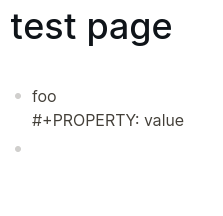
- Two bullet points get rendered on the same line:
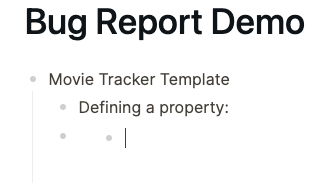
- You can't click on the area after the first bullet point, you have to navigate via cursor from above (from below doesn't work either)
- Text entered after the second bullet point is deleted.
- UI disappears after clicking on second bullet point, no navigation possible:

It doesn't appear to crash (on desktop), you can close the window and open a new one. But the error also occurs on the iOS app.
Reproduce the Bug
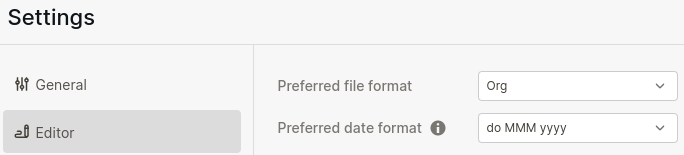
- Make sure file format is set to org.
- Try to create properties on block level, for example in a template:
 4. Hit enter and you will experience the behaviour described above.
Expected Behavior
Working properties like in markdown mode. If you do use the :PROPERTIES: syntax (example below) everything works fine, but it is a bit tedious.
:PROPERTIES:
:property_name: value
:END:
Screenshots
No response
Desktop Platform Information
Mac OS Ventura 13.0 Logseq Version 0.8.10 (0.8.10)
Mobile Platform Information
iPhone 12 mini, iOS 16.0
Additional Context
No response

I think both syntax are supported in Logseq. #+PROPERTY_NAME: property_value is for convenience.
Can you provide the raw text so we may have a further look?

I think both syntax are supported in Logseq.
#+PROPERTY_NAME: property_valueis for convenience.
But this way you create a new syntax in the raw files which isn't supported in org-mode.
Can you provide the raw text so we may have a further look?
Sure, here is the raw text and how it renders in Logseq:
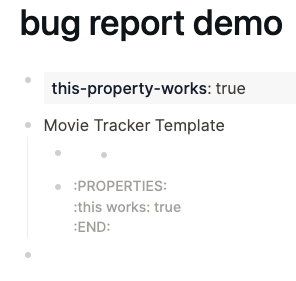
#+this_property_works: true

* Movie Tracker Template
** #+this-prop-creates-error: true
** :PROPERTIES:
:this works: true
:END:
*
Apologies if this is the incorrect manner of appending something to the issue but this problem extends to Windows as well.
Same problem, symptom and visual bug occurs as the original report. What I have observed however is when a property is created through the PDF Annotation process, this renders and works perfectly. However, trying to copy this fails to work, and returns the same issue. I have provided a video to better display the problem which hopefully can help triage the problem further.
Desktop Platform Information
Windows 10 21H1 Logseq Version 0.8.10
https://user-images.githubusercontent.com/53397052/200662725-67b4f3b6-64eb-462c-8ded-1794a42daa13.mp4

This is a bug, also on Linux on 0.8.10
i tried with both syntax mentioned by OP and the documentation indicates that
Org Mode
Extended syntax
[[term/properties]]
syntax: #+PROPERTY: value
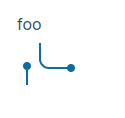
should work, but it does not. And clicking the ghost block can freeze the app.


@robwood22
@gotjoshua
can you confirm you are using the .org as the file extension for the page?
can you confirm you are using the
.orgas the file extension for the page?
confirmed
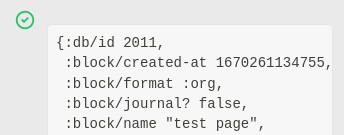
if i add the prop after hitting shift enter then it renders
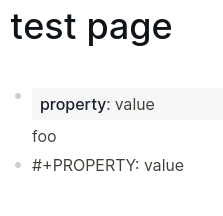 if i put the prop in as the only content of the block it looks like this:
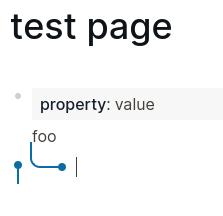
I think both syntax are supported in Logseq.
#+PROPERTY_NAME: property_valueis for convenience. Can you provide the raw text so we may have a further look?
I want to use this opportunity to suggest against teaching users to use this syntax or even implementing this syntax. As it currently stands, even for a "logseq org" user there is no benefit to using #+customprop over :: . Both are not recognized by org-mode. #+customprop may look like org-mode but visual resemblance serves no purpose. #+ is (1) less convenient to type, (2) annoyingly triggers tag-completion pop-up, and (3) does not support the property autocompletion of :: .
I'd suggest
- either teach everyone to use double colon (not only does it have the 3 above-mentioned advantages, but it's at least also used in roam and obsidian; where else is #+customprop used? not even emacs) ; this way, there will also be fewer bugs related to #+customprop , and it will be easier, for logseq team as well as plugin creators, to develop new features regarding properties
- or make it easier for org users to input property drawers, clarify in the documentation about the difference between #+keyword (such as #+title ) and a custom property, and if resources permit, work on feature parity (autocomplete).

I want to use this opportunity to suggest against teaching users to use this syntax or even implementing this syntax. As it currently stands, even for a "logseq org" user there is no benefit to using #+customprop over
::. Both are not recognized by org-mode.
Maybe I am misunderstanding you but #+PROPERTY_NAME: property_value IS official org-mode syntax. Just look at https://orgmode.org/ it is used right there in the first example on the start page.
@Turil By the first example do you mean #+title etc.? That is a "keyword", meaning it has special significance in org-mode. What I meant is #+customprop (emphasis on custom) is not valid org syntax. It proves my point that keywords and properties are confusing in org-mode and logseq has made it worse.
@Turil Wait, I'm confused now because I realized you were the original poster and you were saying the same thing as me earlier:
First I want to note that the implementation is wrong, the org-mode syntax is #+PROPERTY: property_name property_value NOT #+PROPERTY_NAME: property_value
#+PROPERTY_NAME: property_value is for convenience.
But this way you create a new syntax in the raw files which isn't supported in org-mode.
What has caused your understanding to change? I might have misunderstood it as well.
Sorry I had a major brainlag this morning, ignore that post please. You are absolutely right.
Sorry I had a major brainlag this morning, ignore that post please. You are absolutely right.
happens to everyone :) i created a forum post, feel free to upvote: https://discuss.logseq.com/t/abandon-the-customprop-syntax-unique-to-logseq/14403
I came here exactly for this issue!
Glad to see I can use the :PROPERTIES: :END: block instead

I'm still trying to use logseq in the "Org" mode. Being able to do this is a huge potential win for me because I can then also interact with my notes in emacs. However, this issue around properties has been causing me a lot of trouble. I agree with the commenter above that suggested not supporting the #+ syntax. Has there been any work on this topic or a plan about the direction that things should go?

I'm also getting this problem. It seems like the linking between pages won't work as well.

Nearly a year and a half later and, based on Logseq's official documentation, Org properties are still fundamentally and demonstrably broken :/
