

 localForage
workbox database support
Is it possible to integrate into an existing workbox database?
When using service workers - workbox (PWA solution for front-end) creates a database where failed HTTP requests are stored. It looks like this:
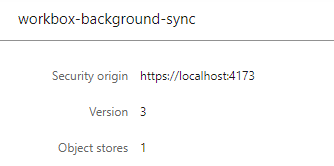


also, see that key path 'id' is used.
So, I am trying to connect to this database and retrieve all keys and values:
      import localforage from "localforage";

      var store = localforage.createInstance({
        name: "workbox-background-sync",
        storeName: "requests",
      });
and
      store
      .keys()
      .then(async (keys) => {
        for (let key in keys) {
          console.log(key); // 0 - index
          var itemKey = keys[key]; // 76
          var val = await store.getItem(String(itemKey));
          console.log(val ); // null !!!
        }
      })
      .catch(function (err) {
        console.log(err);
      });
The localforage is able to get the keys just fine and loop over them. But the value is retrieved as null. No errors are thrown.
Furthermore, out of curiosity I tried inserting my own data into the store (not because I actually plan on using this):
    const add = async () => {
      try {
        var res = await store.setItem(56, { id: 56, data: "fasdf" });
      } catch (error) {
        console.error(error);
      }
    };
and the exception is thrown:
DOMException: Failed to execute 'put' on 'IDBObjectStore': The object store uses in-line keys and the key parameter was provided.
So my question is - is the workbox database not compatible with localForage? What exactly makes it incompatible and what solutions (maybe other indexeddb wrappers) would allow me to read the data from it?
My aim at this point is just reading the data so it would be ideal if localforage could do at least just that..
