

 lncm
lncm
GUI for Setup
We discussed the other night about creating a Web App GUI for making it easy to work with the box, including:
- A setup wizard for network configuration
- Bonjour discovery (xxx.local) for connecting
- The ability to create invoices and show the QR code
- Some kind of management console for funding, spending, opening channels, etc.
- (Possibly) A permissions system to manage multiple devices creating invoices and spending
Luckily, it looks like LND supports GRPC out of the box, so as far as I can tell, it'll enable us to do HTTP calls directly from clients in a web app (no special middleware required). We could bundle a a static HTML/JS app with very little overhead (served on the device via local network and/or tor) which could talk directly to the LND node, or through a reverse proxy on the box.
The main issues we face are regards to security. We need to think about how the bootstrap process can be secured, followed by general use (perhaps some kind of secure token is stored on the clients, so we don't need to rely on HTTPS, which won't work with .local, and/or a protocol such as SRP), as well as system reset / key recovery (it was mentioned that we could use a seed to generate creds for both the node and this system).
I expressed interested in helping with the development of this, including playing with the recently released blueprint framework.
Ref: https://api.lightning.community/ https://github.com/lightningnetwork/lnd/tree/master/lnrpc https://grpc.io/

-
The box already has Avahid installed which uses the same host discovery as "bonjour".
-
I think we should use the invoicer as it should be agnostic between the lightning servers, all you have to do is a simple REST call. I'm more in favor of c-lightning because it can easily be bootstrapped with all the block data and works with pruned node. Neutrino is not an option yet if you actually want to take real money right now. But it's a far fetched goal. Another issue with LND is its not designed for a hands off automated install, and do run it in detached mode feels a bit hacky (tmux/screen). Also need to work out a way to automate lncli createwallet and lncli unlock, as thats another minor annoyance.
-
Dashboards, theres already dashboards around for LND. Should probably take a look at those before reinventing the wheel

-
Yes, we've got avahi / bonjour capability out of the box.
-
Invoicer is useful since we can make it abstract differences between c-lightning & lnd, possibly even bitcoind for on-chain invoicing. It can also take care of authentication properly and act as another layer of security.
Nginx might be able to filter RPC for security but it can't abstract differences between APIs as far as I'm aware.
- I'm in favour of developing a new dashboard since that will be faster and result in something we are more familiar with and better able to extend going forward.


Developing new will be faster than using an already existing one?
Yes, I think we will be better off rewriting a dashboard in React than using the ugly Angular one we saw. Given our familiarity with React and lack thereof for Angular, it will be faster.
@hitchcott So given today's discussion we want to limit this to just the initial setup wizard initially. I'm going to start work on automating the WiFi hotspot on the Linux side.
Key elements appear to be:
- React frontend setup wizard @hitchcott
- Golang http server & backend for wpa_supplicant.conf @meeDamian
- Access point & redirection to setup wizard @AnotherDroog
Here's an overview of what the initial setup could look like:
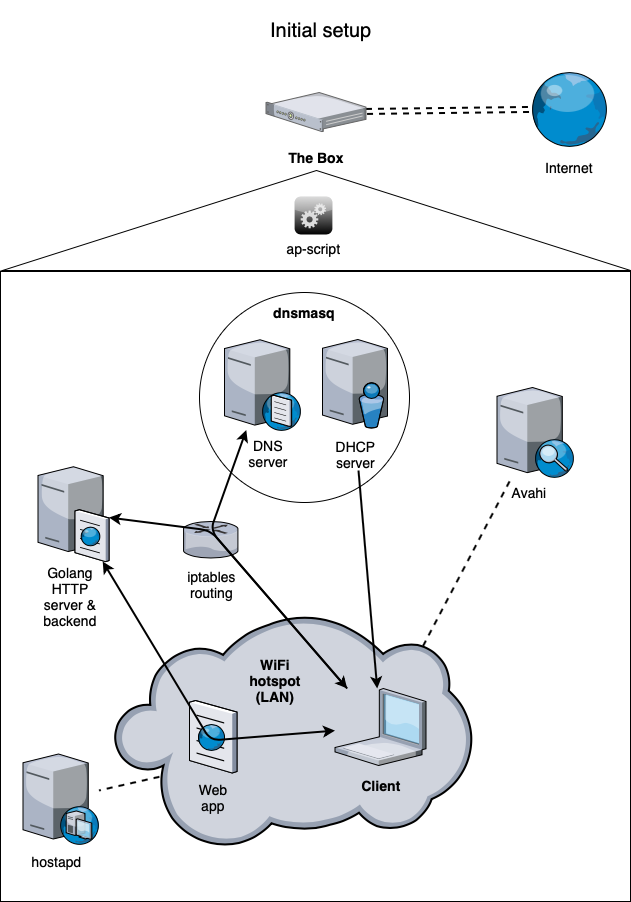
System background:
- ap-script.sh is executed conditionally based on whether there is an Internet connection.
- The script orchestrates safe replacing of config files (dnsmasq, hostapd).
- systemd reloads are issued to networking relevant services (dnsmasq, hostapd, etc).
- iptables rulesets are changed, firewall is changed to accommodate services (if applicable).
- hostapd and golang server are started.
Client side:
- Client connects to broadcast SSID, automatically makes DHCP lease request.
- Device gets IP address lease from DHCP server (dnsmasq), including DNS server announcement.
- Captive portal mode automatically opens browser.
- DNS request goes directly to dnsmasq or is rewritten by iptables routing and redirected to our DNS server.
- DNS server returns golang HTTP server address.
- Stray TCP requests on port 80 are redirected to Golang server
Web app:
- Backend provides a list of SSIDs that have previously been captured.
- User selects the appropriate SSID from the list.
- User optionally enters a custom SSID.
- User enters WPA password for SSID.
- Backend updates wpa_supplicant.conf
Looks cool.
A suggestion for the backend server that writes the wpa_supplicant.conf file, I think it should append to it. So that the box eventually has a list of remembered wifi hotspots
We've got to the point where the alpine base system provides the hotspot and api now.
Specifically there are api endpoints for status, scan, connect, disconnect.
They can be accessed like this, http://localhost:8080/status
Eventually, we could simply extend this mechanism to expose more system tools already available such as setup-hostname and so on.
We can use it as inspiration and build our own golang binary with privileged docker container, instead of modifying iotwifi, probably better.
By the way, I have changed the title of this issue to reflect splitting into two parts, this one being related to setup GUI and #29 for PoS GUI.
It’s going to be integrated with the alpine base very soon.
In the meanwhile you can look at iotwifi container https://github.com/cjimti/iotwifi
On Mon, Nov 5, 2018 at 14:12, BT [email protected] wrote:
Have you put the code anywhere for the hotspot?
— You are receiving this because you were assigned. Reply to this email directly, view it on GitHub, or mute the thread.
Some initial ideas for the flow. As you can see, I'm trying to re-use as much of the UI as possible throughout the different steps.
We give the user the option to configure everything at his desktop before connecting to the box (for security / UX).

Good work on the flow!
Shall we turn it into a draw.io diagram? I also like using Balsamiq for wireframes, any suggestions?
To summarize we've got at least:
- Select from list: WiFi SSID
- Password: WPA password
- Enter: hostname for local machine which doubles as lightning alias
- Select from list: swap device (optional but highly recommended)
- Select from list: storage device (optional but highly recommended)
How do we best consolidate these user-facing passwords into two? One for regeneration of wallet and one for backend admin access?
- Password: user account (for ssh, sudo, web-admin, etc) [min. 8 char]
- Password: lightning wallet (needed for lncli unlock) [min. 8 char]
- Password: lnd seed (to regenerate lightning wallet) [min. 8 char]
- Password: lnd seed cipher (to decrypt wallet seed)