
saltdash
 saltdash copied to clipboard
 lincolnloop
A read-only dashboard for Salt jobs




Salt Dash
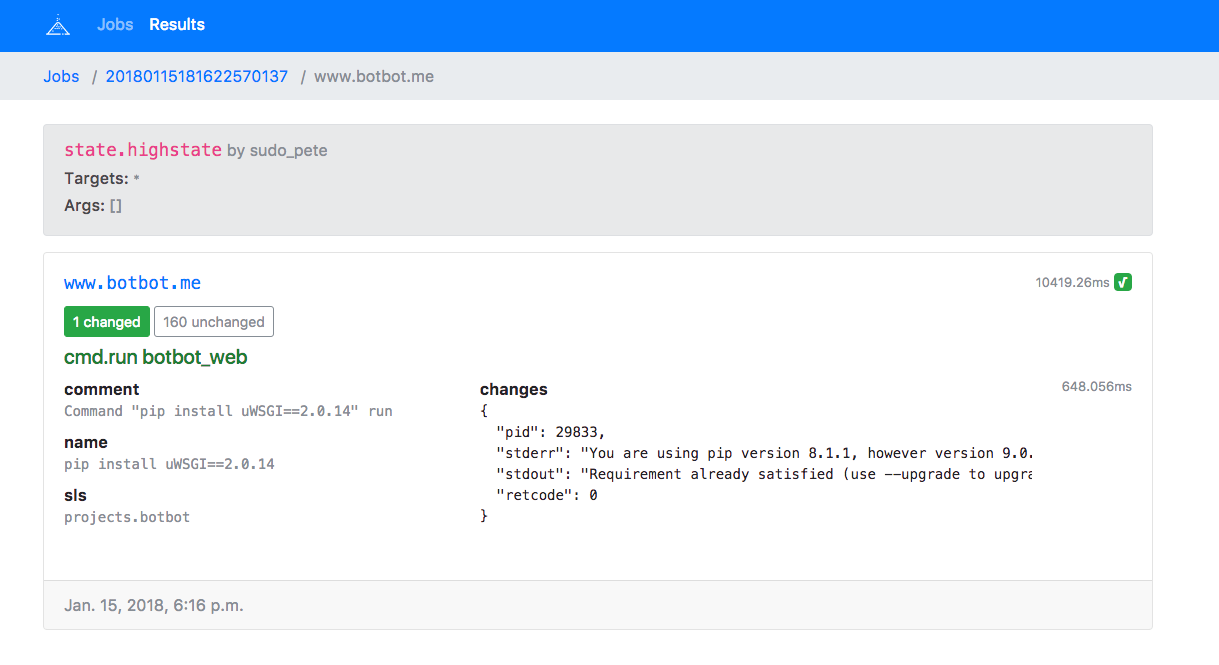
Read-only web interface to read from Salt's external job cache using the pgjsonb returner.
Development
Pre-requisites
- Node.js for building the front-end.
- Pipenv for the back-end.
- A Postgresql database
Installation
git clone [email protected]:lincolnloop/saltdash.git
cd saltdash
make all              # download dependencies and build the world
$EDITOR saltdash.yml  # change settings as needed
pipenv shell          # activate the Python virtual environment
saltdash migrate      # setup the database
saltdash runserver    # run a development server
Client-side
Uses parcel. To start a development environment with live reloading, run:
cd client
yarn run watch
Running in Production
pip install saltdash
saltdash runserver is not suitable for production. A production-level
webserver is included and can be started with saltdash serve. If Docker is
more your speed, there's a Dockerfile as well.
⚠️ The built-in webserver does not handle HTTPS. The default settings assume the app is deployed behind a proxy which is terminating HTTPS connections and properly handling headers. If this is not the case, you should read this and take appropriate actions.
Configuration
Configuration can be done via environment variables, a file, or a combination
of both thanks to Goodconf. By default
it will look for a YAML file named saltdash.yml in /etc/saltdash/ or the current
directory. You can also specify a configuration file with the -C or --config
flags. saltdash-generate-config can be used to generate a sample config file
containing the following variables:
- DEBUG
Enable debugging.
type:bool - SECRET_KEY REQUIRED
a long random string you keep secret https://docs.djangoproject.com/en/2.2/ref/settings/#secret-key
type:str - DATABASE_URL
type:str
default:postgres://localhost:5432/salt - ALLOWED_HOSTS
Hosts allowed to serve the site https://docs.djangoproject.com/en/2.2/ref/settings/#allowed-hosts
type:list
default:['*'] - HIDE_OUTPUT
List of modules to hide the output from in the web interface.
type:list
default:['pillar.*'] - GITHUB_TEAM_ID
type:str - GITHUB_CLIENT_ID
type:str - GITHUB_CLIENT_SECRET
type:str - SENTRY_DSN
type:str - LISTEN
Socket for webserver to listen on.
type:str
default:127.0.0.1:8077
GitHub Team authentication is included by setting the relevant GITHUB_* variables.
You'll need to setup an OAuth App at https://github.com/organizations/<org>/settings/applications with a callback URL in the form: https://your-site.example.com/auth/complete/github-team/
To retrieve your team IDs:
- Create a token at GitHub
curl -H "Authorization: token <token>" https://api.github.com/orgs/<org>/teams
Setting up Salt
Once you've setup a Postgresql database using saltdash migrate, connect Salt's external job cache to the database by adding the following lines to /etc/salt/master.d/job_cache.conf:
# Replace items in brackets with actual values
master_job_cache: pgjsonb
returner.pgjsonb.host: [db-host]
returner.pgjsonb.pass: [db-password]
returner.pgjsonb.db: [db-database-name]
returner.pgjsonb.port: [db-port]
returner.pgjsonb.user: [db-user]
Restart your salt-master and all future jobs should get stored in the database.
If you have lots of jobs, you'll probably want to purge the cache periodically. A helper command is provided to do just that, run:
saltdash purge_job_cache [days_older_than_to_purge]
If you want to automate this, use the --no-input flag to bypass the confirmation prompt.
Protecting Secrets
It is very easy to accidentally expose secrets in Salt via the logs and/or
console output. The same applies for Saltdash. Since secrets are often stored
in encrypted pillar data, by default the output from any pillar.* calls is
hidden via the HIDE_OUTPUT setting. If you have additional modules you know
expose secret data, they should be added to the list.
There are many other ways secrets can leak, however. A few general tips (which are good practice whether you use Saltdash or not).
- Set
show_changes: falseon anyfile.*actions which deal with sensitive data. - Set
hide_output: trueon anycmd.*state which may output sensitive data. - When working with files, use templates or
pillar_contentswhen appropriate. - Avoid passing secrets as arguments to modules or states. Typically Salt can read them from a pillar or config instead.
Attributions
Icon by BornSymbols used under CCBY license.
 lincolnloop