

 libobjc
macos 10.15 build error

clangclangclangclang: : : : errorerrorerrorerror: : : linker command failed with exit code 1 (use -v to see invocation)linker command failed with exit code 1 (use -v to see invocation)linker command failed with exit code 1 (use -v to see invocation): linker command failed with exit code 1 (use -v to see invocation) "_OBJ_sn2nid", referenclang: error: linker command failed with exit code 1 (use -v to see invocation) _pkey_ec_cclang: error: linker command failed with exit code 1 (use -v to see invocation)
clang: error: linker command failed with exit code 1 (use -v to see invocation)


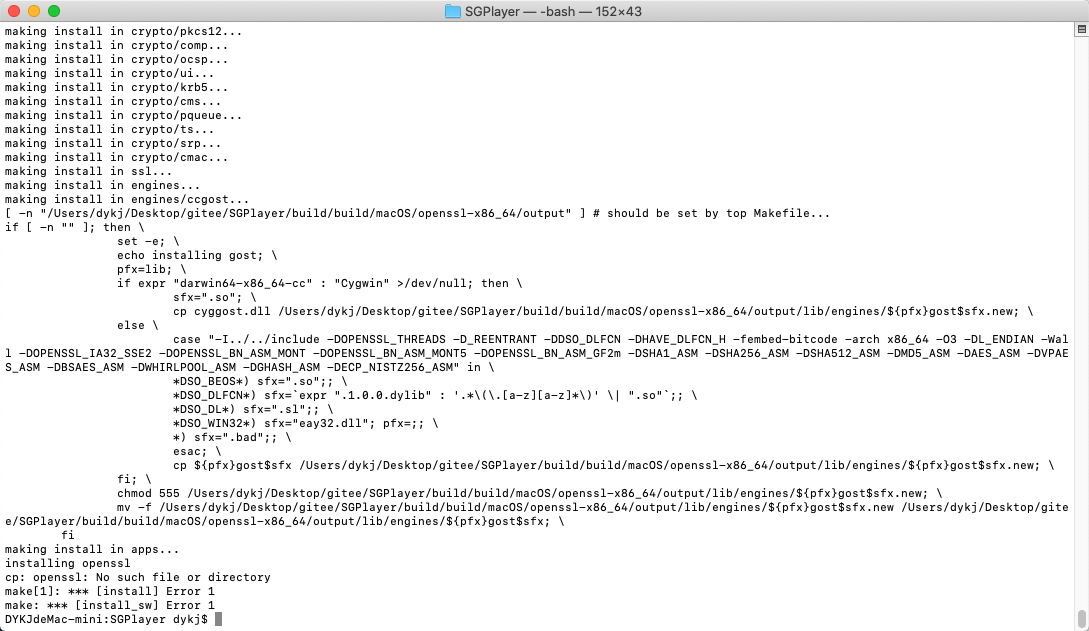
@FKV587 你好,请问你是解决了这个编译错误问题么?我看你又提了视频缓冲时间太短的问题。 cp: openssl: No such file or directory make[1]: *** [install] Error 1 make: *** [install_sw] Error 1
@GitHubSiegeLion 之前使用MacMini 编译失败 后面使用笔记本电脑就编译成功了 具体是什么情况就不清楚了 因为笔记本电脑编译过很多库 里面修改了很多设置
Any Update on this, it seems to only affect the iOS build as the macOS build is good.

solution:
- install and update openssl: $ which openssl $ openssl version $ brew install openssl $ brew upgrade openssl $ brew link openssl --force
- run the script by su: sudo ./build.sh iOS build
good luck

@FKV587 你好,请问你是解决了这个编译错误问题么?我看你又提了视频缓冲时间太短的问题。 cp: openssl: No such file or directory make[1]: *** [install] Error 1 make: *** [install_sw] Error 1
save issue

Any Update on this, it seems to only affect the iOS build as the macOS build is good.
Yes, macOS build is OK but iOS build doesn't work
@FKV587 你好,请问你是解决了这个编译错误问题么?我看你又提了视频缓冲时间太短的问题。 cp: openssl: No such file or directory make[1]: *** [install] Error 1 make: *** [install_sw] Error 1
Same issue? Any fix?
