

 lepoco
Wrong background color on W11 Insider (22H2)
Describe the bug
Hi, i find a problem with a background on Windows 11 22H2 (22621.169).
I not have this problem on 21H2 (tested with two different computer).
You can si this problem only when your wpf window is focused !
To Reproduce
Just focus the WPF Window
How can fix it
You can disable "Show accent in title and border window" on the Settings of Windows but the Background is Black.
Screenshots
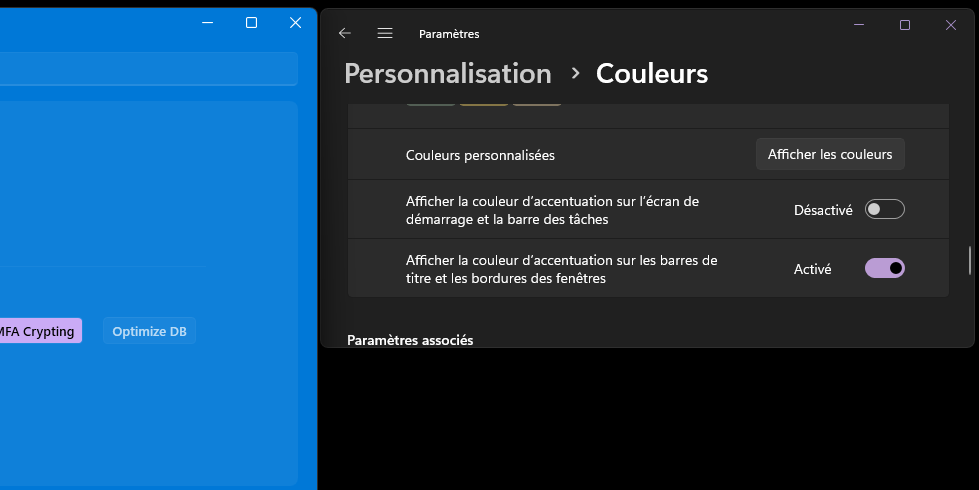

On 21H2
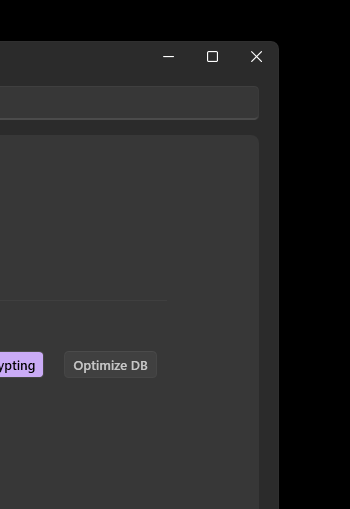

Same on DEMO Apps with 1.2.7 version AND with the last devlopement version (commit 838cd35032e11d525585c8834ed79e01abf2d7ab)
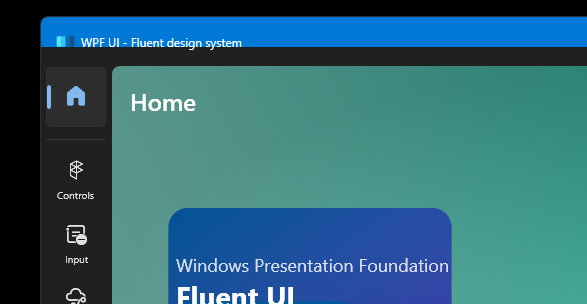
It seems that non-client-area is properly transparent and client-area is overlapping the titlebar but is not over it. Black background looks like error when removing the client background for the Mica effect, and in second case, the titlebar should be 0 or still transparent. The solution is to either disable this effect (titlebar accent) or remove titlebar / give it zero height. Because although the original buttons are not visible, the core titlebar itself is still there and takes the accent color

I can confirm that removing the Mica effect and changing it to WindowBackdropType="None" gets rid of the accent.

Titlebar showing blue is killing me too, when changing themes at runtime the default backdrop is Mica. Adding the Wpf.Ui.Appearance.BackgroundType.None when applying the new theme seems to work.
EX: Wpf.Ui.Appearance.Theme.Apply(Wpf.Ui.Appearance.ThemeType.Light, Wpf.Ui.Appearance.BackgroundType.None);

Titlebar showing blue is killing me too, when changing themes at runtime the default backdrop is Mica. Adding the
Wpf.Ui.Appearance.BackgroundType.Nonewhen applying the new theme seems to work.EX:
Wpf.Ui.Appearance.Theme.Apply(Wpf.Ui.Appearance.ThemeType.Light, Wpf.Ui.Appearance.BackgroundType.None);
@ByronAP @blakepell This helped my problem. Thanks!

