

 leggett
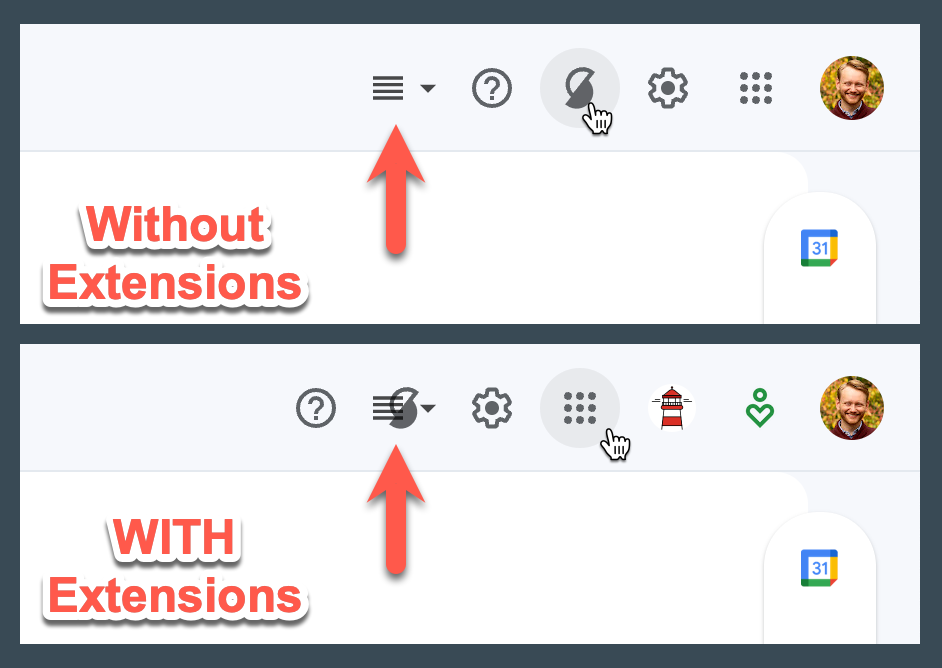
"Toggle split pane mode" button doesn't float to accommodate variability in upper-right menu
I have a couple extensions that add menu items to the upper-right corner menu on Gmail. The Simplify button itself floats left to accommodate the additional items, as expected, but the "toggle split pane mode" that is moved by Simplify into this space remains in a fixed position (and thus, collides with other menu items):

It is possible you reloaded Gmail in conversation view and then went to list view (causes this issue b/c the split pane toggle isn't loaded in conversation view).
OR you have some extensions I'm not aware of (I manually place the icons added by over 30 extensions in the top right corner and make sure nothing overlaps).
Can you tell me what other extensions you have?

I did not change views. However, the extensions are internal extensions, unfortunately, so you wouldn't have tested against them. I'll send you an email with more details.