

 leggett
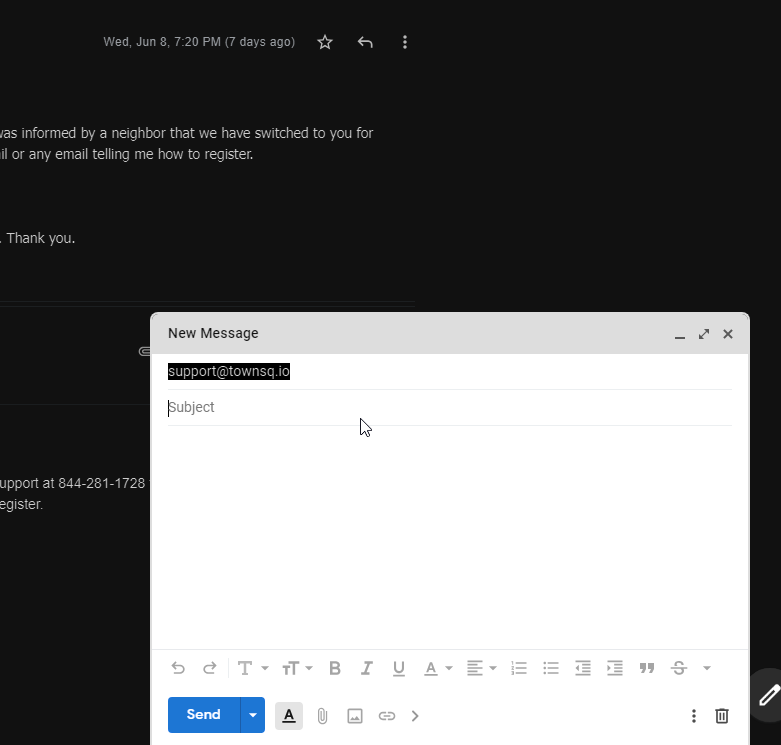
Compose window turns white sometimes
Should always be dark mode but it sometimes randomly switches to white and back again. I'm not sure what triggers it.
Simplify v.2.5.16 - Configuration: aAX ca3 caI caL cfC cfO cfQ cfR cfU composeActions composeFab darkTheme dateGroup fontMsg hideLabelChips hideListCount hideMsgCount hideTabIcons inMsg invertAddons invertCompose izBgDefault listWidthLg lowDensity minimizeChat msgWidthSm nPane navOpen newUI openMole simplify supExtWarn - System: Mozilla/5.0 (Windows NT 10.0 Win64 x64) AppleWebKit/537.36 (KHTML, like Gecko) Chrome/102.0.5005.63 Safari/537.36 - Window: 1562 x 1022 (101pct zoom) - Language: en


I noticed that the Microsoft Store version of the extension was at .16 and the Chrome Store version is .17. I am installing the Chrome Store version and trying again. I realize that the MS version is behind due to their approval process.
Ok on the latest version from the Chrome store I still see issues with it turning white, but it's random:
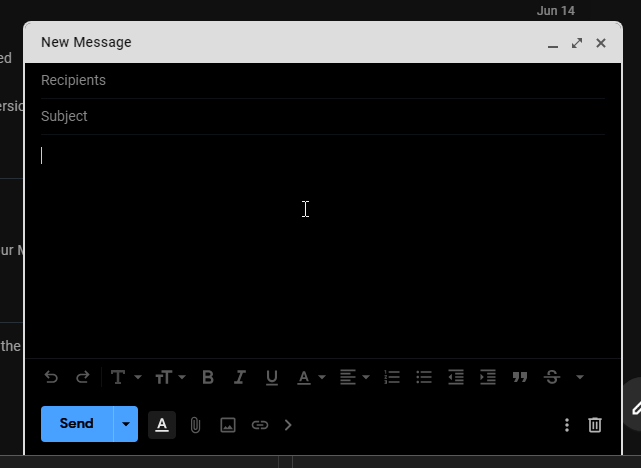
Sometimes the border turns white. Sometimes it's the toolbar at the bottom of the compose window. If I click in and out of the compose window (click to open an email, click back into the compose window, repeat) it happens sometimes but not all the time. I see that this issue has been reported before: #625
Ah, that explains why you're on v2.5.16 (Microsoft takes forever to approve updates – usually a week or two). The version in the Chrome Store is updated within 24 hours of my uploading.
That said, I don't expect the last update to fix this. It is a mysterious bug that I have improved some but haven't been able to fully address. Usually it is caused by a conflict with another extension but I don't see any evidence of another extension being installed that modifies Gmail compose.
I have reevaluating how I implement dark mode on my to do list. For now, your best bet is to disable "Make compose dark" and just have an always white compose.
Yeah I'd rather not disable it. I don't want to go blind every time I compose an email in a dark room 😊.
I hope you'll come up with some solution. I certainly have enjoyed financially supporting your development efforts since you went to a paid model. This is pretty much the only thing on my list I'm unhappy with right now. Keep up the great work.
I'm sure this isn't the case but you don't have multiple versions of Simplify running at the same time, do you (e.g., the Edge store version and the Chrome store version)?
I am seeing the original issue when I defocus the compose mole. Oddly, it isn't an issue if there is lots of text in the compose. Does this match your experience?
https://user-images.githubusercontent.com/8763662/173997859-06a4a0ba-8806-48fd-ace6-b8b3d5ea869f.mp4
Yeah that matches what I was seeing. It's even more unpredictable than that, apparently. The edge version was doing that but the chrome version doesn't. It just has the white border. I don't know if the specific store versions are the cause, but that's just what I observed.
And no, I do not have both extensions installed. I only have 1 installed (chrome version now, original bug report was the edge store version).