

 learningequality
Missing focus ring around password inputs
Observed behavior
I can't see the focus ring around password inputs when navigating with the TAB key. This can be observed in several places in the app where we use the PasswordTextbox component.
One of the examples is creating a new account:

Expected behavior
The focus ring around password inputs can be seen when navigating with a keyboard.
User-facing consequences
Problematic for keyboard users
Steps to reproduce
- Make sure that Allow learners to create accounts and Require password for learners is enabled in the facility settings
- Navigate to the sign-in page
- Click the Create an account button
- Use TAB to navigate password inputs
Context
Kolibri version: Kolibri 0.15.6b1 Operating system: Ubuntu 20.04.3 LTS Browser: Chrome 103.0.5060.114 (Official Build) (64-bit)

Hi @marcellamaki is this issue still active? Then I want to give it a go.

Assigning @Akash-Kumar-Sen in reply to https://github.com/learningequality/kolibri/issues/9095#issuecomment-1207940725
@Akash-Kumar-Sen The same instruction for the development environment should apply to this issue too. Thank you.
@Akash-Kumar-Sen Adding myself as an assignee too just to keep an eye on comments
Hi @MisRob the focus ring is not available for any of the components in my development setup...
Hello @Akash-Kumar-Sen, could you elaborate?
I've just tried on the latest develop branch, and I can see the focus ring around the username when logging in and using my keyboard (Tab/Shift + Tab)
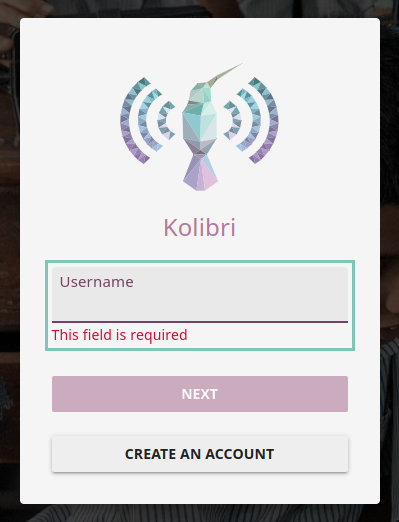
whereas I can't see it around the password where it should be
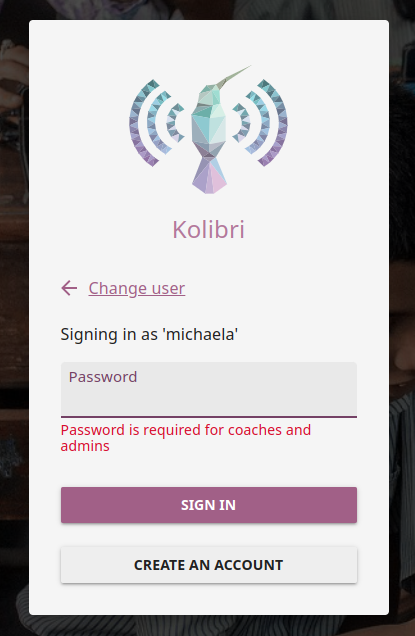
This would be one way to reproduce it. The screenshots above are taken in Chrome.
If you're experiencing another behavior, please post more details like your browser, Kolibri version, and steps to reproduce.
And if you see some more components that are missing the focus ring, you can report them by opening new issues if they don't exist already, or you can just let me know here and I will open them.
Thank you
I was using the release-v0.15.x branch as you suggested in Issue : https://github.com/learningequality/kolibri/issues/9095#issuecomment-1207853846
You're right, this issue has been reported for the v15 branch. I can confirm I could just reproduce it on the release-v0.15.x too, the same way I reported one comment above for the develop. So please continue using the release-v0.15.x for this issue.
(Not related to this issue, just FYI: now that you have setup successfully your device, if you need to do so for some other issues, you could also switch to develop. The problem was that on develop it's not possible to set up a new device, that's why we needed to go through it on the v15 branch. From now on though, you could use it since your setup is done. You would just need to switch node versions and reinstall dependencies when switching branches.)
@Akash-Kumar-Sen I'm unassigning you, in case this is in progress, please post a comment here and I will re-assign you
Not sure how to fix this one yet, but when I remove the "type="password"" from the PasswordTextbox.vue file, the outline works. It shows the password typed by the user on the screen then, though.
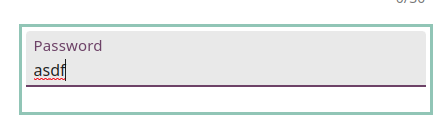

This seems like this is a bug in the kolibri-design-system library rather than the kolibri repo.
https://github.com/learningequality/kolibri-design-system/blob/185f5ffd04a1cfa3d04c44093c61accbdf1424fe/lib/styles/generateGlobalStyles.js#L39
The above code assigns the outline style to inputs. I wonder we'll need to add a fix to the themeOutlineStyle() function in order to get it to assign the outline to inputs of type "password" in addition to the normal text inputs when the input is focused.
@MisRob how urgent is this bug really? If I find myself spending to much time here, I might work on this slight UI change instead: https://github.com/learningequality/kolibri/issues/9097
Hi @andersan, thank you for looking into this. I think it may be a bug either in Kolibri or in Kolibri Design System, yes.
The above code assigns the outline style to inputs. I wonder we'll need to add a fix to the themeOutlineStyle() function in order to get it to assign the outline to inputs of type "password" in addition to the normal text inputs when the input is focused.
From https://github.com/learningequality/kolibri-design-system/blob/7324ffa818e3d356c768a63397a66626fb1a00fd/lib/styles/theme.js#L61-L69 and https://github.com/learningequality/kolibri-design-system/blob/7324ffa818e3d356c768a63397a66626fb1a00fd/lib/styles/generateGlobalStyles.js#L34-L45 I haven't noticed anything myself that should cause outline styles to work for one type of input but not for another. Let me know if you notice something.
Generally speaking, the problem may indeed be styling (e.g. some styles overriding the theme outline specifically for password inputs). However, before investigating that, I'd recommend checking on whether globalThemeState.inputModality is set to 'keyboard' when navigating password inputs via keyboard. That's the first factor that determines whether the focus ring should be displayed. If that's not the case, then the problem would most likely be caused by the script for tracking the input modality rather than styling itself.
@andersan And regarding
how urgent is this bug really? If I find myself spending to much time here, I might work on this slight UI change instead: https://github.com/learningequality/kolibri/issues/9097
This issue seems to be more important than the other one. Accessibility is important for us so I have no doubt that fixing this would be much appreciated :) At the same time, we're grateful for any contribution, and you're welcome to choose what to work on.
@andersan I'll assign you now so that we know there may be some work. If you're not going to work on it, it'd be helpful if you could let us know or unassign yourself. Thank you.
@MisRob Thanks for the additional context and direction! That was super helpful.
It looks like the bug is likely in the trackInputModality.js file in the kolibri-design-system repo. The "hadKeyboardEvent" condition is evaluating to false on the PW inputs but not on the username/full name inputs. I'll look into this further and send a PR when fixed.
@andersan - feel free to @ me in a comment here if you have any questions as you're working on this! @MisRob will be out of office starting early next week, I was making some updates to that file to improve our focus outlines not too long ago, so I'm happy to help you out if I can. (Or accept blame if the git history indicates that this is my fault 😃)

Thank you, both. @marcellamaki As far as my memory goes, nearly every person who touched that file broke something unexpectedly. So perhaps that says something and we could eventually consider replacing that logic with something simpler in the future (:focus-visible, perhaps) or at least think about ways how to make it more reliable. That's not a suggestion for this particular bug though, I think it's more important to have this fixed sooner than migrating the whole logic.
Turned out to be a lot simpler than I thought yesterday - just needed to add "input[type=password]" to the list of elements targeted by the keyboard modality.
Submitted a PR in the kolibri-design-system repo.
Linking the PR and this issue https://github.com/learningequality/kolibri-design-system/pull/364
Closed with https://github.com/learningequality/kolibri-design-system/pull/364