

 lava
lava
unrelated line occures
When I use the following code ,some problems happened.
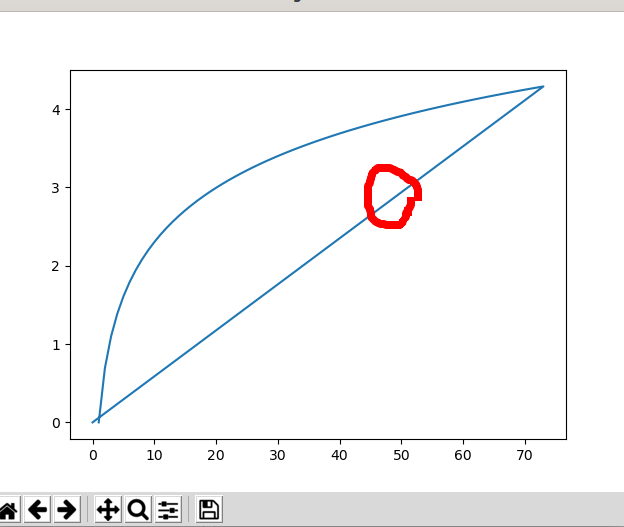 I just don't need the straight line in the middle,but I don't kown how to correct it,and the following picture is my code:
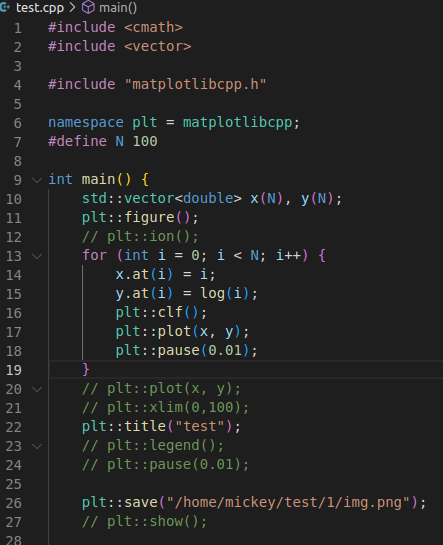 And it's my first time to use matplotlibcpp, so I ask some help to handle the problem.

Hi Hit-Mickey, Your program doesn't have reached to last number that is 100. So, you see the intermediate plot. Best regards, Take

Thanks for replying. But When I use python matplot, I find there is no straight line in the middle.The figure and code are attached with this email. I wonder if there is a little problem in the matplotlib-cpp. Sorry to pradon you,and I will be very grateful if you can solve this problem.
[image: Mailtrack] https://mailtrack.io?utm_source=gmail&utm_medium=signature&utm_campaign=signaturevirality11& Sender notified by Mailtrack https://mailtrack.io?utm_source=gmail&utm_medium=signature&utm_campaign=signaturevirality11& 22/12/04 14:41:53
Takeaki TOEDA @.***> 于2022年12月4日周日 14:40写道:
Hi Hit-Mickey, Your program doesn't have reached to last number that is 100. So, you see the intermediate plot. Best regards, Take
— Reply to this email directly, view it on GitHub https://github.com/lava/matplotlib-cpp/issues/332#issuecomment-1336334001, or unsubscribe https://github.com/notifications/unsubscribe-auth/AYHTEWBIILZFUOA7VPMOYZLWLQ4FVANCNFSM6AAAAAASTCWTF4 . You are receiving this because you authored the thread.Message ID: @.***>
Hi, I understand that you mean just now. You can solve this problem with no size vector and push_back(..) function. Best reagard,
#include "matplotlibcpp.h"
namespace plt = matplotlibcpp;
#define N 100
int main(){
	std::vector<double> x,y;
	plt::figure();
	for(int i=0;i<N;i++){
		x.push_back(i);
		y.push_back(log(i));
		plt::clf();
		plt::plot(x,y);
		plt::pause(0.01);
	}
	plt::title("test");
	plt::show();
}
This helps me a lot. many thanks to you and your matplotlib-cpp
[image: Mailtrack] https://mailtrack.io?utm_source=gmail&utm_medium=signature&utm_campaign=signaturevirality11& Sender notified by Mailtrack https://mailtrack.io?utm_source=gmail&utm_medium=signature&utm_campaign=signaturevirality11& 22/12/04 18:46:16
Takeaki TOEDA @.***> 于2022年12月4日周日 18:43写道:
Hi, I understand that you mean just now. You can solve this problem with no size vector and push_back(..) function. Best reagard,
#include "matplotlibcpp.h" namespace plt = matplotlibcpp; #define N 100 int main(){ std::vector
x,y; plt::figure(); for(int i=0;i<N;i++){ x.push_back(i); y.push_back(log(i)); plt::clf(); plt::plot(x,y); plt::pause(0.01); } plt::title("test"); plt::show(); } — Reply to this email directly, view it on GitHub https://github.com/lava/matplotlib-cpp/issues/332#issuecomment-1336375001, or unsubscribe https://github.com/notifications/unsubscribe-auth/AYHTEWALJ6UEXMRQIYCO7YLWLRYWJANCNFSM6AAAAAASTCWTF4 . You are receiving this because you authored the thread.Message ID: @.***>