

 kushview
MIDI VSTs generating random MIDI notes do not "start" (InstaComposer VST)
Describe the bug
I tried Element to split MIDI channel information with W.A. Productions "InstaComposer" (https://www.waproduction.com/plugins/view/instacomposer) - also available as Demo. I can load it into Element, I can generate random MIDI but I can't use the transports (play, stop). In the VST, there are "play" and "stop" buttons which are not working within Element but e.g. in Ableton directly. Even if I use the Play/Stop in Element it does not change anything - I can't get the plugin playing in Element.
To Reproduce Steps to reproduce the behavior:
- Start Element
- Load InstaComposer VST, connect MIDI out of "InstaComposer" with MIDI out and so on
- click (1), click GO, click (2), click GO
- you should see random midi generated in track (1) and track (2)
- click Play button on top - It should start playing in the InstaComposer sequencer
- click play button in Element - It should start playing in the InstaComposer sequencer
Expected behavior When "play" is clicked, InstaComposer should start playback of the generated MIDI in the sequencer and output it on MIDI out.
Screenshots
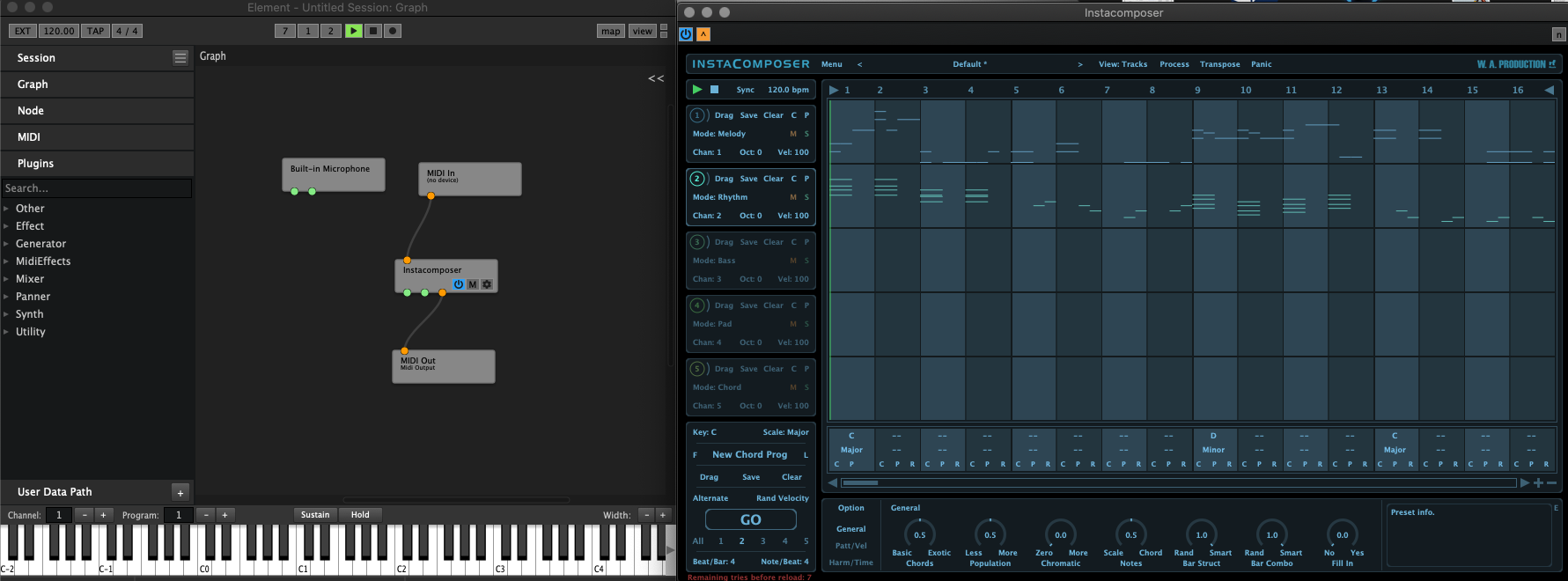
Play not working even if both are selected.
Desktop (please complete the following information):
- macOS Catalina
Standalone or Plugin Both
Additional context
-
I tried the same with similar midi generator, Phrasebox - not working
-
I tried the same with similar midi generator, Harvest - working!
-
I already tried to contact W.A. Productions about this, they told me that they don't know Kushview Element ("this plugin host") and that I need to contact Kushview about it.
